
Home › Forums › Ticket Products › Event Tickets Plus › Expanded form with phone number?
- This topic has 6 replies, 4 voices, and was last updated 9 years, 11 months ago by
Michael.
-
AuthorPosts
-
September 26, 2016 at 3:12 pm #1168935
Michael
ParticipantHow can I make the form expanded by default? As of now you have to choose a number of RSVPs before the rest is shown. I’d like for all of it to be shown automatically so its a little less confusing. Also, I’d like to add a telephone entry field in there as well. I tried adding that option in the functions.php from a support thread I found, but it crashed the site. Thanks in advance for the help.
G-
September 28, 2016 at 1:13 pm #1170023Participant24 Hour support turn around for pro plugin?
September 28, 2016 at 3:26 pm #1170076George
ParticipantHey Michael,
Apologies for the delayed response. Doing this is only possible with custom coding. We do not technically offer support for custom coding, but I was writing up a code snippet for you and did not reply to let you know.
Sorry for dropping the ball there! However, I have put together a code snippet for you that should work well in regards to keeping the RSVP form open by default. Try adding the following code to your theme’s functions.php file:
add_action( 'wp_footer', 'tribe_force_rsvp_form_to_be_open' );function tribe_force_rsvp_form_to_be_open() {
wp_enqueue_script( 'jquery' );?>
<script>
jQuery(document).ready( function() {
if ( 0 < jQuery( '.tribe-events-tickets' ).length ) {
jQuery( '.tribe-events-tickets' ).addClass( 'tribe-events-tickets-has-rsvp' ).addClass( 'tribe-tickets-has-rsvp' );
}
});
</script>
<?php
}
I hope this helps! 😀
— George
September 28, 2016 at 5:30 pm #1170155ParticipantWorks great! Thank you. I don’t suppose there’s a quick and dirty way to add a phone number field?
Also I want to just let people know to enter the number of RSVP attendees in the first field since it doesn’t really specify.
Thanks.
September 28, 2016 at 8:01 pm #1170184ParticipantHey Michael,
I’m glad that helped. Sorry for missing your original question about collecting telephone numbers; this is indeed possible, but takes some extensive custom coding. We have made this easier in Event Tickets Plus, where you can use the Attendee Meta feature to collect any information from customers. You could very easily add a text field for phone numbers with that feature.
Otherwise, your best bet is to hire a customizer to build that field out specifically for you. Here is a list of some great customizers if you’re interested → http://theeventscalendar.com/customizations
When it comes to adding text to the input field to label it as the “attendee count”, you can do this but again it would require custom coding. There aren’t a ton of options here, unfortunately. For example, basically all you can do is generate the sort of text label shown in the following screenshot (click for larger version):
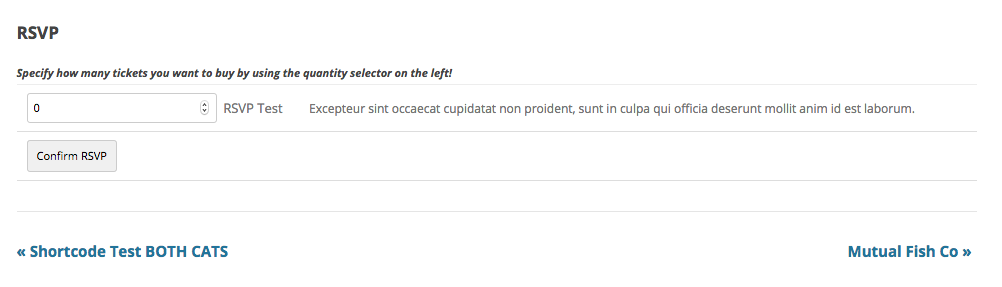
☝️ To do this, I have simply added the code from the following Gist to my theme’s functions.php file:
I hope this helps!
GeorgeOctober 20, 2016 at 9:35 am #1179906Support Droid
KeymasterHey there! This thread has been pretty quiet for the last three weeks, so we’re going to go ahead and close it to avoid confusion with other topics. If you’re still looking for help with this, please do open a new thread, reference this one and we’d be more than happy to continue the conversation over there.
Thanks so much!
The Events Calendar Support Team -
AuthorPosts
- The topic ‘Expanded form with phone number?’ is closed to new replies.