

Forum Replies Created
-
AuthorPosts
-
Geoff B.
MemberGood evening Heid,
I am super stoked that this worked for you.
You are welcome back in our support forums any time 🙂
For now, I am going to close this thread.
Have a great weekend!
Geoff B.
February 16, 2018 at 2:19 pm in reply to: Theme Title is showing Archive not Events, Calendar Events, ect. #1455819MemberGood evening Bruce,
I am super stoked that this worked.
Ideally, you might want to do integrate that change via your child theme (talk to the theme author).That way you will not loose that fix if you upgrade your theme.
You are welcome back in our support forums any time 🙂
For now, I am going to close this thread.
Have a great weekend!
Geoff B.
February 15, 2018 at 10:14 pm in reply to: Theme Title is showing Archive not Events, Calendar Events, ect. #1454941MemberThis reply is private.
MemberGood evening Fabio,
You are absolutely right, this is a translation issue.
It might take a while for my translation suggestion to be approved.Once it is, it will make its way in our next plugin update.
In the meantime, you have 2 solutions:
- Fix the string with a custom language file for our the Events Calendar plugin (https://theeventscalendar.com/knowledgebase/how-to-override-plugin-language-files). Probably the best and cleanest solution. Make sure to use “Italia” and not “ITALIA” in your csv file.
- Temporarily switch your WordPress install to English and rename the Venue Country “Italy”. Once the import is completed, you can revert to Italian.
Let me know how that goes.
Best regards,
Geoff B.February 14, 2018 at 4:02 pm in reply to: Appearance of my main Event page and Single Event page #1453630MemberHey there Sebastian,
Thank you for writing back.
I am wondering where and how my customer are going to see the VAT (Tax)?
Because the only thing I see so far is the price without VAT (Tax).
This is set up directly in WooCommerce. You will to check up exact tax laws that apply to your situation, but the following should get you started on the right track: https://docs.woocommerce.com/document/setting-up-taxes-in-woocommerce/
Let me know how that goes.
Best regards,
Geoff B.MemberHey there John,
I am super stoked to hear it worked out in the end.
Sometimes Web browser cache can be surprisingly persistent on some computers (hence my suggestion of a private browsing window).
You are welcome back in our support forums any time 🙂
For now, I am going to close this thread.
Have a great week!
Geoff B.
February 14, 2018 at 3:46 pm in reply to: Theme Title is showing Archive not Events, Calendar Events, ect. #1453614MemberGood evening Luis,
Thank you for writing back and for the files.
I took a look at them and I found the cause of the issue.
This seems to be caused by the following file /wp-content/themes/unisco/template-parts/header/header-title.php
More specifically the piece of code starting at line 44.
With that in mind, there are a couple of things you can do:- Tweak that file in your child theme to hardcode the desired title for ALL archives (not the best if you are using Archives elsewhere
- Add a conditional specifically for events-archive with the desired title
- Check if you have an SEO plugin active and see what are the rules for Archives and archive titles
As an additional troubleshooting step, could you please provide us with your complete system information in a private reply using the instructions found in the following link?
https://theeventscalendar.com/knowledgebase/sharing-sys-info/
Hang in there!
Geoff B.
MemberGood evening Fabio,
Thank you for the files.
I was able to take a look at them and here are my findings:
- It seems like you are not using UTF-8 encoding on your CSV file. This is especially visible on any accented letters.
- On my end, I had to replace ITALIA with Italy to make sure it matched precisely the name of the country in the dropdown
But, all in all with these 2 tweaks the file worked properly. See attached screenshot.
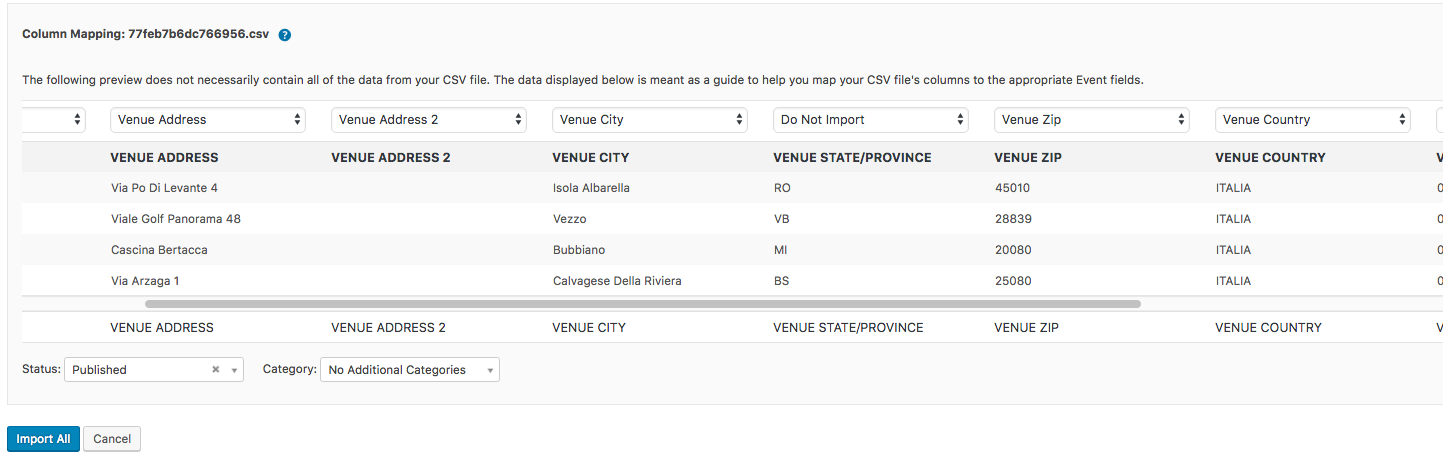
Since it appears that you are using the site in Italian, I am wondering if this is not a translation issue. According to the translation files, I believe the current translation for Venue Country is “Città” which I believe is wrong (in fact there are 2 of them in the dropdown): https://translate.wordpress.org/projects/wp-plugins/the-events-calendar/stable/it/default?filters%5Bterm%5D=country&filters%5Buser_login%5D=&filters%5Bstatus%5D=either&filter=Filter&sort%5Bby%5D=priority&sort%5Bhow%5D=desc
So it looks like somebody needs to submit a fix to the translation files.
Provided my very poor level of Italian, I just suggested “Nazione del luogo” as a replacement, but feel free to suggest a better one.I highly recommend reading the 3 following articles on translation:
- https://theeventscalendar.com/knowledgebase/translating-the-events-calendar/
- https://theeventscalendar.com/knowledgebase/how-to-override-plugin-language-files/
- https://theeventscalendar.com/knowledgebase/incomplete-translations/
Let me know if that helps.
Have a great day!
Geoff B.
MemberThis reply is private.
MemberGood afternoon Kat,
I am super stoked to hear that this fixed it for you!
You are welcome back in our support forums any time 🙂
For now, I am going to close this thread.
Have a great week!
Geoff B.
MemberGood evening Tom and welcome to the Events Calendar forum!
Thank you for your interest in our products.
We’ll be glad to answer your questions.The most important aspect to this project are actually your paid plugins. I am planning on purchasing (if the eval goes well) the Ultimate bundle, but I am wary of laying down $500 prior to understanding if your plugins will work for me. Do you have a process in which I can test your paid plugins prior to purchasing?
I totally understand where you are coming from.
Although we do not offer a testing version of our paid plugins, we offer the next best thing: a rock-solid 30 day refund (no matter what the refund reason is).
That should give you plenty of time to test things out to your liking.
And, of course, we’ll gladly answer any question you have while you are trying things out.Another option would be to take a look at our paid plugins in action here: http://wpshindig.com/events/
Have a great day!
Geoff B.
MemberGood evening DeAnne,
I am super stoked to hear you were able to sort things out.
You are welcome back in our support forums any time 🙂
For now, I am going to close this thread.
Have a great week!
Geoff B.
MemberHey there Phil,
This seems to be a duplicate of https://theeventscalendar.com/support/forums/topic/rewrite-slug-goes-to-a-blank-page/
Therefore, I will close this thread and continue to help you in the original one.
Best regards,
Geoff B.
MemberGood evening Phil and welcome back!
Thank you for reaching out to us.
We are sorry to hear about the page turning blank.
I would love to help you with this topic.I would recommend the following:
- Head over to Events -> Settings -> Community and hit “Save Changes”
- Head over to WP-Admin > Settings > Permalinks and re-save the permalinks
- Try temporarily reverting back to a default WordPress theme such as twenty-sixteen to se if that helps
If that still does not work, after a quick backup of your plugins and database, please update all of our plugins to their latest version.
Let me know how that goes.
Best regards,
Geoff B.MemberGood evening and welcome to the Events Calendar Support forum!
We are sorry to hear you encountered an issue while trying to import the country of the venue.
Since this should normally work (I just tested the files here https://theeventscalendar.com/knowledgebase/csv-files-options-and-examples/), could you send me a copy of the CSV file you are using so that I can test it out.Hang in there!
Geoff B.
-
AuthorPosts