
Home › Forums › Ticket Products › Event Tickets Plus › Import CSV
- This topic has 12 replies, 2 voices, and was last updated 8 years, 6 months ago by
fabiovas.
-
AuthorPosts
-
February 13, 2018 at 12:28 am #1451369
fabiovas
ParticipantHi
I have installed Calendar and Ticket Plus.
I have imported all data without problems but I found a bug:
Importing Venue it is not possible to import Country; In the preview page, on the of receiving fields list there is State/Province but not Country.
I don’t wont insert manually 100 Country
Thank you for help
FabioFebruary 13, 2018 at 11:09 pm #1452490Geoff B.
MemberGood evening and welcome to the Events Calendar Support forum!
We are sorry to hear you encountered an issue while trying to import the country of the venue.
Since this should normally work (I just tested the files here https://theeventscalendar.com/knowledgebase/csv-files-options-and-examples/), could you send me a copy of the CSV file you are using so that I can test it out.Hang in there!
Geoff B.
February 14, 2018 at 2:53 am #1452624ParticipantHi
Thank you for answer.
I send you the CSV file that I have created on the base of example you indicated me.
FabioFebruary 14, 2018 at 3:21 pm #1453596MemberGood evening Fabio,
Thank you for the files.
I was able to take a look at them and here are my findings:
- It seems like you are not using UTF-8 encoding on your CSV file. This is especially visible on any accented letters.
- On my end, I had to replace ITALIA with Italy to make sure it matched precisely the name of the country in the dropdown
But, all in all with these 2 tweaks the file worked properly. See attached screenshot.
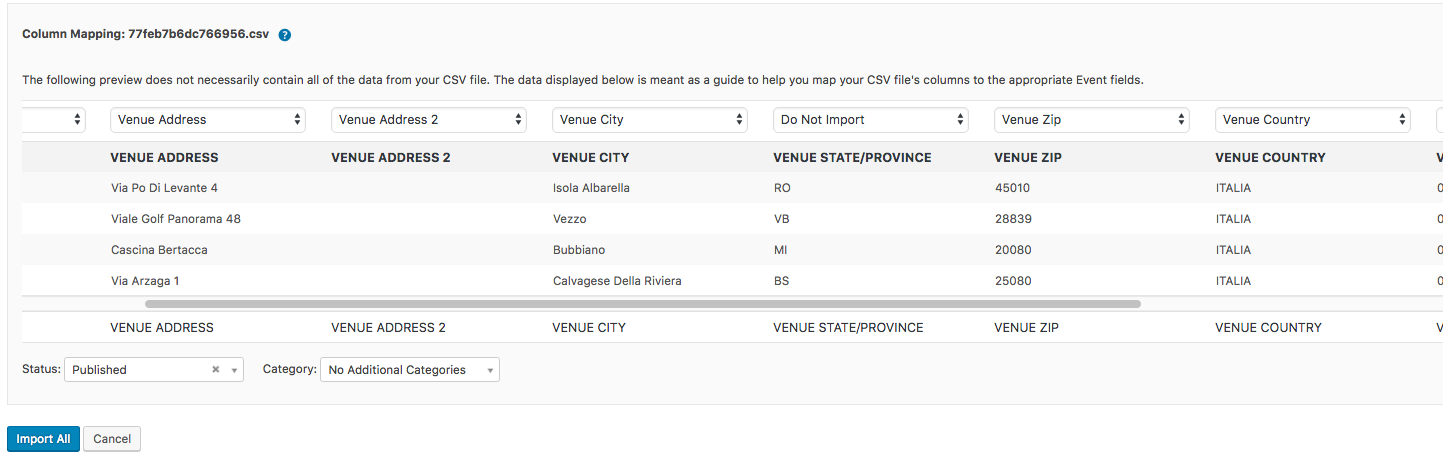
Since it appears that you are using the site in Italian, I am wondering if this is not a translation issue. According to the translation files, I believe the current translation for Venue Country is “Città” which I believe is wrong (in fact there are 2 of them in the dropdown): https://translate.wordpress.org/projects/wp-plugins/the-events-calendar/stable/it/default?filters%5Bterm%5D=country&filters%5Buser_login%5D=&filters%5Bstatus%5D=either&filter=Filter&sort%5Bby%5D=priority&sort%5Bhow%5D=desc
So it looks like somebody needs to submit a fix to the translation files.
Provided my very poor level of Italian, I just suggested “Nazione del luogo” as a replacement, but feel free to suggest a better one.I highly recommend reading the 3 following articles on translation:
- https://theeventscalendar.com/knowledgebase/translating-the-events-calendar/
- https://theeventscalendar.com/knowledgebase/how-to-override-plugin-language-files/
- https://theeventscalendar.com/knowledgebase/incomplete-translations/
Let me know if that helps.
Have a great day!
Geoff B.
February 15, 2018 at 12:56 am #1453812ParticipantHi Geoff
Could be a translation issue.One of the two “Città” could be the Country
For translation
Venue = LuogoCountry is Italy = Nazione
Venue Country = Nazione del LuogoCity is Venice = Città
Venue City = Città del LuogoI try to use UTF-8 encoding but I think and I let you know.
Thank you
FabioFebruary 15, 2018 at 1:19 am #1453830ParticipantGeoff
I tried to use the 2 different “città” as you can see inside two attached jpg file.Element Città 1 “Isola Albarella” is been charged correctly in field Venue City/Città del luogo
Element Città 2 “Italia” is not been charged. The field Venue Country/Nazione del luogo is still emptyThe problem is that in the vertical list there isn’t the field Venue Country, right or wrong translated
Fabio
February 15, 2018 at 10:01 pm #1454930MemberGood evening Fabio,
You are absolutely right, this is a translation issue.
It might take a while for my translation suggestion to be approved.Once it is, it will make its way in our next plugin update.
In the meantime, you have 2 solutions:
- Fix the string with a custom language file for our the Events Calendar plugin (https://theeventscalendar.com/knowledgebase/how-to-override-plugin-language-files). Probably the best and cleanest solution. Make sure to use “Italia” and not “ITALIA” in your csv file.
- Temporarily switch your WordPress install to English and rename the Venue Country “Italy”. Once the import is completed, you can revert to Italian.
Let me know how that goes.
Best regards,
Geoff B.February 15, 2018 at 11:55 pm #1454971ParticipantI wrote the right translation at link you posted Yesterday
February 19, 2018 at 3:42 pm #1458124MemberGood evening Fabio,
Awesome! Can you tell me if that fixed the issue for you ?
If not, could you please send me a copy of your /wp-content/languages/ folder via a link to a zip file (e.g.: Dropbox or Google Drive) ?Best regards,
Geoff B.
March 11, 2018 at 9:41 am #1476007ParticipantHi Geoff
I didn’t solved the issue.
I have typed Country in each events (160).March 12, 2018 at 8:41 pm #1477151MemberGood evening Fabio,
I believe I miscommunicated what I meant.
Since the issue seems to be that the label for Country is incorrect in Italian, my suggestion was to either:- Override the language file for the Events Calendar using the instructions found here: https://theeventscalendar.com/knowledgebase/how-to-override-plugin-language-files
That way you could have the correct label and import your file correctly.
This is probably the easiest solution.Simply unzip the following .zip file and drop the 2 files it contains in /wp-content/languages/plugins italian_2018_03
That should let you import your CSV file normally until the translation is correctly updated in one of our upcoming releases
- Temporarily switch your WordPress installation (in wp-admin under Impostazioni generali) to English and make sure that you replace “Italia” with “Italy” (so that it matches the correct english name of “Italia”. That should allow you to import your CSV file perfectly. Once that is done, you can switch back to italian.
Let me know how that goes.
Best regards,
Geoff B.April 3, 2018 at 9:35 am #1495541Support Droid
KeymasterHey there! This thread has been pretty quiet for the last three weeks, so we’re going to go ahead and close it to avoid confusion with other topics. If you’re still looking for help with this, please do open a new thread, reference this one and we’d be more than happy to continue the conversation over there.
Thanks so much!
The Events Calendar Support Team -
AuthorPosts
- The topic ‘Import CSV’ is closed to new replies.