

Forum Replies Created
-
AuthorPosts
-
Geoff
MemberHi Shambhavi and I hope you had a great weekend!
You do indeed need a third-party e-commerce plugin for taking taking payments, but none of the ones the are compatible with Event Tickets Plus require a monthly fee. For example, WooCommerce is free to download and start using right out of the box:
There may be some fees for using WooCommerce (or Shopp, Easy Digital Downloads and WP-Ecommerce, all of which are compatible with Event Tickets Plus), but that would be for extra functionality. The default plugin in each case should let you start selling tickets right away without a monthly cost.
@James — Yes, you can take PayPal payments with Event Tickets Plus as long as the e-commerce plugin you are using with it supports PayPal and I believe all of the e-commerce plugins compatible with Event Tickets Plus do support PayPal in one way or another.
Cheers!
GeoffNovember 14, 2016 at 7:04 am in reply to: The ticket prices showing are not correct whenever ticket end date is reached #1191806MemberThis reply is private.
November 14, 2016 at 7:00 am in reply to: Event Tickets Plus: Public attendees list with custom fields #1191804MemberHi Johann, hope you head a great weekend!
That’s absolutely correct: a person does not need to use WordPress.com or be logged into your WordPress site in order to register for an event. Their name and email address are the only two bits of information required by default, the latter of which is needed to send the ticket email.
Cheers!
GeoffMemberHi Brandie, and happy Friday!
Yes, Event Ticket Plus does allow you to search attendees by name at check-in.
Even more awesome is that it also provides the attendee with a QR code that you can scan with any mobile QR code scanner and that will automatically check the person in at the door without the need to search. 🙂
Does this help answer your question? Please let me know!
Cheers,
GeoffMemberHowdy Shambhavi and happy Friday! I hope you’re having a great day so far. 🙂
Great questions. I know there is a lot of information about how ticketing works and it can be tough to sort out, so I’m happy to help here.
Let me try to break things down on a product-by-product level:
- The Events Calendar (free): This is our core calendar plugin that allows you to publish event posts to your WordPress site in a calendar format. It’s also required for this to be installed for most of our other plugins to work.
- Event Tickets (free): This allows you to add free tickets (like RSVPs) to the events published to The Events Calendar. In other words, it adds a registration form to an event and sends the attendee an email ticket for the event they can use to check in at the door.
- Event Tickets Plus: This extends Event Tickets so that you can also create paid tickets for events and take payments for those tickets using WooCommerce. You can create as many paid tickets for an event as you would like and set different price points for each ticket.
In other words, there is no need to use any of ticketing plugins if you already have a system of your own that you can link to directly from the event post. However, if you do need a ticketing solution for you calendar, then Event Tickets and Event Tickets Plus would be a solid way to make it happen in a way that integrates directly with The Events Calendar.
Does this help untangle things a bit? Let me know. 🙂
Cheers!
GeoffNovember 11, 2016 at 9:09 am in reply to: Community Events: edit possible without access to backend #1191027MemberHi Torsten,
I’m afraid that logging in is necessary one way or another — otherwise, there would be no way for to associate which events belong to the people who submitted them.
The Community Events setting I shared above asks the person to log into, but does not provide them access to the WordPress backend. In other words, the only content they will have access to is a front-end list of their own events, which they can use to edit their events.
I hope this clears this up a bit!
Cheers,
GeoffNovember 11, 2016 at 8:54 am in reply to: How to change display order of Custom Filter options in Filter Bar #1191017MemberHi Derek and happy Friday!
I am sorry to say that there is no direct way to adjust the order of custom fields in Filter Bar at the moment. It may very well be possible with some custom development, but I do not have a workaround that is supported by the plugin.
I do see that there is an open ticket for this in our feature request forum though:
Would you be willing to add your vote to it and perhaps add a few notes in there about your specific use case as well? That will defintely help us as we consider it and other requests for future releases.
Sorry for the bad news, but does this at least help answer your question about the possibility of changing the order of filters? Please let me know.
Thanks,
GeoffMemberHi Kindra,
I also wanted to add in here that using the save_post action ought to accomplish what you’re looking for. 🙂
Cheers,
GeoffMemberHi Kindra,
Great question!
You ought to be able to hook into the same WordPress action used for creating default posts, but specify the tribe-events custom post type to limit it directly to event posts:
We have the tribe_create_event action for you to hook into, but I do not think it is the exact thing you are looking for and targeting the default WordPress post action would be more effective.
Cheers!
GeoffMemberHello Torsten and happy Friday!
Those are both interesting questions and I have to admit that there are no settings in Community Events that support forcing a phone number format or a character limit on event content submissions.
I imagine you would be able to accomplish both with some custom development. While I do not have the exact code for you, I was able to find an example of how forcing a phone number format could be done using jQuery:
http://stackoverflow.com/questions/10930866/auto-format-phone-number-in-jquery
I think both of these would make great suggestions over in our feature requests forum. There’s no guarantee that we would be able to build them into the products, but this will make sure they are considered and allow others to vote on them as well:
https://tribe.uservoice.com/forums/195723-feature-ideas
Sorry again for not having a solid workaround for you here, but does this at least help answer your question as far as whether those features are possible? Please let me know.
Cheers,
GeoffMemberHi AG,
Thanks for getting in touch and hope you’re having a great Friday so far. 🙂
Yes, you can absolutely create a private page in WordPress and embed the calendar on it using the the [tribe_events] shortcode.
The plugin, however, will still have it’s own page open and that will be publicly accessible, though you do not need need to link to it from anywhere on your site.
And, yes, events can be marked private when published. They will be displayed on the calendar, but will be inaccessible to anyone without not logged into WordPress with an admin level of access.
Does this help answer your questions? Let me know if I can help clarify anything and I’d be happy to!
Cheers,
GeoffNovember 11, 2016 at 7:31 am in reply to: Event Tickets Plus: Public attendees list with custom fields #1190884MemberHey Johann,
Happy Friday and thanks for following up!
The attendees list will be visible to anyone, regardless of being logged into WordPress or not. Whether someone has a photo of themselves or a generic WordPress avatar displayed in the list, however, will certainly be determined by whether the attendee has a Gravatar account associated with the email address used to register for the event.
Does that make more sense? Let me know!
Cheers,
GeoffMemberMy pleasure! Happy to help — let us know if any other questions come up. 🙂
Have a great weekend,
GeoffNovember 11, 2016 at 7:21 am in reply to: Community Events: edit possible without access to backend #1190874MemberHi Torsten,
Please head to Events > Settings > Community and make sure the following setting is active:
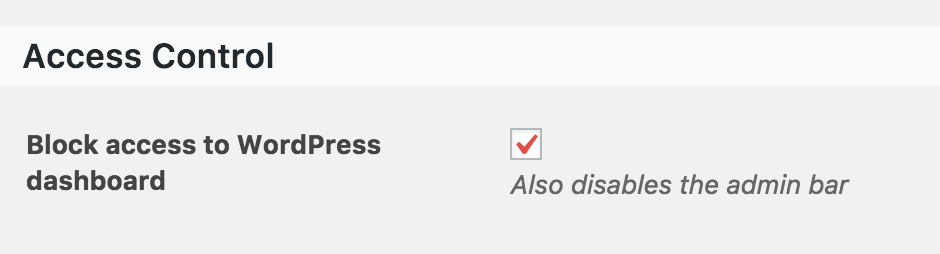
That will ensure the organizer does not have access to the WordPress dashboard when editing their events.
Thanks!
GeoffMemberGreat question!
There is no difference at all between creating a recurring event and creating separate events by copying and pasting the content. Well, the only difference is that the events will not be linked together as a recurring series, but that doesn’t seem to be a big deal here.
You can use a post duplicator plugin to create event copies. There are a number of them available — in fact, here’s a search on the WordPress.org plugin directory that provides a few different options.
Did you have any other questions or can I help clarify anything else? Please let me know and I’d be happy to help.
Cheers,
Geoff -
AuthorPosts