

Forum Replies Created
-
AuthorPosts
-
Geoff
MemberThanks for following up!
Oh geez, that looks like either a conflict in the WordPress admin or possibly a corrupted file somewhere.
Would you be willing to share your system information with me so I can check your installed versions and plugin settings? You can get the system information by heading to Events > Help, copying the information in the System Information section and pasting it here as a private reply.
I’d be happy to take a look at that and make some recommendations from there.
Thanks so much,
GeoffMemberI appreciate that, thanks @john.
I do want to note that our site auto-closes forum threads after three weeks of inactivity. Please know that I still very much would like to get your feedback and would be happy to take it in a new thread if that happens.
Cheers,
GeoffMemberHi Kindra,
Nice work so far!
I think the closest function for you to specify the first recurring event in a series is tribe_get_upcoming_recurring_event_id_from_url(). That will return the ID for the first recurrence in the series, so I wonder if that would accomplish what you’d need to isolate one event from the others in the series when hooking into save_post.
I believe the tribe_all_occurrences_link() function is what you’re looking for to produce the /all URL for recurring events. That is linked directly to Events Calendar PRO, which contains the recurring events feature and appears to be used for similar stuff in the core code.
I hope this helps! I’ll certainly do my best if you have any other questions!
Cheers,
GeoffMemberHi Neil,
My name is Geoff and I head up support here for The Events Calendar. Andras shared this thread with me and I wanted to take an opportunity to reach out directly because you raise valid points in here and I want to assure you they have not fallen on deaf ears or are being swept under the carpet.
There is no excuse for the legitimate issue you noted about automatic Facebook imports not working in some cases. I have confirmed with our development team that this appears to be an issue not so much with Event Aggregator, but the server it is on. Needless to say, we have an open ticket to look into this and it’s something we absolutely want to address as soon as possible, once we’ve pinpointed the exact issue. I unfortunately do not have a concrete date for when a fix will officially roll out, you can be absolutely certain that it is being looked at and that we will follow up with you directly as we learn more. If this is indeed a server issue, then we’ll be more likely to roll something out sooner than if we had to make change to the core plugin for an official release.
You also brought up fair and helpful ideas for possible features to include. While I cannot guarantee that things like creating and assigning organizers and venues to imported events is something that will be included in future releases, we’d love to keep the conversation open on them and get your additional feedback as we spec future releases of Event Aggregator.
As Andras has already mentioned, I really do appreciate you hanging with us while we work on the issue you reported and I hope you’ll continue to give us a chance to do right by you as we continue to build and improve upon Event Aggregator.
Sincerely,
GeoffMemberHi Ross,
Good question!
The calendar shortcode is currently only able to support filtering events by category and the type of view. So, for example:
[tribe_events view=”list” category=”featured”]
That will provide you with a List View of all events in the Featured category.
You can also specify which date you want to use as the starting point for which events to display:
tribe_events view=”list” category=”featured” date=”2016-11-21″]
That example will provide you with a List View of events in the Featured category starting on or after November 21, 2016.
I hope this helps clarify things a bit more! You can see all the documentation for shortcodes outlined in this guide:
https://theeventscalendar.com/knowledgebase/embedding-calendar-views-tribe_events-shortcode/
Cheers!
GeoffMemberHello Gwen,
Sure thing!
We have a guide that walks through how to change the URL associated with your license right here:
https://theeventscalendar.com/knowledgebase/moving-your-license-keys/
In short, you will log into this site, head to the My Account > Licenses scree, click the option to remove the URL listed with your license, then re-input the license key in the plugin settings on the new URL. 🙂
Cheers!
GeoffMemberHi Andrew,
Thanks for writing in!
First off, I do want to note that we are a little limited in how much we can support custom development questions. That said, I’m absolutely happy to help as best I can!
Here’s a snippet that, when tested, both modifies the text in the Past Event notice and adds a link to the calendar’s Past Events archive:
add_filter( 'tribe_the_notices', 'customize_notice', 10, 2 );
function customize_notice( $html, $notices ) {
// If text is found in notice, then replace it
if( stristr( $html, 'This event has passed.' ) ) {
// Customize the message as needed
$html = str_replace( 'This event has passed.', 'You can also view information about <a href="/events/past">recent and past WPCA events</a>.', $html );
}
Will this do the trick for you? Please let me know. 🙂
Cheers!
GeoffMemberHi @rcoryell,
Oh gosh, I’m so sorry for the early trouble out of the gate here with importing from Google Calendar!
I’m happy to look into this with you.
I tried importing events from the URL you shared and it seemed to work correctly. Would you be willing to let me know if what you see in the following screencast I put together matches up with the same steps you are following to import and the interface?
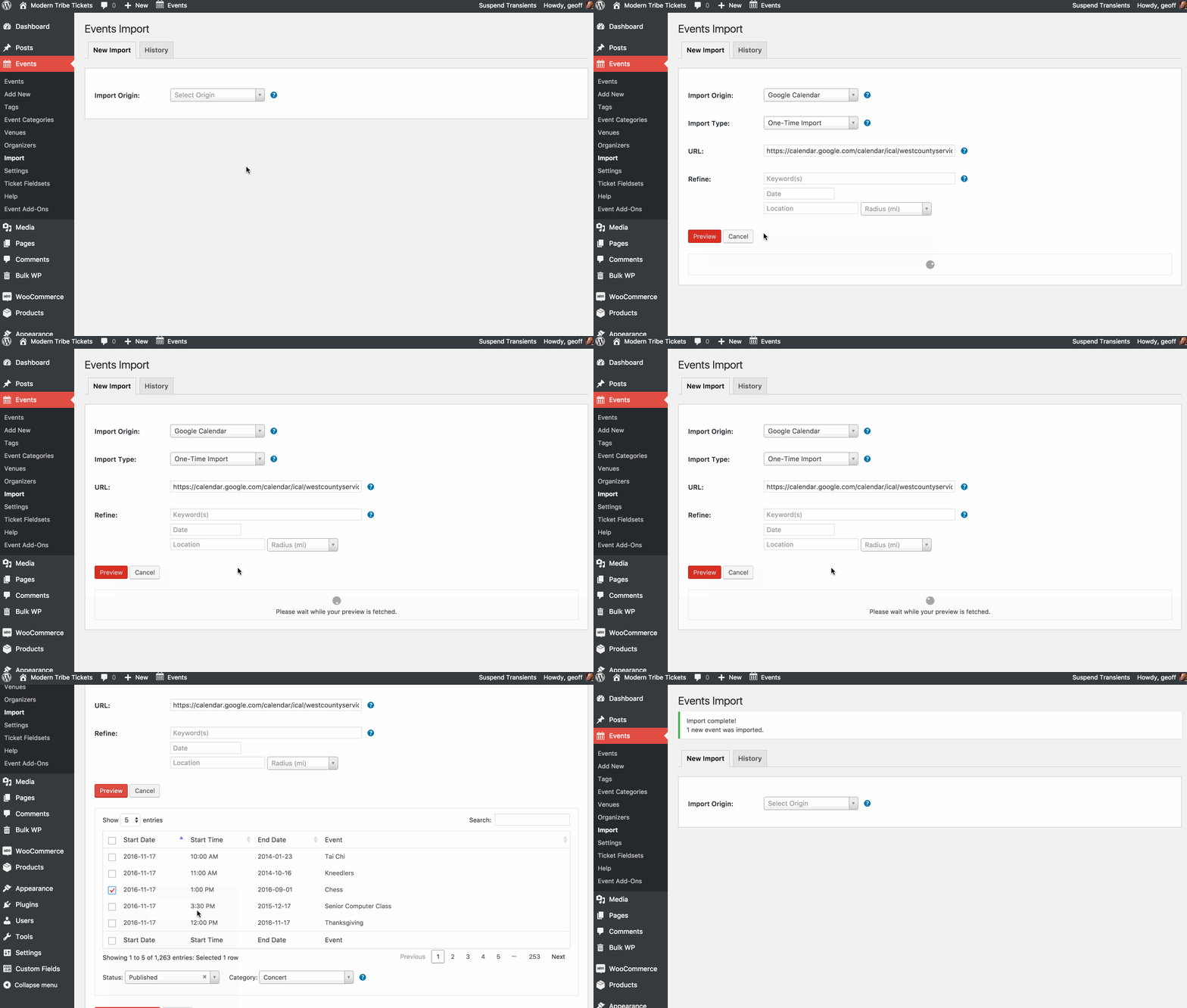
You mention specifically an error message. Would you be so kind as to share what it is — I’m hoping that gives me a further clue for why I would be able to import using the same URL while you are not.
Thanks so much!
Geoff
MemberHi Chris,
Oh yeah, you could definitely use CSS to target the time grid in Week View.
You could use .tribe-week-grid-hours div to target the hourly fields and modify from there. For example, to make the height of each time label smaller:
.tribe-week-grid-hours div {
height: 25px; /* 60px by default */
}
Modern Tribe does do custom development work, but it’s for enterprise-level projects that are often focused on full sites rather than customizations to The Events Calendar. We do, however, a list of recommended developers who may be willing to help.
Cheers,
GeoffMemberHi Liena,
Nice work clearing out the conflicts!
There still seems to be something that causing the calendar’s view switcher (which relies on Javascript) to freeze up just as you describe.
I see you have tried the following:
- Deactivating other plugins: Yes
- Switching to a default theme: Yes
Just to confirm, did you notice any difference in those conditions?
How about when deactivating all other plugins and switching to a default WordPress theme, like Twenty Sixteen, together? Do you notice and difference there?
Let’s start there and see what we find. If the issue continues to persist, we can try some deeper troubleshooting tactics.
Thanks,
GeoffMemberHi Torsten,
Nice find on the plugin!
I tried working with the script a bit, but am afraid I couldn’t tweak it any further than what you have.
I’ve shared this thread with others on the support team to see if anyone else would be able to contribute any thoughts. If someone is able to, they will be sure to follow-up directly and update this thread.
In the meantime, however, we do have a list of recommended developers you might want to consider for help. We’re fairly limited in how much we can support custom development questions like this, but one of the recommended developers ought to be able to support this for sure.
If you don’t mind, I’d like to close this thread for now and one of the folks on our team will update it if they’re able to work with the script — is that ok?
Thanks!
GeoffNovember 17, 2016 at 6:17 am in reply to: Community Events: edit possible without access to backend #1193804MemberRight on, happy that helps!
I hope you enjoy using Community Events with The Events Calendar! I’ll close his thread but please do let us know if any questions come up as you get started (we have a ton of great guides as well) and we’d be happy to help. 🙂
Cheers,
GeoffMemberAwesome and nice work! Thanks for not only following up to let us know all is working well but for sharing the solution as well. 🙂
Cheers and have a great day!
Geoff
MemberHi @john,
I’m sorry to hear Event Aggregator hasn’t lived up to your expectations but I’d be happy to process a refund for you. In fact, I did that just now and the funds should be back in your account within the next 5-10 business days.
I know there are a few known issues with Event Aggregator on our radar. If you have a moment and are willing to share more specifically where you hit issues using the service, I would love to compare them to the already known issues and share them with the team so we can give them the attention they deserve.
In the meantime, sorry again for any trouble and I hope you’ll give us another chance to do right by you down the road.
Thanks,
GeoffMemberHi Liena,
The site does appear to be really slow — however, I’m still able to navigate through the calendar and it seems to be completely functional.
I dug into your site a bit and noticed that there are a lot of error messages coming up in the console, namely:
- Failed to execute ‘postMessage’ on ‘DOMWindow’: The target origin provided (‘https://www.youtube.com’) does not match the recipient window’s origin
- Uncaught ReferenceError: ytcfg is not defined
at https://www.youtube.com/embed/S9b91m2R5V8?rel=0&enablejsapi=1&origin=http%3A%2F%2Fbklyner.com&widgetid=3:10:16382 - A Parser-blocking, cross-origin script, http://ad.broadstreetads.com/zdisplay/54091.js?b=&resp=true, is invoked via document.write. This may be blocked by the browser if the device has poor network connectivity
These errors appear to be conflicts with different components on the site (i.e. YouTube and Broadstreet Ads) that would certainly help explain the impact to the performance and loading times of the site. They are also Javascript errors, which means they can affect the functionality of other components that rely on Javascript, including The Event Calendar’s widget and view switcher.
Will you please clear the conflicting errors from your site and give it another try? That should drastically improve the speed and functionality of not only The Events Calendar but the site as a whole.
Thanks!
Geoff -
AuthorPosts