
Home › Forums › Calendar Products › Event Aggregator › How to import a google calendar
- This topic has 5 replies, 4 voices, and was last updated 9 years, 10 months ago by
roger coryell.
-
AuthorPosts
-
November 16, 2016 at 5:17 pm #1193593
roger coryell
ParticipantYour docs don’t match what I see on my screen. The “import” interface is cluttered and confusing. And every time I try to import https://calendar.google.com/calendar/ical/westcountyservices.org_h7b25g7hajlschjo6r9jaskbno%40group.calendar.google.com/public/basic.ics I get an error message. Please clarify or give me an immediate refund.
November 17, 2016 at 7:33 am #1193829Geoff
MemberHi @rcoryell,
Oh gosh, I’m so sorry for the early trouble out of the gate here with importing from Google Calendar!
I’m happy to look into this with you.
I tried importing events from the URL you shared and it seemed to work correctly. Would you be willing to let me know if what you see in the following screencast I put together matches up with the same steps you are following to import and the interface?
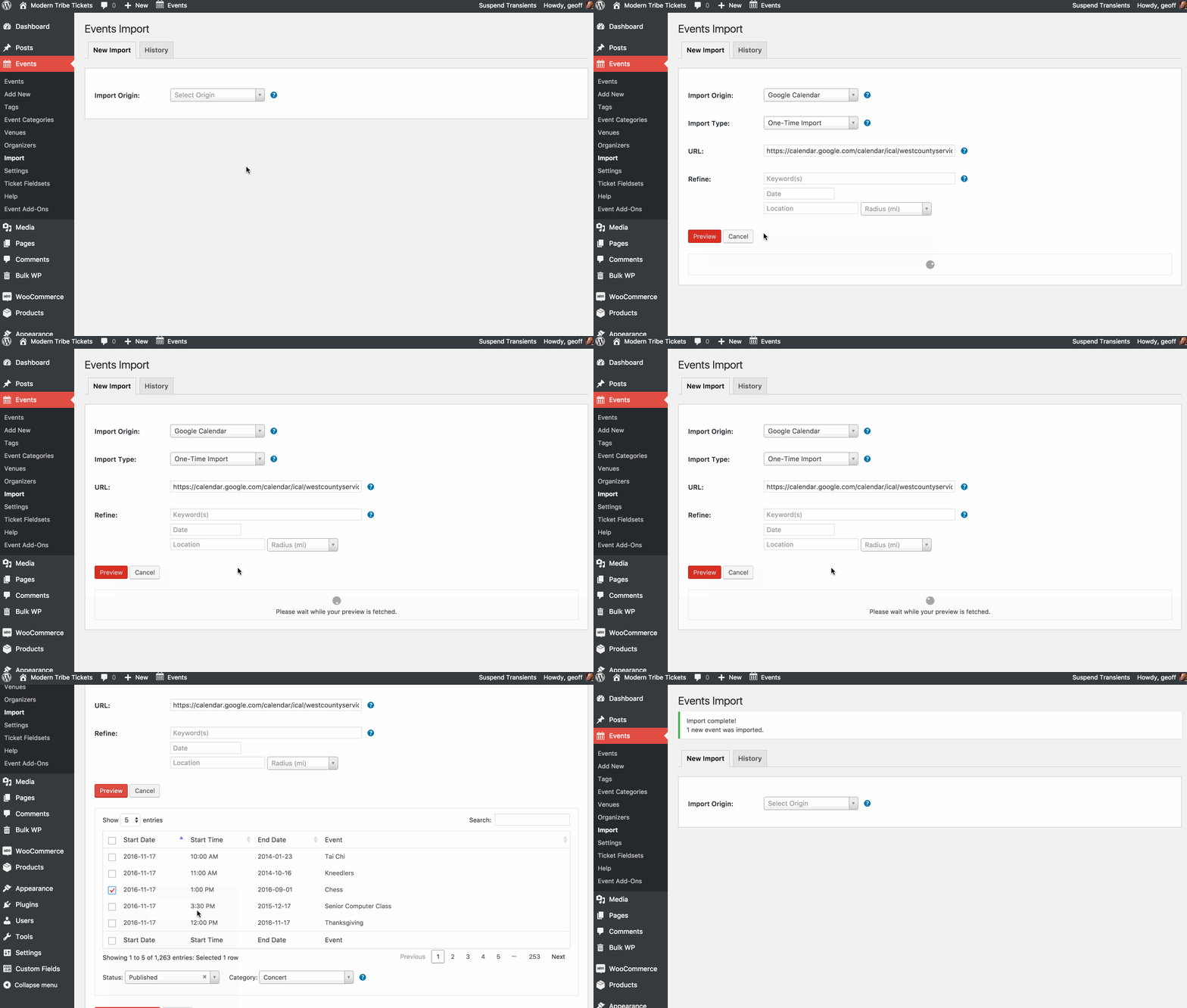
You mention specifically an error message. Would you be so kind as to share what it is — I’m hoping that gives me a further clue for why I would be able to import using the same URL while you are not.
Thanks so much!
Geoff
November 17, 2016 at 7:47 am #1193837ParticipantThe admin screen I see for import is different and confusing. See screenshot. When I try to find one of these many fields that will support an ical URL
{“success”:false,”data”:{“message”:”Please provide the URL that you wish to import.”}}
November 17, 2016 at 5:23 pm #1194237MemberThanks for following up!
Oh geez, that looks like either a conflict in the WordPress admin or possibly a corrupted file somewhere.
Would you be willing to share your system information with me so I can check your installed versions and plugin settings? You can get the system information by heading to Events > Help, copying the information in the System Information section and pasting it here as a private reply.
I’d be happy to take a look at that and make some recommendations from there.
Thanks so much,
GeoffDecember 9, 2016 at 8:35 am #1203936Support Droid
KeymasterHey there! This thread has been pretty quiet for the last three weeks, so we’re going to go ahead and close it to avoid confusion with other topics. If you’re still looking for help with this, please do open a new thread, reference this one and we’d be more than happy to continue the conversation over there.
Thanks so much!
The Events Calendar Support Team -
AuthorPosts
- The topic ‘How to import a google calendar’ is closed to new replies.