

Forum Replies Created
-
AuthorPosts
-
Geoff
MemberYay! That is so dang awesome to hear and I’m so happy that everything is working! Thanks a ton for following up to let me know.
I’ll go ahead and close this thread but let us know if any other questions come up and we’d be happy to help. 🙂
Cheers!
GeoffMemberHi there, thanks for following up!
Yes, Event Tickets Plus does indeed allow you to show a list of folks how have RSVPd for the event. Here’s an example pf how that looks when activated:

Did you have any other questions about the plugin features I can help answer? Let me know!
Cheers!
GeoffMemberHi Michael,
Glad to hear the category name worked, though sorry that it does not work where it’s being used with a shortcode. I’m not entirely sure which shortcode you are using, but it’s very possible that the shortcode is embedding the plugin’s core template rather than the custom template that is overridden in your theme. That may be a conflict with the shortcode plugin you are using, but it’s tough to tell and would require more technical troubleshooting than what we offer here in the pre-sales forum. You might also want to check with the author of the shortcode to see of there’s something that can be done on that side of things.
What are the Benefits of the PRO Version? Maybe it’s better i’ll purchase that for my customer…
And for how many Websites is one license of The Event Calender PRO?We’d love it if you went with Events Calendar PRO and I hope it’s a good fit for your customer. It’s a plugin that extends The Events Calendar so that the calendar has more features, including:
- Recurring events
- Additional calendar views (Photo, Map, Week, Day)
- Custom fields in the event editor
- Shortcodes (full calendar views and widgets)
- Pages for venues and organizers
- …and more
A license allows you access to download the plugin, access to our premium support forums and access to plugin updates for one year at which time you can renew your license to continue plugin updates and support.
I hope this helps!
GeoffMemberRight on! I’m so glad to hear everything is working smoothly and I appreciate you following up to let us know. Definitely keep us posted if any other questions come up and we’d be happy to help. 🙂
Cheers!
GeoffMemberHi Krystyna,
Thanks for following up!
Sorry, but it doesn’t look like your screenshots came through.
Just to clarify, the export functionality is not in the Event settings, but in the WordPress settings (Tools > Export). If you are not seeing the Export feature, then it sounds like there might be an issue with your installation of WordPress.
Hopefully that’s not the case though — let me know if this helps clarify things at all!
Cheers,
GeoffMemberAwesome, thanks Sarah! Please do keep me posted. 🙂
Also, I have paid for The Events Calendar, Event Tickets, Event Tickets Plus and The EC: WooCommerce Tickets. That seems like too many plugins for events, doesn’t it?
That sounds about right, except for WooCommerce Tickets, which was replaced by Event Tickets Plus earlier last year. Once you have fully updated to Event Tickets Plus, you can remove WooCommerce Tickets.
Cheers!
GeoffMemberHi there and thanks for following up!
You had mentioned this as something you were looking for:
Would be possible to add more fields on registering RSVP?
That’s a feature of Event Tickets Plus. You don’t have to sell tickets in order to use Event Tickets Plus but, if you want the additional registration fields for RSVPs, then you will want it.
Cheers!
GeoffMemberAh, sorry to hear about that, Michael!
Another idea is to try something like this instead:
<?php echo tribe_get_event_categories( get_the_id() ); ?>I do want to note that our pre-sales forum is used to answer questions about purchasing our premium plugins. If you’re looking for technical support, it would be awesome if you could post your question to our <u>WordPress.org support forum</u>.
Or, if you already have an active license for one of premium plugins, will you please log into your account and post your topic to our premium support forum instead?
Thanks so much!
GeoffMemberMy pleasure, happy to help! I’ll go ahead and close this thread but let us know if any other questions pop up and we’d be happy to help. 🙂
Cheers and have a great day!
GeoffMemberHello Krystyna,
Hey and welcome back to the forums! I am really glad to hear you are setting up a test site. That’s something I wish every WordPress site had and I applaud you for making it happen. 🙂
I happen to think that the WordPress export option is the best way to go. In other words, you can export all of your event data, including events, venues and organizers in the Settings > Export screen from the WordPress admin.
Once you have everything exported, you can head over to your test site and use the WordPress Importer (Settings > Import) to upload the files you exported from the other site. When you do, start with Venues, then Organizers, then Events to ensure that all the data is imported in the correct order and that Events will be able to associate it’s data to Venues and Organizers.
Does this help answer your question? Please let me know. 🙂
Cheers!
GeoffMemberHi Curt,
Sure thing! I’ve gone ahead and deactivated your license for Events Calendar PRO and exchanged it for a Event Aggregator license. You can access the new license key by logging into your account on our site and navigating to My Account > License Keys.
Let me know if you have any issues accessing your new license key and I’d be happy to help. 🙂
Cheers!
GeoffMemberHi @3ejoueur,
Sure thing! By default, the calendar does not display the year for an event that takes place in the current year.
You can change that on the Events > Settings > Display screen by updating the “Date without year” option:
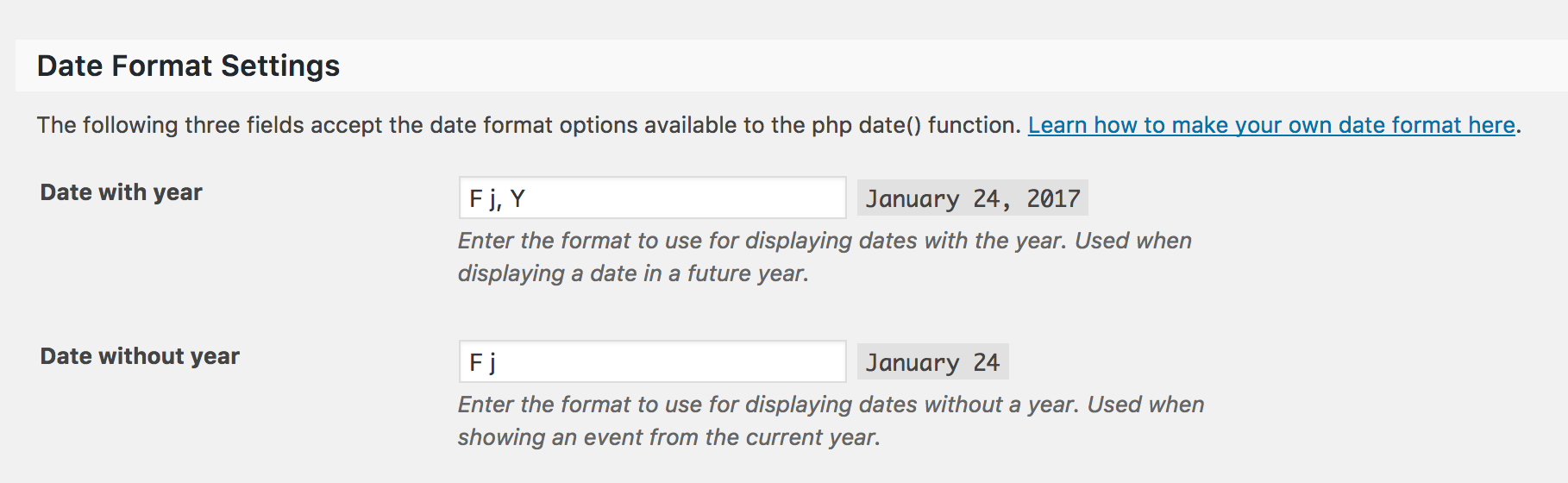
Change the setting to match the option right above it and you should be good to go. 🙂
Does this help answer your question? Please let me know.
Cheers!
GeoffMemberHi Antonio,
Good question! Events Calendar PRO and Filter Bar are two separate plugins with separate features. You will definitely want to purchase both if you need the features of both.
Does this help answer your question? Please let me know. 🙂
Cheers!
GeoffMemberHi Jeremy!
Sure thing, we’d be happy to help.
Will you please send me the username, email and the last 4 digits of a license on the account you want to merge? Please post those in a private reply.
Once I have that information, I will merge the licenses for that account with the one you signed in with to post this thread.
Cheers!
GeoffMemberHi Sarah,
Thanks for writing in — and for the kind words! I’m really happy to hear you’re loving Event Tickets Plus. 🙂
You actually should already have the ability to add custom fields for attendees to fill in when they are purchasing a ticket. Is that what you are looking for? If so, this post goes into great detail on how to set up those fields:
https://theeventscalendar.com/knowledgebase/collecting-attendee-information/
Hopefully that’s what you are looking for. If it’s not please feel free to let me know and I’d be happy to help.
Cheers,
Geoff -
AuthorPosts