Date format with Year

Home Forums Calendar Products Events Calendar PRO Date format with Year

Viewing 4 posts - 1 through 4 (of 4 total)
  • Author
    Posts
  • #1223045
    3ejoueur
    Participant

    Hello,

    Since 2017, when we create an event it doesn’t show the year (frontend and backend see screenshots).

    I would like to see the year in the new events I have created since the 1st day of 2017.

    Can you tell me what to change to do so ?

    Thanks in advance

    #1223054
    Geoff
    Member

    Hi @3ejoueur,

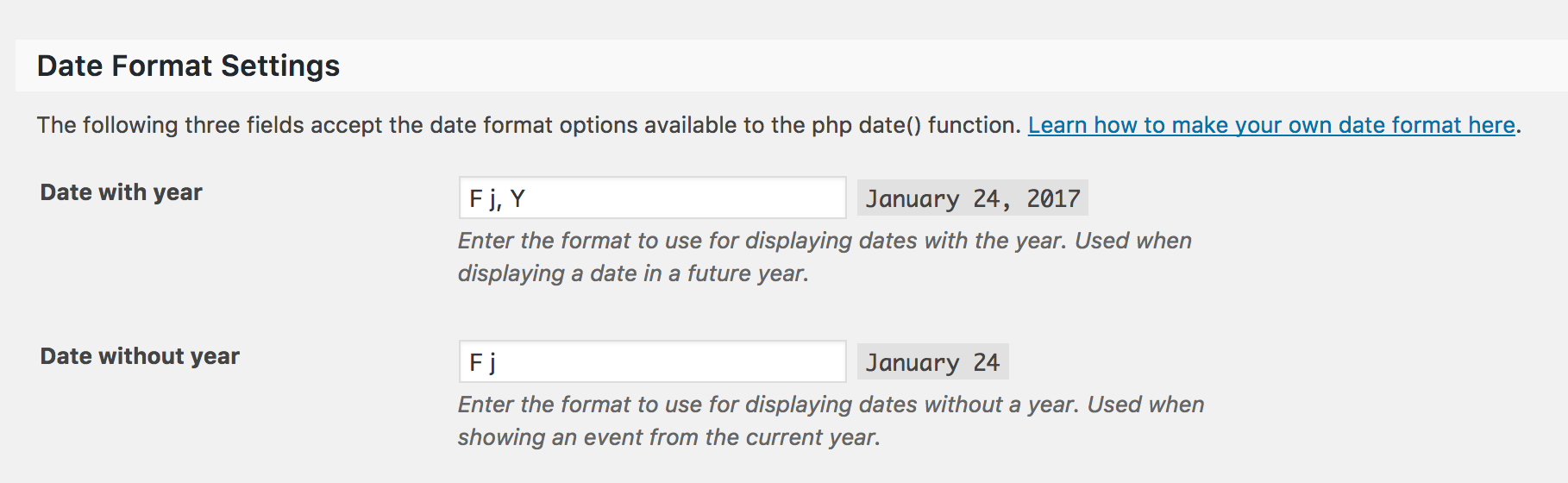
    Sure thing! By default, the calendar does not display the year for an event that takes place in the current year.

    You can change that on the Events > Settings > Display screen by updating the “Date without year” option:

    screen-shot-2017-01-24-at-9-06-06-am

    Change the setting to match the option right above it and you should be good to go. 🙂

    Does this help answer your question? Please let me know.

    Cheers!
    Geoff

    #1223080
    3ejoueur
    Participant

    Yes it is perfect, thanks 😉

    #1223255
    Geoff
    Member

    Right on! I’m so glad to hear everything is working smoothly and I appreciate you following up to let us know. Definitely keep us posted if any other questions come up and we’d be happy to help. 🙂

    Cheers!
    Geoff

Viewing 4 posts - 1 through 4 (of 4 total)
  • The topic ‘Date format with Year’ is closed to new replies.