

Forum Replies Created
-
AuthorPosts
-
September 12, 2016 at 2:25 pm in reply to: do imported events link back to the original facebook event? #1163011
Geoff
MemberThanks, Don!
I’m going to go ahead and move this thread to our Facebook Events forum since it sounds like this is more of a technical issue rather than a pre-sales question. The URL is the same, but you will need to login to reply.
The other reason I want to move this thread is that it will allow you to share private replies with me. In this case, will you please head to Events > Settings > Help, copy the system information at the bottom of the screen and paste it for me here as a private reply? That will help me check some of your settings for clues about what might be going on and at least rule out a few possibilities.
Thanks!
GeoffMemberThanks so much for the link!
I really do think that The Events Calendar will not only be a suitable replacement for the events you are managing on the site now, but an improvement as well. The base plugin is actually free and probably will do everything you need without any of the premium add-ons:
Right out of the box, The Events Calendar has both a Month View and a List View that you can switch between. The list view is sort of like what is on your site now, but with a bit more flair and design. Month View looks like your standard calendar, with a full month grid.
If you’re looking for more features, like advanced widgets to embed on other pages and posts (like your homepage), then I would suggest Events Calendar PRO to run alongside The Events Calendar, but that may be unnecessary depending on your needs. 🙂
can you make an event hide once date has passed? Or perhaps on homepage using widget, only show upcoming events?
Events that have passed will automatically be filed away into an archive of other past events that is located at: [your-site]/events/past. The calendar’s List View and Event List widget (both included in the free base plugin) will only display what is upcoming.
Does that sound like what you’re looking for? Please let me know.
Cheers!
GeoffMemberThanks, Leigh!
Hmm, so strange. Here’s what I’m seeing when I test out the code changes on your site:
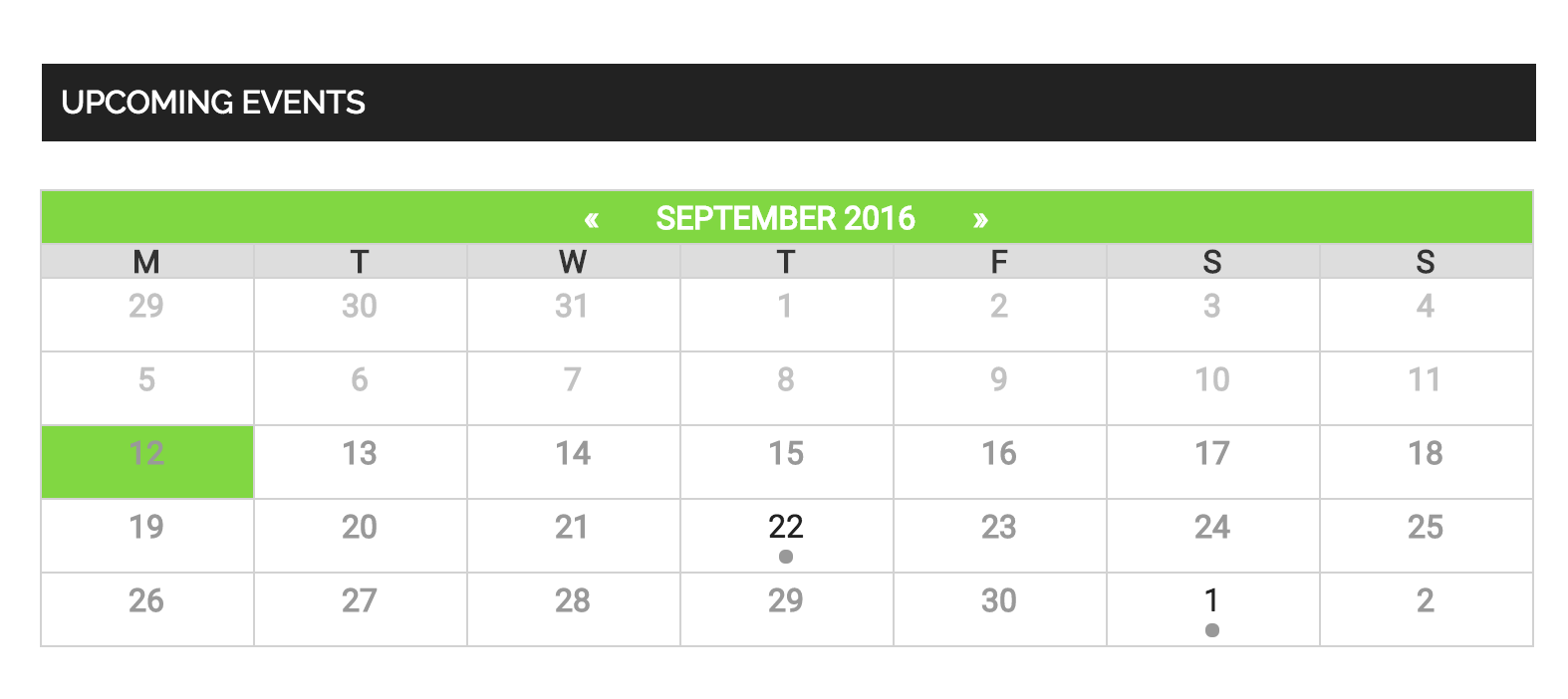
Are you adding the snippets to the theme’s style.css file? If so, would you be willing to try the Simple Custom CSS plugin instead? I have a hunch that the theme style’s are tough to override and that plugin will make it easier to make it happen.
Thanks so much!
GeoffSeptember 12, 2016 at 2:08 pm in reply to: Where can i find the "Attendee Information option" button #1162990MemberNice! So glad that did the trick — thanks a ton for following up to let me know and definitely let us know if any other questions or issues pop up. We’d be happy to help. 🙂
Cheers,
GeoffSeptember 12, 2016 at 2:06 pm in reply to: do imported events link back to the original facebook event? #1162989MemberHi Don,
I’m trying to get a sense of whether you see the Event Website field in the event editor because that is what Facebook Events should be importing the Facebook page URL to. Do you see that field listed in your event editor like the screenshot I shared?
Thanks so much!
GeoffMemberHi Luis, I see my last reply was marked as the correct answer — I’ll go ahead and close this thread and we’ll see you over on WordPress.org. 🙂
Cheers!
GeoffMemberThanks!
Hmm, I’m not seeing all of the code in there, but this should change the gray for today’s date to green:
.tribe-mini-calendar .tribe-events-present, .tribe-mini-calendar .tribe-mini-calendar-today {
background-color: #81d742 !important;
}
Geoff
MemberHey there, and thanks for getting in touch!
Do you happen to have a URL you can share that I can use to look at your events? I may be missing it somewhere, but wasn’t able to see one in your thread.
Thanks!
GeoffSeptember 12, 2016 at 10:10 am in reply to: Just Installed but get BIG ERROR if I try to save a post. #1162873MemberHey David and sorry for the trouble here! Server 500 errors are always a pain and definitely can be scary at first glance.
Often, a Server 500 error is the result of not enough memory being allocated to PHP on the server. In other words, a request is being made but the server does not have enough power to respond to it.
As a first course of action, will you please follow the steps outlined in this blog post? I turn to it every time this issue pops up on any of my projects and it usually does the trick.
Let’s start there and see what we find.
Thanks!
GeoffMemberHi Leigh,
Oh geez, it looks like the theme styles are overriding those customizations. Try this instead:
.tribe-mini-calendar thead,
tribe-mini-calendar .tribe-events-present {
background: #81d742 !important; /* or whatever color you would like */
}

.tribe-mini-calendar .tribe-events-has-events:hover {
background: #21759b !important; /* or whatever color you would like */
}
What is the short code for the full size event calendar?
I am afraid there is no shortcode for the full calendar at the moment, though it is something we are working on and hope to release in Events Calendar PRO 4.3. 🙂
Geoff
September 12, 2016 at 10:00 am in reply to: do imported events link back to the original facebook event? #1162867MemberHi Don and thanks for following up!
That’s certainly strange. If you head to the WordPress editor for one of those events, do you see a field in there for Event Website (screenshot)? If so, is there any information in the field?
Thanks,
GeoffMemberMy pleasure! Thanks for following up and definitely let us know if any other questions pop up as you continue looking into the plugins. 🙂
Cheers,
GeoffMemberHey Jonathan,
No worries at all! In fact, I simply re-activated your Eventbrite Tickets plugin for another year, so you’re actually covered for another year there and another year and a half for Events Calendar PRO. 🙂
Are both licenses showing up as active for you now? Let me know!
Cheers,
GeoffSeptember 12, 2016 at 9:29 am in reply to: Where can i find the "Attendee Information option" button #1162856MemberHi Hans and welcome back to the forums!
The option to add custom ticket fields are in the post editor when you create a new ticket. Here’s a little screencast I put together to show you exactly how that works from the editor. Let me know if it helps. 🙂
Cheers!
GeoffMemberHi Leigh and welcome to the forums! I’m sorry fore the trouble here but am happy to check this out with you.
Oh yes, it looks like we’re working with the Mini Calendar here, which is a bit different than the full-size calendar. Now worries, though, we can figure this out!
Will you please add the following CSS to your theme’s style.css file or by using the Simple Custom CSS plugin:
.tribe-mini-calendar thead,
tribe-mini-calendar .tribe-events-present {
background: #81d742; /* or whatever color you would like */
}

.tribe-mini-calendar .tribe-events-has-events:hover {
background: #21759b; /* or whatever color you would like */
}
Here’s a screenshot of how that looks when I test it out on your site. Will this work for you as well? Please let me know. 🙂
Cheers!
Geoff -
AuthorPosts