

Forum Replies Created
-
AuthorPosts
-
Courtney
MemberHi Manuele
It sounds like you’ve got this working. I noticed you marked this as resolved. I’ll close out this thread.
Thanks
Courtney 🙂MemberGreat to know Andrew
Thanks
Courtney 🙂MemberHey there @stedy
Can you submit your own new ticket containing your System Info.
Please also go through our Testing for Conflicts Guide https://theeventscalendar.com/knowledgebase/testing-for-conflicts/ before submitting the ticket.
Thanks
Courtney 🙂MemberThanks Eric
Let us know if you need any further assistance.
Thanks
Courtney 🙂MemberHi Chris
Events Calendar Pro is needed for recurring events.
Community Events will allow for user submissions. You can set these to either auto-publish, or create drafts that require you to manually publish.
You can use Event Tickets to add an RSVP functionality, or if you want website visitors to pay for tickets, move along to Event Tickets Plus. For this plugin, we do integrate with e-commerce plugins. We currently support WooCommerce or Easy Digital Downloads. Read more about each option’s features and payment gateways.
Finally, if you want community members to be able to create events themselves with ticket options available, you could use Community Tickets. Note that this plugin requires Event Tickets, Event Tickets Plus, an e-commerce plugin, and Community Events to work.
Is there anything else I can help you with?
Thanks
Courtney 🙂MemberHi Phillip
You can see our RSVP ( Event Tickets ) or Ticket ( Event Tickets Plus ) buttons at our demo site: http://wpshindig.com/event/event-tickets-demo/.
At this time, we do not lead to a form really. We integrate with an ecommerce plugin to achieve the checkout process. We currently support WooCommerce or Easy Digital Downloads. Read more about each option’s features and payment gateways.
If you think that is something you would like as a feature I encourage you to visit our User Voice Page and either upvote an existing request or make a new request there.
You can suggest it it http://tribe.uservoice.com.
Is there anything else I can help you with?
Thanks
Courtney 🙂MemberHi Yaron
To see an owner page, take a look at our demo site: http://wpshindig.com/event/st-louis-wordpress-developers-meetup/2018-01-17/. This is an example of a single event. You can click on the organizer from there. It will take you to http://wpshindig.com/organizer/eric-juden/. At this time, the demo site only has 1 event for this organizer, but this will show you a list view of the organizer page.
The look of that single event looks like it would take a good deal of custom coding. For that, we refer people to our Themer’s Guide. If you want to hire someone to achieve that, we’d suggest Find A Customizer. If you are a Beaver Themer user/customer, I know they have some interesting integrations with our plugins in the works in their latest beta version, but I’m not sure just how far that look will go with their features.
Is there anything else I can help you with?
Thanks
Courtney 🙂MemberHi Joanna
payment through paypal
At this time, our plugin relies upon an ecommerce solution for all payment processing. We currently support WooCommerce or Easy Digital Downloads.
Read more about each option’s features and payment gateways.assign a specific #of tickets per time slot
For each event, you can create a ticket, or several ticket types. You can set a limit for each ticket type, or set a limit for all tickets available for that event. Ex: Child, Adult, Family – you could have 10 tickets each, or set a capacity of 30 total tickets no matter which type they are.
different prices for different times
I believe the easiest way to do this would be to assign tickets to events of different times.
email a group reminder to people who booked and paid for an event
Our system only handles emailing the ticketholder with the initial purchase of a ticket. However, you can export attendee data and load the emails into a newsletter system of your choice. https://theeventscalendar.com/knowledgebase/managing-your-orders-and-attendees/#exporting-attendees
Ability to “sell” free tickets or paid tickets
Yes, you can either create an RSVP using just Event Tickets, or you could leave the price option blank in Event Tickets Plus for that to display as FREE.
Do I need woocommerce to make it work or just a paypal email address?
Answered in #1
What is the cost for customers who already have events calendar pro?
We do not have discounts at this time. It will depend upon the license level that you want, but is viewable on Event Tickets Plus https://theeventscalendar.com/product/wordpress-event-tickets-plus/
Will it need formatting to work on my site or is there a standard look for the events ticket plus feature?
You can see an example at http://wpshindig.com/event/event-tickets-demo/.
Is there anything else I can help you with?
Thanks
Courtney 🙂MemberHi Marcus
We do not offer an admin demo of Event Aggregator. We do offer 30 day refunds if you find the plugin does not meet your needs. It’s just a matter of submitting a refund request form at https://theeventscalendar.com/knowledgebase/refund-policy/.
It may be hard to see what is going on, but our demo site http://wpshindig.com/events is relying upon EA for all events created.
Is there anything else I can help you with?
Thanks
Courtney 🙂December 13, 2017 at 11:09 am in reply to: Does event aggregator also sync with Google Calendar? #1404847MemberHi Eivind
Due to the constraints of iCal, the synchronizing is only 1 way at this time. When you make a change in the Google Calendar source that imports to Event Aggregator, it will be reflected on your site if your settings allow (Events » Settings » Imports » Event Update Authority).
However, you can import the calendar to Google. From the main Events Calendar page, look in the bottom right corner for +Export Events. You can see this button on our demo site: http://wpshindig.com/events/. That .ics file can be imported to many calendar types, and will remain consistent with events published on your site.
It is not truly synching the way you might envision it, but it is a working solution.
Is there anything else I can help you with?
Thanks
Courtney 🙂MemberHi there!
Thanks so much for getting in touch! I’m afraid that we’re not equipped to provide technical support for current plugin users here in our pre-sales forum. We’d be more than happy to assist you at one of the following locations:
• If you’re using one or more of our free plugins such as The Events Calendar and Event Tickets, you can request assistance on the WordPress.org support forum for the affected product.
• If you’re a current license holder for one of our premium offerings, please log in to your account and submit a post to the appropriate forum for the affected product. Please include your System Info https://theeventscalendar.com/knowledgebase/sharing-sys-info/ so we can better help you.If you can, please take the time to confirm in your post that you’ve run through our Testing for Conflicts steps prior to contacting us–this will save us a step and help us to get your issue resolved that much quicker! 🙂
Thanks again, and we’ll see you in the forums!
CourtneyMemberHi Karen
Yes, you can definitely test the plugin and then move it to a live site. You can walk through the steps on Moving Your License Key when you are ready to take the plugin to the live domain.
Thanks
Courtney 🙂MemberHi Harvey
We’d be happy to help sort that out for you.
Please send an email to support [at] theeventscalendar [.] com if you would like your license to be swapped for Events Calendar Pro.
We do offer 30 day refunds if you find the plugin does not meet your needs. It’s just a matter of submitting a refund request form at https://theeventscalendar.com/knowledgebase/refund-policy/.
Is there anything else I can help you with?
Thanks
Courtney 🙂MemberHi Julie
You can apply for our non-profit discount by completing the form at https://theeventscalendar.com/apply-for-npp.
⚠️Please Note: Licenses granted through this program do not include access to support.
If you need in-depth support,
please consider purchasing a regular license.
Is there anything else I can help you with?
Thanks
Courtney 🙂MemberHi Andrew
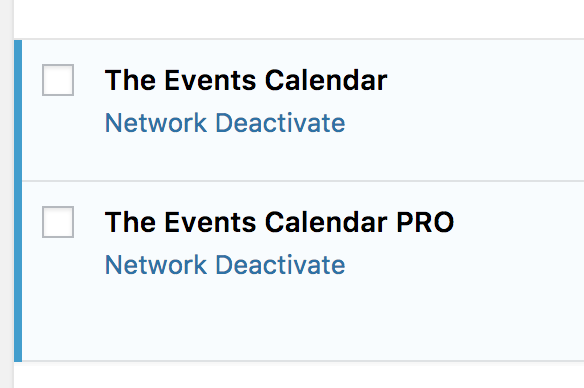
Our plugins can be network activated.
Is there anything else I can help you with?
Thanks
Courtney 🙂 -
AuthorPosts