

Forum Replies Created
-
AuthorPosts
-
December 22, 2015 at 10:02 pm in reply to: Looking for Updated Code or Hooks to Custom Snippet #1045668
Cliff
MemberHi. Thanks for your detailed question.
One way to protect your site from erring out like it did is to use function_exists. You may choose to do that for the future.
Regardless, I believe you’re looking for this: https://theeventscalendar.com/knowledgebase/moving-the-ticket-form/
Please let me know if you need anything else.
MemberHi. Thanks for the link.
1) I was able to look into it and see that the “Add to Cart” button stays gray the entire time until the button is hovered — on all browsers, not just mobile.
The CSS changing the background color of the button once hovered is from http://studio614.co/wp-content/themes/kleo/woocommerce/assets/css/woocommerce.css
Here’s the same CSS selector with the change to make the background color to “black” instead of “#fff” (hex code for white color):
.woocommerce #content input.button:hover, .woocommerce #respond input#submit:hover, .woocommerce a.button:hover, .woocommerce button.button:hover, .woocommerce input.button:hover, .woocommerce-page #content input.button:hover, .woocommerce-page #respond input#submit:hover, .woocommerce-page a.button:hover, .woocommerce-page button.button:hover, .woocommerce-page input.button:hover {
background-color: black;
}
Alternatively, you could change “background-color: black;” to “color: black;” to change the text color to something other than “#fff”.
Of course, you can change to any other color besides “black”, too.
You can add custom CSS code via your child theme’s style.css file or via a plugin like Simple Custom CSS or, my favorite, Jetpack. Jetpack supports regular CSS and the LESS and Sass pre-processors.
2) Regarding the ticket area’s responsiveness… We like to keep each forum post to a single issue but my quick response is that it seems to work just fine for me.
Here’s what I see on Mac Chrome
I hope this helps. Please let me know how it goes for you.
MemberHi. I see you weren’t logged in to the account you purchased our plugin(s) with when you posted this question. As such, we won’t be providing customized support if you need it.
However, here’s the general information that I hope will help you with your situation:
While we don’t directly take po/mo files, we’ve got these instructions:
- Translating the premium plugins
- Translating The Events Calendar (free/core plugin)
Here’s another helpful link for your situation: https://theeventscalendar.com/knowledgebase-category/change-terms/
Please reference that information and let me know if you need any further assistance.
December 22, 2015 at 9:35 pm in reply to: Append information to event description post submission #1045661MemberHi John. Thanks for your question.
Skimming through /wp-content/plugins/the-events-calendar-community-events/src/Tribe/Submission_Handler.php, I found 2 actions that may be of interest to you:
- tribe_community_event_created
- tribe_community_event_updated
I suspect that should get you headed in the right direction.
Please let me know how it goes for you.
December 22, 2015 at 9:17 pm in reply to: Calendar Month View events not displaying correctly on Mobile Phones #1045658MemberHi Richard.
1) I visited http://www.lekdanling.org/events/ and saw the background coloring. It’s coming from http://www.lekdanling.org/wp-content/themes/altitude-pro/style.css
You could override the coloring by using the same CSS selectors:
.tribe-events-calendar td.tribe-events-past div[id*=tribe-events-daynum-], .tribe-events-calendar td.tribe-events-past div[id*=tribe-events-daynum-]>aCurrently, there’s:
background-color: #99d6eb;
color: #fff;
2) I tested on my local install with the Twenty Fifteen theme and everything’s working how you’re expecting it to. Please make sure you’re running the latest version of our plugins and if it’s still not working for you, please follow our Testing for Conflicts Guide and see if that helps narrow down the cause of this.
I’m looking forward to hearing back from you.
MemberHi Phil.
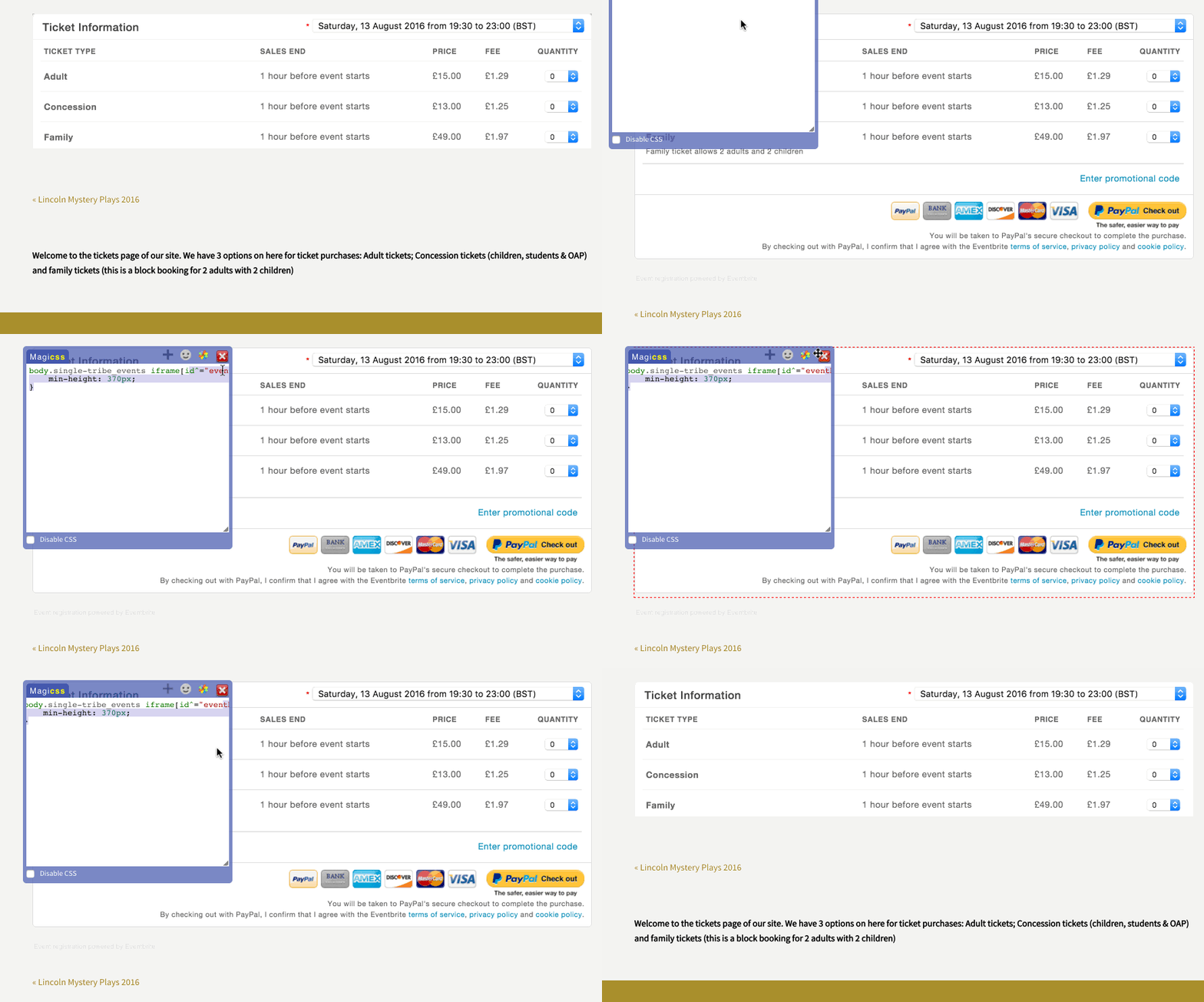
If I understood your issue correctly, please try this custom CSS:
body.single-tribe_events iframe[id^="eventbrite-tickets"] {
min-height: 370px;
}
You can add custom CSS code via your child theme’s style.css file or via a plugin like Simple Custom CSS or, my favorite, Jetpack. Jetpack supports regular CSS and the LESS and Sass pre-processors.
A preview of the customization:
Let me know how it goes for you!
(Update: Look what I found! Another way to do it — via PHP instead of CSS: https://theeventscalendar.com/knowledgebase/changing-the-height-of-the-eventbrite-tickets-iframe/ )
December 22, 2015 at 11:22 am in reply to: Changes made via iCal link aren’t syncing with site #1045508MemberI see all those links are from the same source (I’m guessing having the same “not validating” issue). I’d suggest trying some iCal feeds from another source.
For example: click the “Subscribe to > iCalendar Feed” link at http://calagator.org/ and see if you experience the same issue(s) you do with iCal feeds from resources.planningcenteronline.com
Let me know what you find out.
December 22, 2015 at 11:08 am in reply to: Search event button not working in Google Chrome #1045497MemberHi. Thank you for the additional information.
I visited the front-end of your site and tested the Search Events button in the “Tribe Bar” (above the Event List view).
(Please note that we do not login to wp-admin for our customers’ sites so I deleted those credentials from your private reply. Please don’t provide them again in the future.)
I noticed changing the date doesn’t even require you to click the Search Events button because it automatically updates via Ajax. If you enter a search term or location search, you then need to click Search Events, but clicking the button doesn’t do anything.
However, this isn’t the way it works on my local testing site. As such, please follow our testing for conflicts guide and see if that helps narrow down the cause of this.
Let us know what you find out.
Thanks.
December 22, 2015 at 10:59 am in reply to: after update: COMMUNITY can not generate Event location #1045488MemberI understand the frustration anytime there are bugs.
However, in your case, it sounds like you’re concerned about anonymous submissions, for which there are no bugs.
If you’re experiencing issues with anonymous submissions not able to create new Venues, please follow our testing for conflicts guide and see if that helps narrow down the cause of this.
Let us know what you find out.
Thanks.
MemberHi. Thanks for your question.
I assume you’re inquiring about our http://wpshindig.com/about/ site.
It uses a custom theme that isn’t available. Additionally, the setup and database are not available.
I know this isn’t what you wanted to hear, but please let me know if you have any follow-up questions.
Thank you.
December 21, 2015 at 10:10 pm in reply to: Not understanding how to embed the calendar into a page #1045054MemberHi. Thanks for your purchases. Sorry for the frustration your setup process has caused you. I can help with this.
Here are a few quick tips:
- It is not possible to set your Events page to your site’s home page. There’s a setting at wp-admin > Events > Settings > “Events URL slug” that tells you where your “Events page” is located.
- You cannot “embed” the Events page into other WordPress pages. However, you may choose to use one of our plugin’s widgets or shortcodes throughout your site.
- The Events page is technically a WordPress archive page for the “tribe_events” post type, not a “regular WordPress page” that you can apply a page template to, for example.
- For some customization, you can play with the first 2 options at wp-admin > Events > Settings > Display tab >
- Default stylesheet used for events templates
- Events template
- For full customization, you’d need to refer to our Themer’s Guide
I hope this information clears things up for you.
Please let me know if you have any follow-up questions.
Thanks!
December 21, 2015 at 10:00 pm in reply to: Changes made via iCal link aren’t syncing with site #1045049MemberHi. Thanks for all the details; it really helps.
I tested that link in 2 different iCal Validator sites and both gave the same error:
Problem! Found 1 error
Lines not delimited by CRLF sequence near line # 1
Reference: RFC 5545 3.1. Content Lines
Maybe this iCal URL you’re trying to import is the problem.
Have you tried other iCal URLs? If yes, did they worked just fine?
December 21, 2015 at 9:48 pm in reply to: Not a full translation into Russian. Where and how to add? #1045046MemberThank you for your interest in helping translate our plugins!
We’ve just launched a whole new process for translations and have two write-ups for it here:
- https://theeventscalendar.com/knowledgebase/changing-the-language-on-your-calendar/
- https://theeventscalendar.com/knowledgebase/adding-or-updating-a-translation/
Two things to note are:
- You do not have to submit an entire translation, you can just submit translations for individual strings. Even if it’s just one string, or something like a spelling correction, it all helps!
- Your submitted strings will be saved as “suggestions”, and not immediately included in a translation file for export until an administrator approves them. This may seem like a limitation, but it helps us ensure nobody comes along and deletes translations or adds spam or something to them. Your suggestions should be approved in a timely manner.
I hope this information brings you up to speed on our translations site. Let us know if you have any other questions or concerns! 🙂
Thank you!
MemberHi. Thanks for your question.
I do not understand exactly to what you are referring.
If our testing for conflicts guide doesn’t help you resolve your issue, could you please provide me a link and/or a screenshot of what issue(s) you’re experiencing?
Thank you.
December 21, 2015 at 9:40 pm in reply to: Manually added orders not adding users to attendee list (Tickets) #1045042MemberHi Quentin. Thanks for letting us know to close this one. Keep up the good work!
-
AuthorPosts