

Forum Replies Created
-
AuthorPosts
-
October 18, 2016 at 4:19 pm in reply to: Woocommerce event tickets: single-product template #1178758
Brook
ParticipantNo worries there. We can help you find you account. Would you mind sending an email to
 with your personal details? If you could provide:
- Your full name
- Site URL
- License key. If your site has one it will be found in WP-Admin > Events > Settings > Licenses.
- Your website developer’s name and email address
I understand if you can not provide everything. But the more info you can provide the better. Using that info we will try to find the account that is associated with your website. If your developer created it specifically for you, we can give you a username/password to login with.
It is very likely that your license expired a while ago. The product you mentioned, The Events Calendar: WooCommerce Tickets was replaced by Event Tickets Plus over a year ago. Event Tickets Plus behaves just like your old one did, but has new many features and a new name. If your license is expired you will need to purchase another year in order to get access to our support forums here. That is $89. When making a purchase like that you can always create a new account, and then you would not worry about whether or not your old developer will surrender access to the account.
So there are all of your options. Please do let me know if you have any questions. I hate to have you run through any hoops like the above, but we do have be cautious when granting access to an account just in case someone is doing so without the original openers authorization.
Cheers!
– Brook
ParticipantHowdy Craig,
Please pardon my belated response here. We launched a new product last week and have had way higher than expected number of new customers and thus support requests.
The only issue is the coaches manually have to check if they have an event upcoming and what type of events they provide. Just did not want anyone thinking I figured out the issue.
Did the code I provided before work? You’ll note it should dynamically return only those organizers who have events. There should be no need for the coaches to manually set this.
Currently I am using Events Calendar Pro, BuddyPress and Geo My Wp. Members are able to select from 2 categories currently when creating new events, Online Events and Live Events. My goal is to add a filter that we can pass when searching with GeoMyWp form that gives a checkbox for each event category. Also would like to add an additional checkbox that filters any coaches that have upcoming events as a whole.
The GeoMyWp is just not something I am familiar with. 🙁 I can not provide any knowledge there, but if I were you or your developer I would start by examining their API docs. Once you have figured out how to add such a filter, add it.
Once you have added the filter, if you are having trouble retrieving a list of WP taxonomies, such as our categories, or any other data from our plugin, then I can help! And I’d love to. You just need to let me know specifically what data you are trying to get.
I understand this is going to require extra coding and I am totally willing to pay someone to put that together for my client. I have been trying at this forever.
Have you see our List of freelance customizers ? That would be a good place to start.
Does that all make sense?
Cheers!
– Brook
ParticipantHowdy again,
I am sorry you did not get the beta emails. We are certainly not done developing Events Aggregator, more features will be added. So you did not miss the boat there for requesting additions.
The reason CSV is not supported is because it is highly unusual for people to host a CSV and regularly update it. There is obvious utility in doing that, but it is the sort of use case that would be extremely rare. I would not be surprised if less than 1% of users would even think of such an idea. In that case 99% of users might prefer we spend our time elsewhere, since any feature we add must be retested each time we update our code, and maintained. Further a significant chunk of users can view that features as “bloat”, and if you add too many of those you can become the “bloated plugin” everyone hates.
We face this dilemma all of the time. Our solution to it is to gauge the amount of demand a feature has, but adding it to our feature request page. After a few months we can look back and weight it based on this metric.
This leaves you with two options:
- Submit a feature request.
- Build this as a customization.
It should be possible to build this as a customization. You could write a PHP script which fetches the files, and uploads it to WordPress. From there pass the file to our CSV importer. Then schedule this whole process as a cron script. Easier said than done, but very possible.
Oh, that’s my whole reason for buying aggregator was to automate the csv import. The csv can live anywhere, doesn’t have to be on my computer. In my current solution I simply update a file on the webserver with an automated ftp script. If Aggregator can pull from web sources for other types of imports I don’t understand why it can’t pull a csv file from the same server where the plugin is installed.
I am sorry if this was miscommunicated somewhere. I can definitely hook you up with a refund if you want. Just let me know if you want that.
Does that help clarify things?
Cheers!
– Brook
ParticipantI think it might have briefly appeared as some funky code. Sorry about that. Here is what it was supposed to say:
I would love to help you figure this out! Would you mind logging in first so I can verify your support access? Or, if you do not have a license to any of our premium plugins (which includes a year of support access to these forums) then do not forget about the free support you can get on WordPress.org: The Events Calendar . We even check those forums once each week and provide as much support as we can for free.
Does that make sense now? We can definitely assist you on our forums here if you have a license. But if you don’t have nor want one, you should checkout the free support all WordPress users can enjoy on WordPress.org.
Please let me know if you have any questions.
Cheers!
– Brook
October 18, 2016 at 9:14 am in reply to: How to make flat fee to charge per ticket sold instead of each event in an order #1178397ParticipantHowdy again Tac,
I am sorry for the delay. We had a significantly higher than normal amount of support than expected after launching Event Aggregator last week. Fortunately not from bugs, but just from new customers.
I have to update my schedule for this a bit, my new goal is to have an updated version of that snippet ready by the end of the day tomorrow.
Cheers!
– Brook
October 18, 2016 at 9:11 am in reply to: Google iCal Link works only manual with iCal importer #1178392ParticipantHowdy Christian,
Sorry for the unusually long response time. We have had a much higher than normal number of new customers, causing a delay at times over our typical 24 hours response times.
Within Google Calendar you will be given two URLs, a private and a public one:
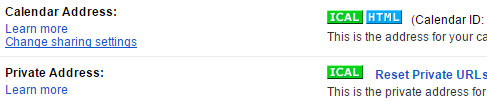
Is it possible you are using the private address? In order for anything to see that it will have to be logged in with your Google username and password, which WordPress does not have. So you need to share the public URL. When you click on the iCal button there it will take you to your public URL. It might prompt you to modify your privacy settings first.
Does that all make sense? Will that work for you? Please let me know.
Cheers!
– Brook
October 18, 2016 at 9:07 am in reply to: Woocommerce event tickets: single-product template #1178379ParticipantHowdy Janusz,
I would love to help you figure this out! Would you mind logging in first so I can verify your support access? Or, if you do not have a license to any of our premium plugins (which includes a year of support access to these forums) then do not forget about the free support you can get on WordPress.org: The Events Calendar . We even check those forums once each week and provide as much support as we can for free.
Cheers!
– Brook
ParticipantHowdy Sheri,
Please pardon the belated response. Your message here got temporarily lost in cyberspace. 🙁
Could you shoot an email to
and share with us your order number for the order you already places? From where we can issue you a coupon for Events Aggregator that will bring the cost of it down to match our new bundle.Does that all make sense? Will that work for you? Please let me know.
Cheers!
– Brook
ParticipantHowdy Jack,
Thanks for the clear explanation and testing you’ve done so far!
I think I know the issue you’re hitting here. That filter will get called once for each ticket available for the event. The $quantity variable will be 0 for any ticket that was not purchased.
Since your code exits, it does so the first time this filter gets called, which will always be the “top” ticket. If you remove the exit you will see the filter fire multiple times. If you only wish to validate tickets which were purchased, check that the quantity is greater than zero.
Does that all make sense? Will that work for you? Please let me know.
Cheers!
– Brook
October 18, 2016 at 8:23 am in reply to: Custom fieldsets in woocommerce confirmation email #1178327ParticipantHowdy Chloe,
I would love to help you with this.
in order to add to the admin woocommerce confirmation email the custom fields I created ( using custom fieldset) ; but I can’t make it work !
I’ve read all threads on the subject and I believe it’s not working cause I have different fieldset for specific tickets.There are a few ways of adding extra fields to tickets. The most common way would be using the “Ticket Fieldset” pictured here. One of the less common ways involves creating the aptly named “custom fields” with a third party plugin, and also includes a “custom fieldset”. Since these are named very similarly and do similar things, it can get confusing. I just wanted to be sure you had added you had used the Ticket Fieldsets which I linked to. If you have not, then that would explain the difficulty! If you used something else what was it?
We are working on making it easier to insert Ticket Fieldsets into the WooCommerce emails. By the end of the week I should have a downloadable plugin you can install that will do this for you. If this is giving you difficulty, but no error messages, perhaps it just makes sense to wait for the free addon plugin we’re working on?
Cheers!
– Brook
ParticipantExcellent news about it being resolved, thank you for getting back!
We have repeatedly explored the idea of email support. I appreciate the feedback about this and will pass it along. To be up front though I doubt they will ever switch or offer an email alternative. Forums are such a standard support tool in the WordPress community, both for WordPress.org and premium plugins. For the same reasons most other plugin authors use them we do too. One thing we are definitely going to do though is add email replies, so that you can continue a support exchange like this one without ever having to leave your inbox.
Thanks again!
– Brook
ParticipantNote for anyone else viewing this with a similar issue: The solution the above private reply outlined is to deactivate the license on any sites that do not need the license input, such as testing servers. The reply contained private account details and so is not visible to all.
Cheers!
– Brook
ParticipantThis reply is private.
ParticipantHowdy Alessio Garonzi,
I would love to help you figure this out! Would you mind logging in first so I can verify your support access? Or, if you do not have a license to any of our premium plugins (which includes a year of support access to these forums) then do not forget about the free support you can get on WordPress.org: The Events Calendar . We even check those forums once each week and provide as much support as we can for free.
Please let me know if you have any questions about our policy or difficulty logging in.
Cheers!
– Brook
ParticipantHowdy Rodrigo,
Our CSV Importer does its best to find duplicates based on the name and date of the event. If it finds a preexisting event with a matching name and date it will then update it, if it does not find such a thing it will create a new event.
For organizers and venues it simply matches by name. If the name changes in your CSV then a new organizer or venue will be created.
I love the idea of adding a Unique ID field to the CSV, so that it could update existing events even when the name or date changes. However that’s not a feature that has been suggested before to my knowledge. I’d be happy to add it to our feature suggestion page if you are interested. For the sake of clarity many developers write feature requests in the form of “user stories”, and we do too. Here is what I was thinking for your needs:
I am a site admin regularly importing events, organizers, and venues from CSV files. The names of previously imported items are subject to change, along with all other details. Since each item in my CSV files has a Unique ID field, I would like the importer to match the Unique ID to previously imported items and update them, even when the name or date changes.
Does that sound like your “story”?
I should also mention that since the CSV files are on your computer, it is not possible to schedule a true recurring import using CSVs. You can manually import them as often as you like. But they can not be automatically imported, since the website will not have access to files stored on your computer with you first uploading them.
Does that all make sense and answer your questions?
Cheers!
– Brook
-
AuthorPosts