Google iCal Link works only manual with iCal importer

Home Forums Calendar Products Event Aggregator Google iCal Link works only manual with iCal importer

Viewing 3 posts - 1 through 3 (of 3 total)
  • Author
    Posts
  • #1176415
    Christian
    Participant

    Hi Team,

    i tried to schedule the sync function each hour. But the link that i got from goggle doesn´t work here. If i download the ical file and upload that in the system it works fine, but the automatic function does not work. It would be nice if you could help me further!!

    Many thanks for your efforts
    Christian

    #1178392
    Brook
    Participant

    Howdy Christian,

    Sorry for the unusually long response time. We have had a much higher than normal number of new customers, causing a delay at times over our typical 24 hours response times.

    Within Google Calendar you will be given two URLs, a private and a public one:
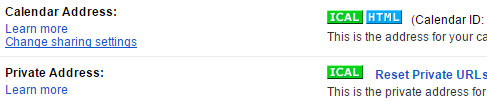
    capture

    Is it possible you are using the private address? In order for anything to see that it will have to be logged in with your Google username and password, which WordPress does not have. So you need to share the public URL. When you click on the iCal button there it will take you to your public URL. It might prompt you to modify your privacy settings first.

    Does that all make sense? Will that work for you? Please let me know.

    Cheers!

    – Brook

    #1189662
    Support Droid
    Keymaster

    Hey there! This thread has been pretty quiet for the last three weeks, so we’re going to go ahead and close it to avoid confusion with other topics. If you’re still looking for help with this, please do open a new thread, reference this one and we’d be more than happy to continue the conversation over there.

    Thanks so much!
    The Events Calendar Support Team

Viewing 3 posts - 1 through 3 (of 3 total)
  • The topic ‘Google iCal Link works only manual with iCal importer’ is closed to new replies.