
Home › Forums › Ticket Products › Event Tickets Plus › Custom fieldsets in woocommerce confirmation email
- This topic has 19 replies, 6 voices, and was last updated 9 years, 11 months ago by
Chloe.
-
AuthorPosts
-
October 17, 2016 at 5:09 am #1177620
Chloe
ParticipantHello,
i’ve been trying to implement this snippet in my themes’ functions.php file ( https://theeventscalendar.com/support/forums/topic/insert-ticket-field-set-with-ur-snippet-on-email-dont-work/ )
in order to add to the admin woocommerce confirmation email the custom fields I created ( using custom fieldset) ; but I can’t make it work !
I’ve read all threads on the subject and I believe it’s not working cause I have different fieldset for specific tickets.How could I make this work ?
Thanks for your help !
October 18, 2016 at 8:23 am #1178327Brook
ParticipantHowdy Chloe,
I would love to help you with this.
in order to add to the admin woocommerce confirmation email the custom fields I created ( using custom fieldset) ; but I can’t make it work !
I’ve read all threads on the subject and I believe it’s not working cause I have different fieldset for specific tickets.There are a few ways of adding extra fields to tickets. The most common way would be using the “Ticket Fieldset” pictured here. One of the less common ways involves creating the aptly named “custom fields” with a third party plugin, and also includes a “custom fieldset”. Since these are named very similarly and do similar things, it can get confusing. I just wanted to be sure you had added you had used the Ticket Fieldsets which I linked to. If you have not, then that would explain the difficulty! If you used something else what was it?
We are working on making it easier to insert Ticket Fieldsets into the WooCommerce emails. By the end of the week I should have a downloadable plugin you can install that will do this for you. If this is giving you difficulty, but no error messages, perhaps it just makes sense to wait for the free addon plugin we’re working on?
Cheers!
– Brook
October 18, 2016 at 8:33 am #1178335ParticipantHi Brooks,
Yes we’re talking about the built in custom field sets you pictured in your reply 🙂 As I said I’ve seen some users had develop a custom function to insert them in the woocomerce email, but it only seems to work if one custom fieldset is set through all tickets ; I have several and my short technical knowledge prevent me from making it work.
So yes, if you are working on an add-on that will allow me to pass all those info in the woocommerce emails, that would definitely worth to wait for it for a few days !
I just hope i’ll be able to install the add on without problems, I have an issue while trying to upgrade to versions 4.3 of event ticket and event ticket +, see here : https://theeventscalendar.com/support/forums/topic/4-3-update-issue/
Best regards ,
October 18, 2016 at 4:28 pm #1178761ParticipantSo yes, if you are working on an add-on that will allow me to pass all those info in the woocommerce emails, that would definitely worth to wait for it for a few days !
I understand that. I will get back to you about this.
I just hope i’ll be able to install the add on without problems, I have an issue while trying to upgrade to versions 4.3 of event ticket and event ticket +, see here :https://theeventscalendar.com/support/forums/topic/4-3-update-issue/
In addition to what Nico said you might be interested in disabling WP_DEBUG . That article walks you through how you can do this in the code. Technically any live site should not have debug enabled — the information it outputs, like the notice you saw, are intended solely for plugin developers. Thus WordPress strongly recommends setting WP_DEBUG to false on live sites.
If you follow this advice the errors should go away, and your site will likely behave fine on 4.3. All the same we really appreciate your sharing the notices as you did, we can investigate those and suppress them in a future update or apply the advice they give if it’s relevant.
Thanks for your patience Chloe!
– Brook
October 19, 2016 at 12:15 am #1178917ParticipantThanks Brooks,
indeed, debug mode was still active; After downgrading / disabling debug / upadating the plugins again, everything is working fine.
I’ll leave the ticket open until you notice me about the addon for the fieldset, ok ?Thanks for all your help.
October 19, 2016 at 10:10 am #1179233ParticipantOf course! That will work good, we’ll leave the ticket open until you have a solution and have tested it.
I am happy disabling debug did the trick.
– Brook
October 24, 2016 at 10:28 am #1181997Danielle
ParticipantThis is a feature that I need as well. I can’t even really use this plugin until I am able to allow the customer to see the ticket fieldset values they entered. We are launching a new, large site in 2 weeks and I either need to find another plugin besides Event Tickets Plus, or wait for this new add-on to come out and save the day so we don’t have to find something else.
Are there any updates as to how close this add-on plugin is to being available? Thank you!!
October 24, 2016 at 10:02 pm #1182288ParticipantOops! I forgot to post an update on Friday. We are still working on the miniature free addon that will add these details to the Woo email. We had some hiccups on Friday. If everything goes according to plan we will have it ready tomorrow, and I will share a link here.
– Brook
October 26, 2016 at 4:39 am #1183088Shaun
ParticipantHi,
I’m just wondering how close this plugin is as I have exactly the same problem/need?
Thanks
October 27, 2016 at 11:05 am #1183941ParticipantThe plugin is close, Shaun. We encountered some issues with when the attendee tickets are generated. They are actually generated after the WooCommece New Order notification email, or at least before the items within that email are listed. The problem with this is that we were hoping to list the attendee data next to each item in that email, rather than in the footer of that email.
So we are investigating work arounds. It’s possible we will just have to insert that data into the footer for now, much like the suggestion in the original topic. But hopefully I can find a better workaround.
– Brook
October 29, 2016 at 2:14 pm #1184948ParticipantGood news! I was able to find a workaround to the above issue.
Here is the extension, it is ready to be downloaded, installed, and activated as a plugin: tribe-ext-tickets-email-options-0-3-0
This will insert some extra options into WP-Admin > Events > Settings > Tickets:
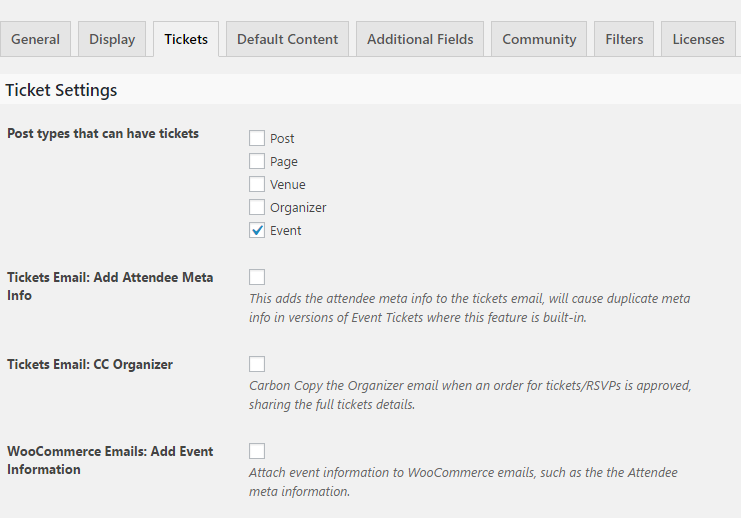
Check the bottom option to show the Attendee Meta information in WooCommerce order details emails. This includes the New Order email, and also the email sent to the customer. Anywhere the full order details are shown this info will be included.
Here is a before/after example of the information that gets included:
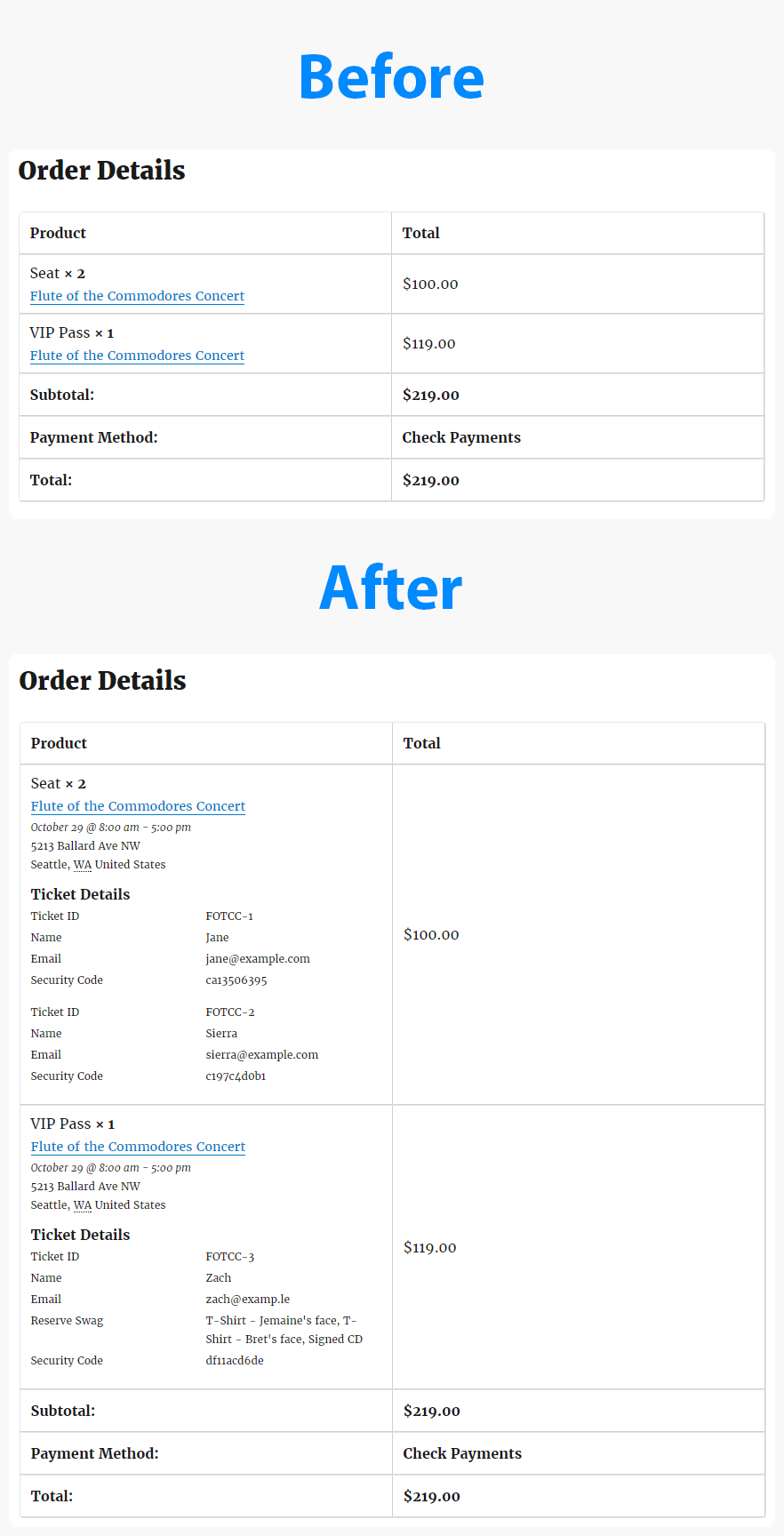
The styling might look different in different email clients. So it might appear exactly like you see above. It all depends on who receives the email. But the information itself will always get included.
If you have a chance to test this out, please let me know if you have any feedback.
Cheers!
– Brook
October 29, 2016 at 3:17 pm #1184958ParticipantThank you! So glad you were able to get this done so quickly. This is exactly what I needed.
October 30, 2016 at 1:46 pm #1185094ParticipantYou are very welcome Danielle! I am happy to hear it helped.
– Brook
October 31, 2016 at 3:27 am #1185155ParticipantThis reply is private.
October 31, 2016 at 9:39 am #1185309ParticipantHi Brook,
In fact the fatal error was caused by a plugin conflict – I had the “The Events Calendar – Notify organizer of new attendees” installed, I deactivated the plugin and managed to activate the new one. I still have couple of trouble thoughFor now, the custom fieldset infos only display on the ticket email that the client receives, not in the woocommerce order detail email that the admin receives…
I did check the setting for the organizer to receive a duplicate of the ticket, but that’s not working for me either…Thans for al the help,
Best regards,
-
AuthorPosts
- The topic ‘Custom fieldsets in woocommerce confirmation email’ is closed to new replies.