

Forum Replies Created
-
AuthorPosts
-
October 29, 2016 at 2:14 pm in reply to: Custom fieldsets in woocommerce confirmation email #1184948
Brook
ParticipantGood news! I was able to find a workaround to the above issue.
Here is the extension, it is ready to be downloaded, installed, and activated as a plugin: tribe-ext-tickets-email-options-0-3-0
This will insert some extra options into WP-Admin > Events > Settings > Tickets:
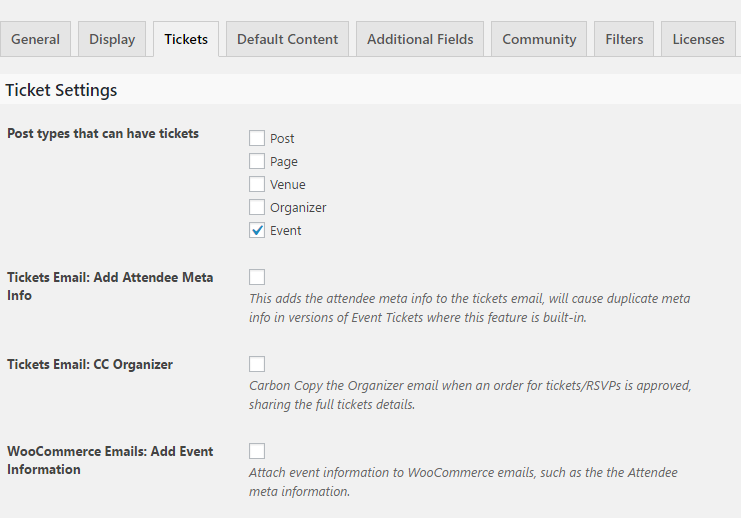
Check the bottom option to show the Attendee Meta information in WooCommerce order details emails. This includes the New Order email, and also the email sent to the customer. Anywhere the full order details are shown this info will be included.
Here is a before/after example of the information that gets included:
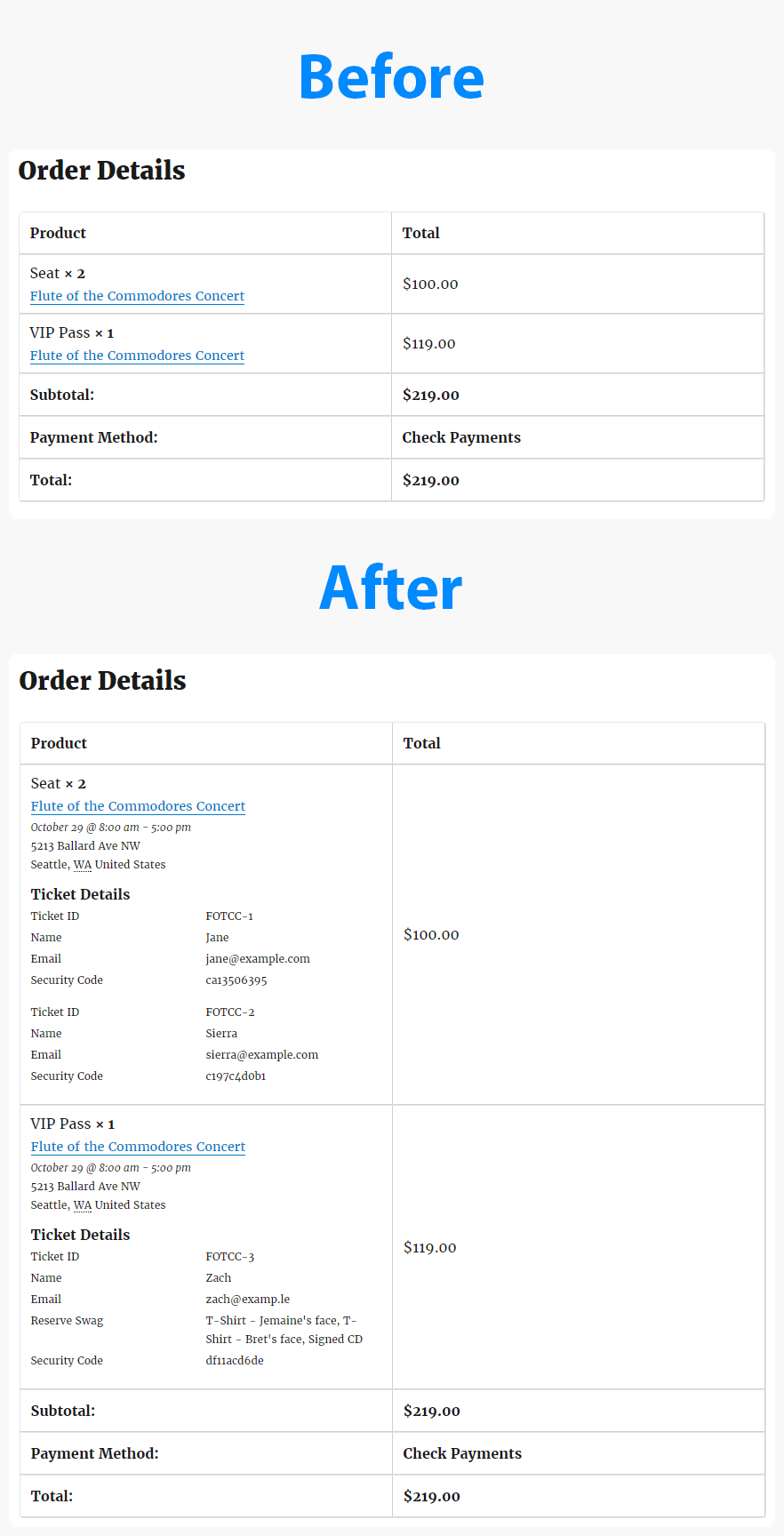
The styling might look different in different email clients. So it might appear exactly like you see above. It all depends on who receives the email. But the information itself will always get included.
If you have a chance to test this out, please let me know if you have any feedback.
Cheers!
– Brook
ParticipantYou are very welcome!
It is further worth noting that our calendar is very adaptable to those familiar with PHP programming. An enormous amount of WP hooks are provided, enough that it would be possible to tailor the calendar to your needs quite a lot. For instance, with a modification you could include the users event in the main calendar views. So that way the main calendar would show both the public events you have approved, and any private events the user just wants visible on their calendar.
Cheers!
– Brook
ParticipantHowdy Deven,
It applies to all of our plugins. They all permit you to use a single license for the dev and production (live) servers. So if you you plan to only have one live site, the personal license is a good fit.
Cheers!
– Brook
ParticipantGood to know! I will keep my ear to the ground for any further reports of this. We actually have not seen any duplicate recurrences since the 4.2.2.1 update. But if more people are hitting this and share their system info, we can search for a common thread.
Thanks for getting back Win-River!
– Brook
October 27, 2016 at 10:30 pm in reply to: Using tribe_get_events On Main Calendar Page Recurring Events Issue #1184258ParticipantDoh! I looked a bit deeper and I think I understand why this is happening now. Inside of Tribe__Events__Pro__Recurrence__Queries::collapse_sql() it looks like it is double checking if it is month view, and then bailing. Even though the above function has already checked. There are probably some edge cases that this double checking is meant to prevent.
I have one more idea. Immediately before building and running your query you could tell the Tribe API that it’s not on Month view with something like this:
add_filter( 'tribe_is_month', '__return_false' );Then right after you have run your query undo this:
remove_filter( 'tribe_is_month', '__return_false' );If that does not work we might be out of options. Did that or a similar strategy work?
Cheers!
– Brook
ParticipantI am sorry Alexander, I think I had two topics open when I responded last time. Your request was very clear, but I responded to the wrong thing.
What you want is certainly possible. We have an awesome snippet that does basically that, perhaps it’s exactly what you want:
https://gist.github.com/ggwicz/2a87b71e08c584341ef2809f2ea9cb27
That will show the details on the order page in this format:
[embed]https://cloudup.com/cDGRZ57-i46[/embed]
That shows not just the event title, but also basic details about the event such as the venue and time. Does that seem like what you are looking for? If so, just insert the snippet into your theme’s functions.php and you should be golden! If you prefer fewwer or different details to be shown just let me know.
Cheers!
– Brook
ParticipantOh wow that really did get mangled. I just updated it to remove all the funky code. I was just resharing the snippet from before, the one that should rebuild the date ranges on each page load. Like I requested, above would you mind reinserting just that snippet into your theme and seeing if it works on its own?
Cheers!
– Brook
October 27, 2016 at 10:10 pm in reply to: How to make flat fee to charge per ticket sold instead of each event in an order #1184247ParticipantHere we go Tac! You can install this new version via the Manual Update process:
tribe-ext-ct-per-ticket-fee-0-2-0
Sorry about the delay. I really wish we had more people interested in this, it’s a feature I would have loved to see baked into Community Tickets. We plan to spotlight it soon as part of our “extensions initiative”, maybe more folks will see it and express interest then?
Please let me know if you need anything else.
Cheers!
– Brook
ParticipantHowdy TJ,
You have made some awesome progress here.
You might be interested in the class: Tribe__Tickets__Attendance
Tribe__Tickets__Attendance::instance( $event_id )->increment_deleted_attendees_count( $num );
You can set the num of attendees you deleted. If you do it this way then it will not throw off our attendance count algorithms, which typically need to keep track of how many tickets were deleted.
You might also be interested in Tribe__Tickets__RSVP::delete_ticket() as an example, because it does a similar thing to what you are trying to do. It’s not identical to your needs, but it does show how to use our various APIs for removing a set of attendees.
Did that help?
Cheers!
– Brook
ParticipantHowdy again!
I gotta be honest,I’m not sure why the query is not working for you now. But I did streamline that query into a miniature plugin/tool a little bit back. Perhaps the plugin will work better than directly running the query? It does support various server configurations better.
Could you download, install, and activate this: tribe-extension-recurring-cleanup Then go to WP Admin > Tools. You will see a new tool listed there that allows you to type in an event ID and clears its children.
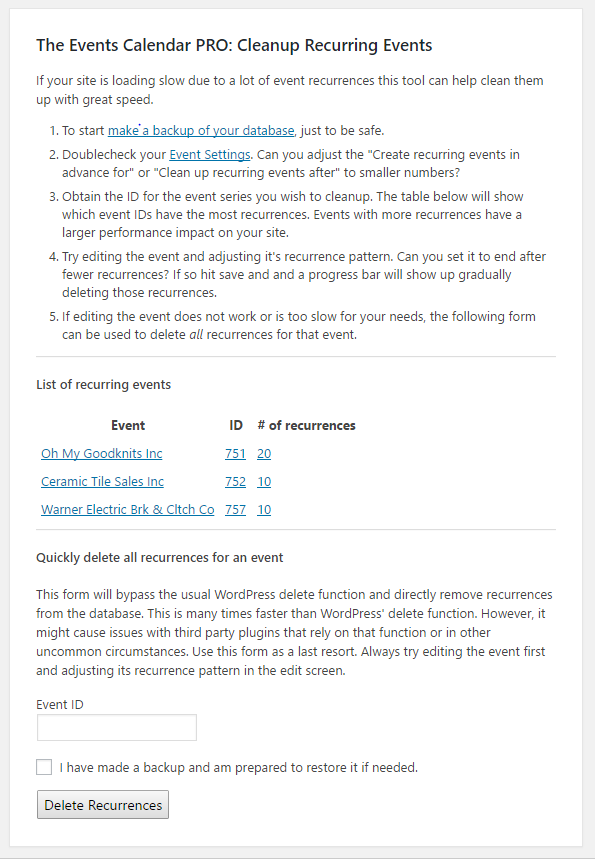
Does that work better?
Mind if I ask what events you are trying to delete this time? Is it a new one with a lot recurrences?
Cheers!
– Brook
October 27, 2016 at 11:05 am in reply to: Custom fieldsets in woocommerce confirmation email #1183941ParticipantThe plugin is close, Shaun. We encountered some issues with when the attendee tickets are generated. They are actually generated after the WooCommece New Order notification email, or at least before the items within that email are listed. The problem with this is that we were hoping to list the attendee data next to each item in that email, rather than in the footer of that email.
So we are investigating work arounds. It’s possible we will just have to insert that data into the footer for now, much like the suggestion in the original topic. But hopefully I can find a better workaround.
– Brook
October 26, 2016 at 11:32 am in reply to: Using tribe_get_events On Main Calendar Page Recurring Events Issue #1183332ParticipantHowdy Glen,
I would love to help you with this as best as we’re able. We can only provide so much support for customizations like this, but we love to point you in the right direction as best we can.
I think you will want to unhook the Tribe__Events__Pro__Main:->setup_hide_recurrence_in_query() method from ‘tribe_events_pre_get_posts’, and hook your own custom version back on to that action. Something like this should unhook it:
remove_action( 'tribe_events_pre_get_posts', array( Tribe__Events__Pro__Main::instance(), 'setup_hide_recurrence_in_query' ) );
From there I would copy the contents of that method into your own custom function:
function glens_setup_hide_recurrence_in_query( $query ) {

   if ( ! isset( $query->query_vars['is_tribe_widget'] ) || ! $query->query_vars['is_tribe_widget'] ){
      // don't hide any recurrences on the all recurrences view
      if ( tribe_is_showing_all() || tribe_is_week() || tribe_is_month() || tribe_is_day() ) {
         return $query;
      }
   }

   // don't hide any recurrences in the admin
   if ( is_admin() && ! ( defined( 'DOING_AJAX' ) && DOING_AJAX ) ) {
      return $query;
   }

   // don't override an explicitly passed value
   if ( isset( $query->query_vars['tribeHideRecurrence'] ) ) {
      return $query;
   }

   // if the admin option is set to hide recurrences, or the user option is set
   if ( Tribe__Events__Pro__Main::instance()->should_hide_recurrence( $query ) ) {
      $query->query_vars['tribeHideRecurrence'] = 1;
   }

   return $query;
}
And then add that as an action to ‘tribe_events_pre_get_posts’. At this point the behavior should be identical, but now your custom function is that one that decides when to filter the query.You could add an extra condition to this to choose not filter the query at times, such as when a custom query var that you have added is present.
Does that all make sense to you or your developer?
Cheers!
– Brook
ParticipantHowdy Salle,
That is definitely possible! Just insert this into your theme’s functions.php file:
https://gist.github.com/elimn/a7dcd0a63815db583c1e
Then change this line:
//tribe_et_move_tickets_purchase_form( 'tribe_events_single_event_before_the_content' );To this:
tribe_et_move_tickets_purchase_form( 'tribe_events_single_event_before_the_content' );Does that all make sense? Will that work for you? Please let me know.
Cheers!
– Brook
October 26, 2016 at 9:41 am in reply to: My site is running very slow + slow to edit events in dashboard #1183273ParticipantThis reply is private.
ParticipantHowdy Craig,
I’d love to pickup where you left off before.
Could you try inserting this snippet, and only this snippet, back into your theme?
/**

 * Force a recalculation of the known date range.

 * Remove after repair is completed.

 */

function repair_known_date_ranges() {

    Tribe__Events__Dates__Known_Range::instance()->rebuild_known_range();

}
add_action( 'init', 'repair_known_date_ranges' );
That should have the same effect as going back and clicking Save. But the other snippet, which you were running at the same time, could override this one and cause strange behavior. Does running just that snippet work?
If not I have to ask, how are you adding events? I notice you have a post duplicator plugin, along with some other import plugins. If you have ever used this for events it could very well be the source of the “bug”, or conflict. The issue you are facing is not typical. Only in very nonstandard environments have we seen this crop up, and it is usually the result of another plugin altering The Events Calendar data. If we know the plugin causing the conflict then it can become possible to isolate things down and maybe craft a compatibility path. It’s not really fixing a “bug” per se. But if we don’t know the other plugin it’s basically impossible to craft a fix without resorting to brute force solutions like the above snippet.
Does that all make sense?
Cheers!
– Brook
-
AuthorPosts