

Forum Replies Created
-
AuthorPosts
-
Brook
ParticipantNo worries at all Oliver! I’ve been at the end of my tether with software lots of times too.
Brook, would the same apply to a manual CSV import, I would end up would duplicate events?
When a CSV is imported we have to make educated guesses on whether an event is a duplicate. Only when you change the title of an event in the CSV and reimport it will you possibly see a duplicate. It the title stays the same across multiple imports, you should never see duplicates. So no, I do not think you will experience this problem with CSVs.
Let me know if you have any more questions.
Cheers!
– Brook
ParticipantThanks again for sharing the feed. That really helped speed up the investigation.
Your calendar is doing the same thing Outlook does. In technical terms it is generating a new Unique ID (UID) each time the calendar is loaded. In the iCal format UIDs are intended to uniquely identify an event. Two events could share the same date, time, and every other piece of information but the ID should always be unique. When an event is updated, it should keep it’s unique ID, because that ID is the only way to accurately identify any event. But your calendar is generating a new UID for every event each time the page is loaded. It is expressly stating that these are all brand new events and should not update existing ones. So, Event Aggregator does as its told and creates new ones.
What program or script are you using to generate this iCal feed? Is there a new version of it perhaps that fixes this bug?
Cheers!
– Brook
ParticipantThis reply is private.
ParticipantThis reply is private.
ParticipantThat makes sense now. When I saw that was outputting a purchaser email I was thinking that’s what you were after, but on second thought obviously you want the attendee email. In that case making a public version of the other function would be the easiest route.
– Brook
ParticipantNo worries there. Our topics stay open for 3 weeks after the last reply, so you’ve got plenty of time. Just let me know when I can be of help.
Cheers!
– Brook
ParticipantYes I need to be able to access that function which returns an array for excel output.
I can just filter the list with that listingIn that case you could copy/paste the logic in Tribe__Tickets__Tickets_Handler.php->generate_filtered_attendees_list() into a new function. It references a few $this variables, but you could copy the contents of those to inside the new function and reference them instead. Then you could output it in the excel format if that is your preference.
This might not be necessary though if all you care about is the attendee data. Tribe__Tickets__Tickets::get_event_attendees() outputs the same data, it’s just not formatted for Excel/CSV. Rather it’s formatted for use within PHP scripts. From what I am gathering from your first post you are not trying to output this for Excel, rather you are just using this to power your Add Member bar. In which case I would just use from Tribe__Tickets__Tickets::get_event_attendees() and not worry about making a public version of the other function.
Totally up to your preference, you’re familiar with your goals better than I am.
I will be looking into ajaxing the add to cart part of the plugin.
That’s a cool idea. It would certainly work around the refresh bug.
Cheers!
– Brook
ParticipantExcellent news that this is what you need! Let’s just get it working on your site.
You will need to be on the latest 4.3.1+ versions of the plugins. Are all Tribe plugins that version or greater? Do you have any other snippets, extensions, or plugins that alter the emails sent out? If so could you disable those?
If the above does not help would you mind grabbing your system information and pasting it here? Make sure to use the ‘Set as private reply’ checkbox to protect your private information from the public. You can find the system info by going to WP Admin > Events > Settings, clicking on the “Help” tab, and scrolling down to the ‘System Information’ box. (Or by going to [yoursite]/wp-admin/edit.php?post_type=tribe_events&page=tribe-events-calendar&tab=help) That will give me a lot of extra information to help diagnose the problem.
Cheers!
– Brook
November 2, 2016 at 10:15 am in reply to: Using tribe_get_events On Main Calendar Page Recurring Events Issue #1186460ParticipantYou are very welcome Glen! Glad to be of help. Thanks for getting back.
– Brook
ParticipantHowdy again Thomas,
Updates are on their way. We have a batch of them going out today. Some of these we might even be able to fix on our servers, so no updates will be issued to the plugin in that case but the problems will go away.
If you are in a hurry to alleviate the symptoms, do not forget about the option of using Facebook Events in the mean time. While I hate to recommend downgrading, for people affected by the highest impact issues like yourself it just makes sense.
Cheers!
– Brook
ParticipantI am very sorry slny, this topic had a mismarked status indicating it had already received a response. My mistake!
Since I hooked into the CSV output array filter to Format the different forms into the same output columns, I really want to be able to access the CSV output before it gets put into a file stream, so I can just read that array and do a match and remove for all email that are already in the system.
Hooking into the filter ‘tribe_events_tickets_attendees_csv_export_columns’ is a great way to accomplish this. It sounds like that’s what you’ve already done, so you should be good on this front. The only thing remaining is to get you the attendee list elsewhere.
bottom line is I need some way to return me an array of existing attendee email so I can filter output of search as you type function to exclude those who have already brought their tickets from buying another.
It sounds to me like all you need is the public static function:
Tribe__Tickets__Tickets::get_event_attendees()This will generate a list of attendees, and from there you would have the data you need to filter with. Does that look right to you?
– back button -> shows tickets forms again but all empty
This behavior often varies from browser to browser. Personally I have never seen an HTML spec indicating what DOM state the browser should be in when the back button is pressed. Which would be a good reason for the behavior to vary.
– refresh button -> form post resubmits to cart
That sounds like a bug. I see that it’s been logged a few days back, so it’s one we plan to address. To be up front I would not be surprised if it takes a while to fix that though. Users to rarely press the refresh button, it is unlikely to impact the extreme majority of sites. Plus a lot of browsers warn you when resbumitting data like that, indicating that unexpected behavior might happen. Thus this would naturally be a lower priority bug then one that impacts more users.
Please let me know if you have any more questions. Cheers!
– Brook
November 1, 2016 at 8:55 am in reply to: Update v3.5 -> v4.3.1 has broken currency and paid event saving #1185815ParticipantHowdy Ian,
I would love to help you with this. I am happy to hear you’ve upgraded.
(1) Currency
The currency has switched to the default $ instead of £
Last time our developers looked into this it was no longer possible with the new Eventbrite API to set the currency. However I just asked our primary Eventbrite developer if he would not mind checking again, to see if there have been any changes.
I’ll get back to you when he gets back to me.
(2) Making Paid events Live.
We are now not able to make live paid events because it complains of the PayPal address missing.
Error message:
We were unable to sync your event to Eventbrite. Here’s what happened:
This event has no PayPal payment emailTypically the Organizer Email should be the one that would get the PayPal payment. Is the organizer for the event you’re adding also your paypal address? Or is that email field perhaps blank?
Cheers!
– Brook
November 1, 2016 at 7:47 am in reply to: Custom fieldsets in woocommerce confirmation email #1185757ParticipantHowdy Danielle,
There are plans to modify the cart page to an extent. Primarily we are interested in giving people the ability to edit their attendee info right from the cart. That will be an upcoming feature released as part of Event Tickets Plus. I am not certain how it will look just yet. The cart page of Woo purposefully has less info than the other pages, and so the full order details might be inside of a link we add to that page, a popup, or some other format that does not conflict with Woo.
I am very happy to hear you got that working Chloe! This extension is a newer version of the one you mentioned, so you would not want to run both simultaneously.
Thanks for the feedback guys!
– Brook
ParticipantThank you for sharing the URL in your screenshot! All of those pages start to look the same when you scroll down.
I do have a free addon which modifies that page, and everywhere else the order details are shown. Here is a good before and after shot of its changes to the order table in your screenshot:
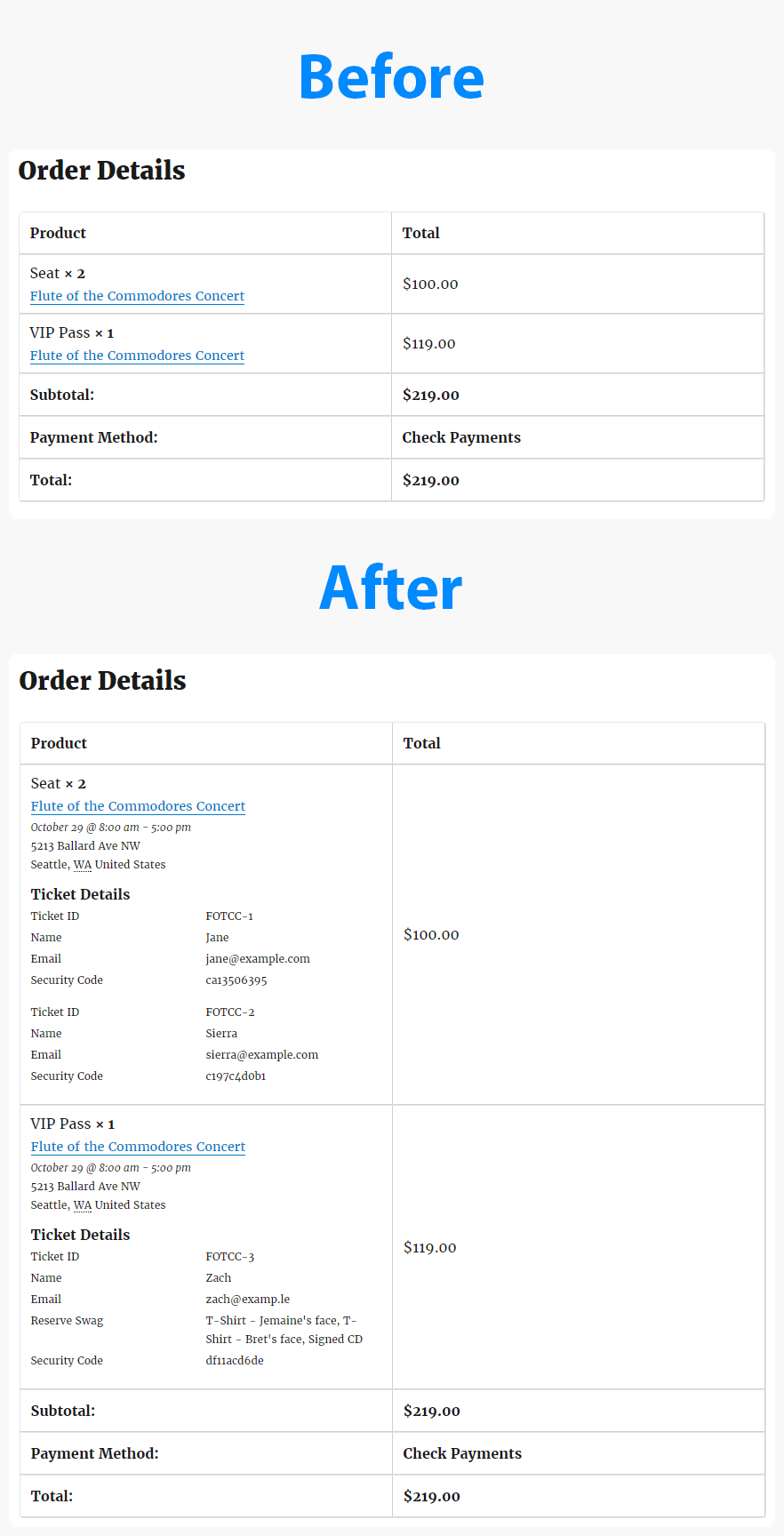
Is that what you are looking for? If so you can download, install, and activate this miniature plugin: tribe-ext-tickets-email-options-0-3-0 Once that’s installed you will notice three new options in WP-Admin > Events > Settings > Tickets. Check the option “WooCommerce Emails: Add Event Information”. This will add the information to every page which shows the full order details, including the one from your screenshot and many of the emails WooCommerce sends out when an order is received.
Is that what you are looking for?
Cheers!
– Brook
October 30, 2016 at 1:46 pm in reply to: Custom fieldsets in woocommerce confirmation email #1185094ParticipantYou are very welcome Danielle! I am happy to hear it helped.
– Brook
-
AuthorPosts