

Forum Replies Created
-
AuthorPosts
-
Brook
ParticipantHowdy Craig,
That is exceptionally odd! It’s hard to understand how that snippet doesn’t work but saving a post does.
You have an interesting idea for a workaround. But I don’t really see a good way of implementing that workaround. I think the only other option on the table would be to disable the known date range entirely, and just have it always show next/prev links regardless of whether there are future or past events.
https://theeventscalendar.com/knowledgebase/add-nextprevious-links/
A lot of customers do that anyways, just because they find the disappearing links to not be intuitive. We are actually trying to work on making them more intuitive, but in the mean time always showing the links is a valid option and it would work for this circumstance.
Does that all make sense? Please let me know.
Cheers!
– Brook
November 16, 2016 at 10:01 am in reply to: Can I connect venues to organizers like they are to events? #1193323ParticipantHowdy Emil,
I would love to assist here. Thanks for clearly outlining your goals and why you are trying to accomplish this.
You certainly could link the two together, but it’s going to require a decent amount of dev work. At its simplest all you need to do is add a custom field, or “additional field”, to the organizer allowing you to specify a venue. I think the simplest route would be a custom field in this case.
If you want to have a fancy drop down to show all of the venues and let the user select one, checkout the class Tribe__Events__Linked_Posts__Chooser_Meta_Box to add that. Inside /the-events-calendar/src/admin-views/linked-post-section.php you can see how we implement that class to display both organizers and venues inside a fancy drop down.
From there you have a field that links the two together. Now on the front end, inside the parametric search view or anywhere else, you can query this custom field and include any venue details you want in your queries and views.
And that’s how a developer could build such a feature. Does that all make sense to you or your developer? Do you have any followup questions?
Cheers!
– Brook
November 9, 2016 at 10:18 pm in reply to: Woo Event Ticket Cart – Separate Tickets / Show Attendee Meta #1190145ParticipantSo the first step I need is being able to read those data stored in the cookie?
If your code is running after that transient is generated, yes! That would be the ideal way of doing it.
– Brook
ParticipantHowdy Mauitime,
Cliff asked me to have a look at this given my familiarity with this portion of the code.
I am not sure why your recurrences are not running. WP Crons can be a bit finicky, they rely to an extent on the servers configuration. And not every server is consistent or even compatible with them.
Do you have a good way I can reliably force that to happen after the updates to test it out?
The easiest way to run that action would be to call the Tribe__Events__Pro__Recurrence__Scheduler->add_hooks() and then run the action Tribe__Events__Pro__Recurrence__Scheduler::CRON_HOOK like this code does:
$recurrence_scheduler = Tribe__Events__Pro__Recurrence__Meta::$scheduler;

if ( is_a( $recurrence_scheduler, 'Tribe__Events__Pro__Recurrence__Scheduler' ) ) {
   $recurrence_scheduler->add_hooks();
   do_action( Tribe__Events__Pro__Recurrence__Scheduler::CRON_HOOK );
}
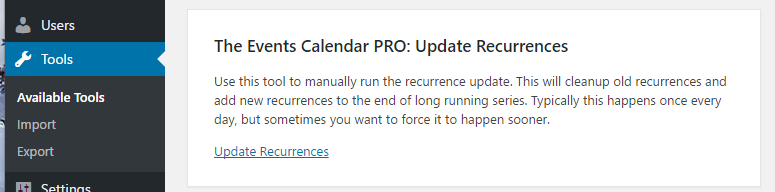
I wrote a small extension/tool that packages the above into a lovely UI. If you download, install and activate this plugin you will find a new tool in WP Admin > Tools > Available Tools: tribe-ext-recurrence-update-0-1-0
That tool will have this UI. Just click the button to force an update.
Did that do the trick or are you still having issues? If you’re still having issues, do you have a staging server setup that we could login to? We would not change any settings or anything while logged in. But it could really help speed things up if we could examin the events settings. If this is something you’re interested in, please:
- Generate a new admin account for us and share the credentials in a private reply here.
- Point us to an event where the recurrences are not getting generated.
Cheers!
– Brook
ParticipantThis reply is private.
ParticipantWell that’s odd! Could you link me to the cours test event, so that I could try adding it to my cart and seeing the problem in action?
Cheers!
– Brook
ParticipantI’m assuming those features only work on the server that has the PRO license installed.
Not quite. Every feature of Pro, and all of our other premium plugins, will work as soon as you activate that plugin on your site. No license required. If you wish to get automatic updates for that plugin though, you must input a license.
Does that make sense now?
Cheers!
– Brook
November 9, 2016 at 1:06 pm in reply to: Woo Event Ticket Cart – Separate Tickets / Show Attendee Meta #1189919ParticipantHello again slny311,
Geoff asked me to chime in here since I have done a decent amount of work surrounding Attendee Meta.
When a customer order advances beyond the pending payment phase Event Tickets Plus generates a WP Post for each attendee. For WooCommerce attendees this post has the post type: tribe_wooticket The ID of this post is the “qr_ticket_id” that is referred to in the above code. Since this will not get generated until after the cart has submitted its data and progressed further along the purchasing process, this post will not exist and won’t be useful to you inside the cart page.
The meta data itself gets submitted to the cart page inside the $_POST[‘tribe-tickets-meta’] key. So you could read it from there. If the order progresses Woo will store this meta data along with any other Woo meta data in the wp_woocommerce_order_itemmeta table. So you can read/alter it in there until such time as the payment processing phase and the tribe_wooticket post gets created. At that point the data will be stored in the tribe_wooticket post meta and can be queried using the code Geoff shared.
It just feels like bad user experience having them remove all the tickets if they entered something wrong and wants to make changes to 1 of the ticket.
I completely agree. We have been discussing some possible options to address this. If you would like to vote on this issue please checkout this feature request/user story. Currently my preferred solution would be to mimic how Woo product variations, and split each ticket up into its own item in the cart complete with the details (meta info) attached to it. This will take a little bit of time to implement, but I think it would be pretty slick.
Please let us know if you have any further questions. We do want to help as much as we can with customizations like this, but of course when it comes providing/inspecting code we have to leave a certain amount of exploration up to you or your developer. Cheers!
– Brook
ParticipantThis reply is private.
ParticipantHowdy Oliver,
Thanks for getting back!
I was worried that you might get a response like that. The spec is not overly verbose in this area, and so it can be relatively easy to miss some key words causing implementations like that of your iCal feed. But to be sure that is not a correct implementation of the spec, and unfortunately when someone implements it that way there is nothing we can do to consistently work around it. If there was a work around that did not involve innaccurate guessing, we would love to use that instead and account for even broken implementation of iCal. So yes, for now CSV import would be the only option.
We have been building calendar software for nearly a decade now and are pretty versed on such matters. We would be happy to discuss this further with the authors of that software if it will help you out. You could provide us with their email, or provide them with ours:

If you are interested in hearing a technical response to that developer, here it is:
It is easy to see how you might come to the conclusion that the spec is calling for a generated timestamp, and that thus it would change each time the feed is served. But I would ask that you review the relevant section of the spec. As noted at the outset of it:
Purpose: This property defines the persistent, globally unique identifier for the calendar component.
Of course the nature of persistent IDs is that they do not change. If the ID were altered every single time the iCal file is viewed it would be the exact opposite of persistent.
It is also worth noting the full description text. I will bold a few relevant lines for further discussion:
Description: The “UID” itself MUST be a globally unique identifier. The generator of the identifier MUST guarantee that the identifier is unique. There are several algorithms that can be used to accomplish this. A good method to assure uniqueness is to put the domain name or a domain literal IP address of the host on which the identifier was created on the right-hand side of an “@”, and on the left-hand side, put a combination of the current calendar date and time of day (i.e., formatted in as a DATE-TIME value) along with some other currently unique (perhaps sequential) identifier available on the system (for example, a process id number). Using a DATE-TIME value on the left-hand side and a domain name or domain literal on the right-hand side makes it possible to guarantee uniqueness since no two hosts should be using the same domain name or IP address at the same time. Though other algorithms will work, it is RECOMMENDED that the right-hand side contain some domain identifier (either of the host itself or otherwise) such that the generator of the message identifier can guarantee the uniqueness of the left-hand side within the scope of that domain.
This is the method for correlating scheduling messages with the referenced “VEVENT”, “VTODO”, or “VJOURNAL” calendar component.
The full range of calendar components specified by a recurrence set is referenced by referring to just the “UID” property value corresponding to the calendar component. The “RECURRENCE-ID” property allows the reference to an individual instance within the recurrence set.This property is an important method for group-scheduling applications to match requests with later replies, modifications, or deletion requests. Calendaring and scheduling applications MUST generate this property in “VEVENT”, “VTODO”, and “VJOURNAL” calendar components to assure interoperability with other group- scheduling applications. This identifier is created by the calendar system that generates an iCalendar object.
Implementations MUST be able to receive and persist values of at least 255 octets for this property, but they MUST NOT truncate values in the middle of a UTF-8 multi-octet sequence.
It is clear that you have taken the optional “current calendar date and time of day” recommendation to mean the time the feed was viewed. I can completely understand that. The spec is a little ambiguous here in not specifying whether “current” means the time the event was first added to the feed, or the time the feed was viewed. Fortunately though the context of the rest of the spec helps clarify.
The nature of this property is to be persistent. It would be impossible for it to be persistent if the view time was used. Further the spec clarifies that this field is to be used in matching modification and deletion requests. If the ID is constantly changing, if it even changes once, it can not be used for matching. Indeed if it constantly changes, what would the purpose of this field even be?
Some further reading:
- http://stackoverflow.com/questions/25968483/ics-icalendar-uid-purpose-and-use
- https://en.wikipedia.org/wiki/ICalendar#Events_.28VEVENT.29
Please let me know if you have any questions. Cheers!
– Brook
ParticipantYeah that did not make it into the last round of updates. With each of these issues we will let you know when they do get fixed. Someone, will be tasked with notifying each affected user in the thread where it was reported. So you will get a response here letting you know what issues were fixed when an update is released.
Thanks again for your patience.
-Brook
ParticipantThanks for the feedback. I only just realized that the event title from my screenshot does not get added unless Community Tickets is present. Here is an updated version that will add the event title regardless of whether Community Tickets is installed:
tribe-ext-tickets-email-options-0-4-1
Does that add the title for you?
Cheers!
– Brook
November 6, 2016 at 7:52 am in reply to: Attendee Info not showing up in Tickets Email after update to Version 4.2.7 #1188373ParticipantHowdy Paul,
In addition to what George said you might deactivate the above plugin, or at least disable its attendee meta setting. Or else you might get two attendee meta sections in your outgoing emails.
Cheers!
– Brook
ParticipantThanks Alexander!
Yeah two of the plugins you are running are likely culprits for a conflict:
- TEC Addon: Display order details on WooCommerce version 0.1.1 by Gustavo Bordoni(http://bordoni.me)
- Event Tickets: Additional Email Options version 2016-07-07 Beta by Modern Tribe, Inc.(http://m.tri.be/1x)
In particular the last one should not be run alongside the extension I shared above. They are the same plugin, but the one you currently have installed is the beta version. You will need to disabled this plugin to install the newer version of it.
The first one might also cause issues, but is less likely to.
Does that all make sense?
Cheers!
– Brook
ParticipantThat’s good to hear. Thanks for sharing the result!
– Brook
-
AuthorPosts