
Home › Forums › Calendar Products › Events Calendar PRO › Recurring Events stopped being calculated
- This topic has 8 replies, 5 voices, and was last updated 9 years, 11 months ago by
Jen Russo.
-
AuthorPosts
-
November 9, 2016 at 1:11 pm #1189927
Jen Russo
ParticipantI am not sure when but my recurring events stopped calculating out into the future.
I am having a hard time testing this. Although I deactivated all the plugins and tried a different theme I think I was having a problem launching the tribe-recurrence-cron properly. I able to hack the code a little and manually get the events to calculate (by calling Tribe__Events__Pro__Recurrence__Meta::save_pending_events( $post_id ) for each event) but I was getting problems in that when I was trying to manually run the cron Scheduler wasn’t getting properly initialized which meant that this line was failing in Recurrence/Meta.php
self::$scheduler->get_latest_date()
as well as $this->latest_date not working properly and coming back blank in
Tribe__Events__Pro__Recurrence__SchedulerI am not sure if that’s what’s happening when the cron runs normally or not.
How can I properly, repeatably test the tribe-recurrence-cron?
November 9, 2016 at 2:13 pm #1189960Cliff
MemberHi mauitime (cool name).
Sorry you’re having this issue. It’s not something we’ve seen other users report, which typically means it’s an issue just on your site.
From your system information report, it looks like you’re not using the latest versions available, which is probably the issue here. Could you please make sure all your Modern Tribe plugins (and WordPress core) are at their latest versions?
- Downloads / Version Numbers
- License Keys
- TEC Automatic Updates
- or TEC Manual Updates
- WordPress core updates
Once you verify you’re on the latest versions, please test to see if the issue is still happening for you.
If that doesn’t do it…
It sounds like you followed our Testing for Conflicts Guide (basically switch to Twenty Sixteen theme and deactivate all plugins and custom code other than Modern Tribe plugins) to see if that helps narrow down the cause of this. I’d do this again after you’re on all the latest versions.
I’d also suggest enabling WP_DEBUG and WP_DEBUG_LOG and share any debug messages you see while creating a recurring event, editing an existing recurring event, navigating your site’s home page, events page, single-event pages, and any other of your site’s pages relevant to this ticket.
You might also be interested in a plugin like WP Crontrol or WP Cron Status Checker (third-party, not guaranteed or supported by us).
Referencing the information at https://www.godaddy.com/community/Managing-WordPress/Wordpress-Wp-cron-editing/td-p/7043#lineardisplaymessageviewwrapper_1 might also be helpful.
I hope you’re able to figure it out soon. 🙂
November 9, 2016 at 3:16 pm #1190005ParticipantThe problem I am having is that recurring events are not getting calculated. This happens in a cron once a day. Do you have a good way I can reliably force that to happen after the updates to test it out? I need these to be calculated now, not hopefully tonight. How do I force a recurring event calculation to happen right now.
November 9, 2016 at 10:06 pm #1190135Brook
ParticipantHowdy Mauitime,
Cliff asked me to have a look at this given my familiarity with this portion of the code.
I am not sure why your recurrences are not running. WP Crons can be a bit finicky, they rely to an extent on the servers configuration. And not every server is consistent or even compatible with them.
Do you have a good way I can reliably force that to happen after the updates to test it out?
The easiest way to run that action would be to call the Tribe__Events__Pro__Recurrence__Scheduler->add_hooks() and then run the action Tribe__Events__Pro__Recurrence__Scheduler::CRON_HOOK like this code does:
$recurrence_scheduler = Tribe__Events__Pro__Recurrence__Meta::$scheduler;

if ( is_a( $recurrence_scheduler, 'Tribe__Events__Pro__Recurrence__Scheduler' ) ) {
   $recurrence_scheduler->add_hooks();
   do_action( Tribe__Events__Pro__Recurrence__Scheduler::CRON_HOOK );
}
I wrote a small extension/tool that packages the above into a lovely UI. If you download, install and activate this plugin you will find a new tool in WP Admin > Tools > Available Tools: tribe-ext-recurrence-update-0-1-0
That tool will have this UI. Just click the button to force an update.
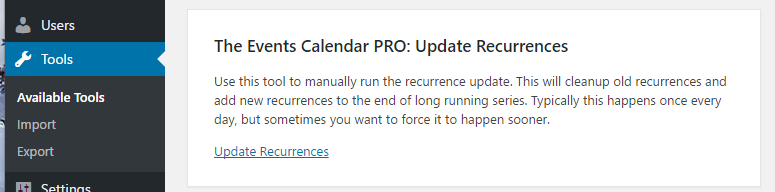
Did that do the trick or are you still having issues? If you’re still having issues, do you have a staging server setup that we could login to? We would not change any settings or anything while logged in. But it could really help speed things up if we could examin the events settings. If this is something you’re interested in, please:
- Generate a new admin account for us and share the credentials in a private reply here.
- Point us to an event where the recurrences are not getting generated.
Cheers!
– Brook
November 9, 2016 at 10:08 pm #1190138ParticipantI tracked down some more information. When the cron runs to calculate recurring events, it can technically time out before getting all the events figured out. It doesn’t look like the code is properly picking up on htis fact and restarting in the middle. Am I seeing that correctly? I manually ran the cron many times and eventually I got through all the events and now everything is calculated as expected. I can handle a little variation day by day since I’m calculating a month out but something went wrong somewhere, possibly because I had old code, and I ran out of future events. Is there any way around this problem? Did I just have a bad version of the code?
November 10, 2016 at 1:48 pm #1190634MemberAs Brook shared, there are a lot of moving pieces with an issue like this.
By default, the cron batches 100 so it’s possible it isn’t making its way through the batch and is going back to square one.
Therefore, let’s have you try this code snippet:
add_filter( 'tribe_events_pro_recurrence_batch_size', function() { return 20; } );It should cause the batch to be in 20 instead of 100 — obviously much smaller and therefore may take longer to complete but hopefully won’t timeout.
Please let me know if this has any noticeable effect for you over the next few days.
Thank you!
November 10, 2016 at 7:15 pm #1190703MemberUpon further digging, that code snippet won’t affect your particular situation.
This is a new snippet to make the recurrence happen more often than once per day:
https://gist.github.com/elimn/6220631c52527a406823c390f95cb93c
Let us know.
December 2, 2016 at 8:35 am #1200903Support Droid
KeymasterHey there! This thread has been pretty quiet for the last three weeks, so we’re going to go ahead and close it to avoid confusion with other topics. If you’re still looking for help with this, please do open a new thread, reference this one and we’d be more than happy to continue the conversation over there.
Thanks so much!
The Events Calendar Support Team -
AuthorPosts
- The topic ‘Recurring Events stopped being calculated’ is closed to new replies.