

Forum Replies Created
-
AuthorPosts
-
Brook
ParticipantHowdy Kimberly,
I see what you are referring to. That section of the page is actually not part of our stock calendar. It will be a part of your theme. But, I can make some guesses on how you could modify it.
If you have some WP Theming experience then I would search through your theme folder for “<!– Event meta –>”, which is the HTML comment for that section. You likely only have one comment in your files containing that, and whichever ones does i s the template you need to modify. From there you could check if tribe_is_community_edit_event_page() is true. If it is then you are on the Community page, and you can modify this section to show whatever you want.
If you don’t have WP Theming experience you might contact your theme author. They clearly create a The Events Calendar tie-in with there theme, but that tie-in does not look like its intended to work with Community Events. They might be interested in crafting a Community Event tie-in as well (which should be pretty easy). Or if neither of the above applies, I could walk you through how to hide that section.
Does that all make sense? Will one of those work for you? Please let me know.
Cheers!
– Brook
ParticipantHowdy Todd,
I would love to help you with this. I am not seeing that issue on your site. I am guessing you found a fix for it. Was the fix switching to excerpts in list view as opposed to full text? Are you trying to switch back to full text?
Ta!
- Brook
ParticipantHowdy Todd,
I would love to help you with this. I am not seeing that issue on your site. I am guessing you found a fix for it. Was the fix switching to excerpts in list view as opposed to full text? Are you trying to switch back to full text?
Ta!
- Brook
ParticipantHowdy Karly,
It sounds like this is what you’re looking for:
.tribe-this-week-widget-day-wrap .tribe-this-week-event:first-child {
border-top: none;
margin-top: none;
}
That work?
Cheers!
– Brook
January 11, 2016 at 11:10 pm in reply to: Find Out More per event & Continued Reading for last event #1054322ParticipantThanks for getting back. Happy you were able to find the source of this. Let us know if we can be of help in the future.
I am going to archive this topic since it’s resolved.
Cheers!
– Brook
January 11, 2016 at 10:25 pm in reply to: Update doesn't fix missing Time and Date in Details Section #1054309ParticipantWow Kurt, thanks for sharing every step you’ve tried. Sorry this has been an intermittent pain, those are the hardest to troubleshoot. I’ll pass the info along to our developers. Thanks again!
- Brook
ParticipantThank you Sarah! That was very helpful.
I believe your server is timing our on import. It is quite possible your server logs have more detailed information.
The next step would be to contact your website host. Ask them if there is a timeout limit. If they aren’t forthcoming about this limit, ask how you can modify the php.ini settings. Often in the php.ini there a setting called “max_execution_time”. It seems likely that this is set to 30 on your server. In order to import such a large .ics file it will need to be much larger. You might even set it to 300 if your host allows. Then try the import.
If that option does not work, you might export the .ics file from Google calendar in smaller increments. Sometimes people categorize their events and export a category at a time. Or a different more powerful webhost that would be capable of mass imports. First step though would be to contact the current one, typically they allow you to adjust the timeout settings.
Does that all make sense? Will that work for you? Please let me know.
Cheers!
- Brook
January 11, 2016 at 10:12 pm in reply to: Event Calendar Pro – CSV Import – Event End Date Incorrect #1054300ParticipantHowdy Jessica,
Thanks for sharing the link! I tried that CSS file. When I imported it the dates were all correct. Here are the settings I used:
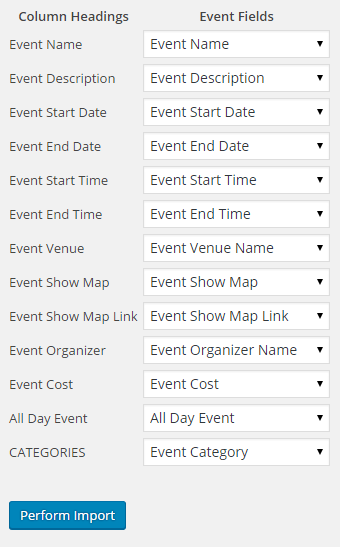
I am sure you have double checked your settings, but can you check one more time? I know from experience that it is easy to accidentally set the end date to the end time by accident, which can have strange and unpredictable results.
Do your settings match those above? If so, would you mind sharing your full system info? Make sure to use the ‘Set as private reply’ checkbox to protect your private information from the public. You can find the system info by going to WP Admin > Events > Settings, clicking on the “Help” tab, and scrolling down to the ‘System Information’ box. (Or by going to [yoursite]/wp-admin/edit.php?post_type=tribe_events&page=tribe-events-calendar&tab=help) That will give me a lot of extra information to help diagnose the problem. IN particular I am wondering if your Timezone settings might be affect this somehow.
Cheers!
– Brook
ParticipantYou’re very welcome. Let us know if there’s anything else we can do in the mean time.
Since you marked this resolved I am going to archive it. Cheers!
– Brook
January 11, 2016 at 3:24 pm in reply to: Search term is cleared when Next Page link is clicked #1054199ParticipantThank you for sharing the link and everything. I stumbled across something that might be related. Our plugin generates the Next/Prev Events links in the HTML, then it updates their hrefs with JS. The link in the HTML will drop the search term, the link provided via JS preserves it. This is likely related to our problem here. Something in the Enfold preloader and transitions is likely causing this JS to not run.
A feature we have planned but not scheduled is to remove those links reliance on JS. When that happens this conflict will likely be fixed for good. In the mean time I see your site is working again. I take it you must have disabled page transitions. Is that going to be a workable solution for now?
- Brook
ParticipantThank you Karly. I appreciate you’re patiently working with me through this. I wish our ending was a bit more fruitful.
Cheers!
– Brook
ParticipantIt seems like the importer should allow you to import all of the data associated with the event.
Our product strategist/leader definitely agrees there. Which is what I mean when I said “we have a few more planned improvements”. We would like to be able to import as many things as reasonably possible via CSV. Some things likely won’t be importable, like recurring event patterns. But many more fields will be and I think multiple organizers is a strong candidate. These improvements are tentatively slotted for version 4.2 of our plugin. We are working on 4.1 right now and its due out in a month or two.
If you’re not happy with the plugin let us know. I dislike manual entry as well. We do offer a 30 day refund window if you’re unsatisfied. I’d hate to see you go, but certainly don’t want you to keep something you don’t want either.
Cheers!
– Brook
ParticipantMy bad! Here it is:
https://gist.github.com/elimn/13b32fb7763826df78d2
Did you already try reimporting the deleted events? If so and that didn’t work, then I’d try the steps I outlined using that snippet.
Let me know how I can be of help. Cheers!
– Brook
ParticipantHowdy Sam,
Near as I can tell that is not the Genesis theme you are running. The licenses is different and there is no mention of Genesis in your main CSS file. The issue is definitely similar, but the cause looks to be different. Would you mind opening a new topic so we can better help you with this? The solution might be similar to Brians, in which a missing CSS class is causing the JS to not run on the target element. In the new topic could share a copy of your system information, and let us know whether or not you created the theme? If it’s a public theme could you share a link to it so we can inspect the PHP files?
Cheers!
– Brook
ParticipantThanks for marking the answer correct. I am going to archive this topic since it’s resolved.
Cheers!
– Brook
-
AuthorPosts