Forum Replies Created
-
AuthorPosts
-
Brian
MemberHello,
Sorry for the issues you are having.
Can you please try removing your license keys from your account on TheEventsCalendar.com and then reactivating them on your site to see if that resolves the issue.
To do that, login to your account and go to My Account > License Keys
Click “Disconnect now” next to all the urls and go to your site and add those license keys back.
Let me know how that works out for you.
Thanks
MemberGreat, glad it helps, I am going to go ahead and close this ticket, but if you need help on this or something else please post a new ticket.
Thanks!
Jesse, if those steps do not work for you please create your own ticket and reference this one and we can take it from there.
Thanks
MemberHi,
Sorry for the issues you are having. I can help troubleshoot this with you.
I tried to visit both links and both gave me a 404 error.
Is that the issue you are having?
Or is the page blank when you visit?
Let me know and if you can provide a link a private reply that will help.
Thanks
MemberThis reply is private.
MemberHi,
Thanks for using our plugins. I can help out here.
WooCommerce removed the Quantity Increment’s in 2.3
This plugin will add them back:
https://wordpress.org/plugins/woocommerce-quantity-increment/
Cheers
MemberHi,
Thanks for the interest in our plugins. I can answer your questions.
1. Can i sell for sectors or localities?
Tickets can only be created per event.
2. Pre sale configuration or it can manage with publish date?
I am not sure what you mean here you create tickets in events and have the ability to set a start and end sales date per ticket.
3. payment gateways managing the WooCommerce, right?
Correct, you can use any of the payment gateways you have in WooCommerce as the tickets are products.
4. Ticket sale limit for person for example two tickets for person
We do not have a feature to do this, but there are plugins such as this to help do that:
5. Setting tax and a cover service, aditional price?
This would be done by the eCommerce system and WooCommerce does have their basic system for free.
For more information please look over our new user primer to go over all the settings:
https://theeventscalendar.com/knowledgebase/new-user-primer-event-tickets/
Cheers
February 18, 2016 at 8:44 am in reply to: Add option to export month events to Google Calendar #1077016MemberHi,
Thanks for using our plugins. I can help out here.
We do not add the Google Calendar Export Link to the Month View or any multiple event views as it would not work.
The export link can only take one event at a time.
Let me know if you have any follow up questions.
Thanks
February 18, 2016 at 8:41 am in reply to: Fatal Error Code on Event Pages. I have up-to-date version of Events Cal Pro #1077007MemberHi,
Thanks for using the Events Calendar.
Here on the pre-sales forum, I’m afraid we do not provide technical support. I would ask that you take any technical support questions across to our wordpress.org forum – our staff scan it periodically and other community members may also be able to help out.
If you have purchased a plugin from us, please login and post in the premium forums for that plugin and we can help you out there:
https://theeventscalendar.com/support/forums/
Having said that:
The function giving the fatal error, tribe_events_single_event_meta() was deprecated 18 months ago in 3.6 and removed in 3.11.
To fix this you need to update your custom template themes/church-event/tribe-events/single-events.php in your theme.
You want to replace:
echo tribe_events_single_event_meta();with this function:
tribe_get_template_part( 'modules/meta' );Thanks again!
MemberHi,
Thanks for using the Events Calendar.
Here on the pre-sales forum, I’m afraid we do not provide technical support. I would ask that you take any technical support questions across to our wordpress.org forum – our staff scan it periodically and other community members may also be able to help out.
If you have purchased a plugin from us, please login and post in the premium forums for that plugin and we can help you out there:
https://theeventscalendar.com/support/forums/
Thanks again!
MemberHi,
Sorry for the issues you are having. I can help troubleshoot this with you.
Once you changed over to Payment Data Transfer (PDT) through PayPal does it work then?
From my troubleshooting in the past this helped other customers with this issue.
Look for this section: “Why don’t customers see the link to download their products after paying and getting redirected back to my website?”
At this link to verify you have it all setup:
https://docs.woothemes.com/document/paypal-standard/
Stripe does not seem to have this issue as we have no reports of for this or with any other Payment Processor. It only seems to be with Paypal on certain sites.
EDD would not have the issue as they do not have the order complete process that WooCommerce does.
Also, Are refunds processed through woocommerce synced with PayPal or in reverse.
I believe they are, but that is a WooCommerce setting and not something we control. Here is there article on it:
https://docs.woothemes.com/document/woocommerce-refunds/
Let me know about the PDT setup and if that helps or not.
Thanks
MemberHi,
Thanks for using our plugins. I can help out here.
We have this guide that might get you close to what you are looking for:
https://theeventscalendar.com/knowledgebase/horizontal-list-widget/
Unfortunately, that is about all we can provide for customizations and can only support features as shipped with the plugins.
I can try to help answer some questions to get you started, but not much more beyond that.
As for all the options for displaying events on the home page we have our widgets and shortcodes in Pro:
https://theeventscalendar.com/knowledgebase/pro-widget-shortcodes/
Thanks
February 18, 2016 at 8:12 am in reply to: Events on home page that looks like recent blog posts #1075131MemberHi,
Thanks for using our plugins. I can help out here.
We have this guide that might get you close to what you are looking for:
https://theeventscalendar.com/knowledgebase/horizontal-list-widget/
Unfortunately, that is about all we can provide for customizations and can only support features as shipped with the plugins.
I can try to help answer some questions to get you started, but not much more beyond that.
As for all the options for displaying events on the home page we have our widgets and shortcodes in Pro:
https://theeventscalendar.com/knowledgebase/pro-widget-shortcodes/
Thanks
MemberHi Dylan,
Thanks for the interest in our plugins. I can answer your questions.
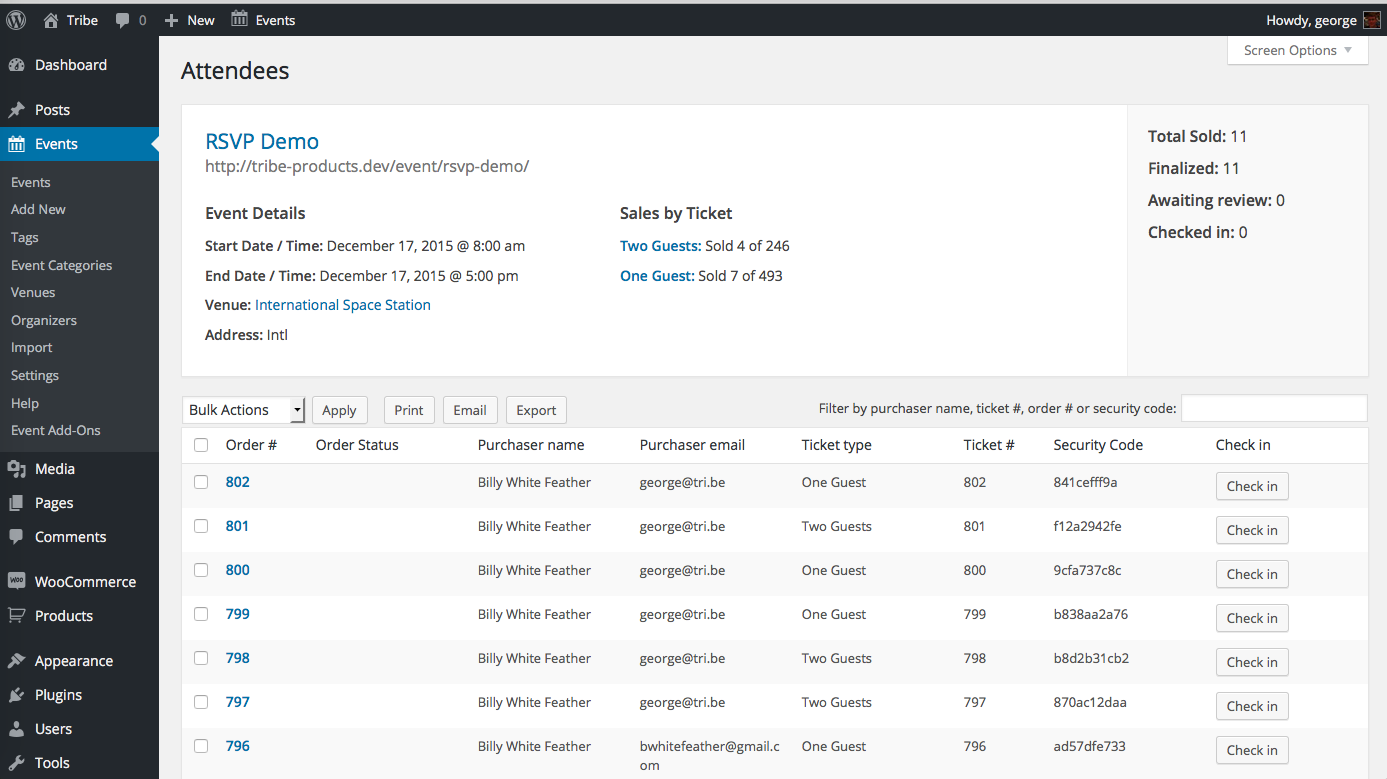
The information is the same as what is shown in the attendees list in this graphic:
https://theeventscalendar.com/content/uploads/2014/11/Screen-Shot-2015-12-02-at-2.11.49-PM.png
You can use the free version of Event Tickets and using the RSVP feature add attendees to an event and the exported list generated there is the same as Event Tickets Plus
If you have any further questions please create you own ticket and we can help out.
Cheers
MemberHi,
For the most part themes are responsible for adding in those classes and some like Genesis are removing them on purpose.
This filter should add it back:
add_filter( 'post_class', 'tribe_post_class_filter' );

function tribe_post_class_filter( $classes ) {

	if ( tribe_is_event() && is_single()  ) {

		$classes[] = 'hentry vevent';

	}

	return $classes;

}MemberGreat, glad it helps, I am going to go ahead and close this ticket, but if you need help on this or something else please post a new ticket.
Thanks!
-
AuthorPosts