
Home › Forums › Welcome! › Pre-Sales Questions › Pre Purchase Questions
- This topic has 4 replies, 2 voices, and was last updated 10 years, 7 months ago by
Support Droid.
-
AuthorPosts
-
February 16, 2016 at 8:24 pm #1074131
Zoe
GuestHey,
We currently use Tickera which has great features but is buggy as shit and the support is the worst ive ever experience. I know TEC does not have as many features, but Im looking for somehting that WORKS. Every week I’m dealing with my client who has continuous issues with tickera. NIGHTMARE. So have some pre purchase questions for you.
1. If using EC Pro and Tickets Pro, what control do you have over the emails customers get?
2. If someone purchases a ticket, they get a WooComm invoice, do they also get a TICKET?
3. What does a ticket look like?
4. Can you customise the ticket (tickera has ticket templates you can define per ticket/ per event)?
5. Do you have a check in app? (ie attendees bring tickets and you can scan to check in at door)?
6. Can you create manual orders for customers that are unable to book themselves?
7. Is there anyway to prompt use to complete a form? IE, can we customise thank you email to have a link to complete form? My client runs some events where she must gather additional information.Basically tickera has:
1. Custom forms per ticket / event type
2. Custom ticket templates per ticket (so you can design the tickets they are sent)
3. Check in AppHelp me convince the client that you are better!!!!!
PLEASE hahaZ
February 17, 2016 at 7:55 am #1074493Brian
MemberHi,
Thanks for the interest in our plugins. I can answer your questions.
Unforutnaly, we do not have any of these features beyond adding it through a customization:
1. Custom forms per ticket / event type
2. Custom ticket templates per ticket (so you can design the tickets they are sent)
3. Check in AppWe are working so custom data can be collected per ticket and hope to have that in the next release.
It is possible to edit the email templates, but we do not have a feature to assign them to different tickets.
It is possible to use QR codes to checkin through any QR App, but we do not have a dedicated one.
Let me know if you have any follow up questions.
Thanks
February 18, 2016 at 5:10 am #1074852Dylan
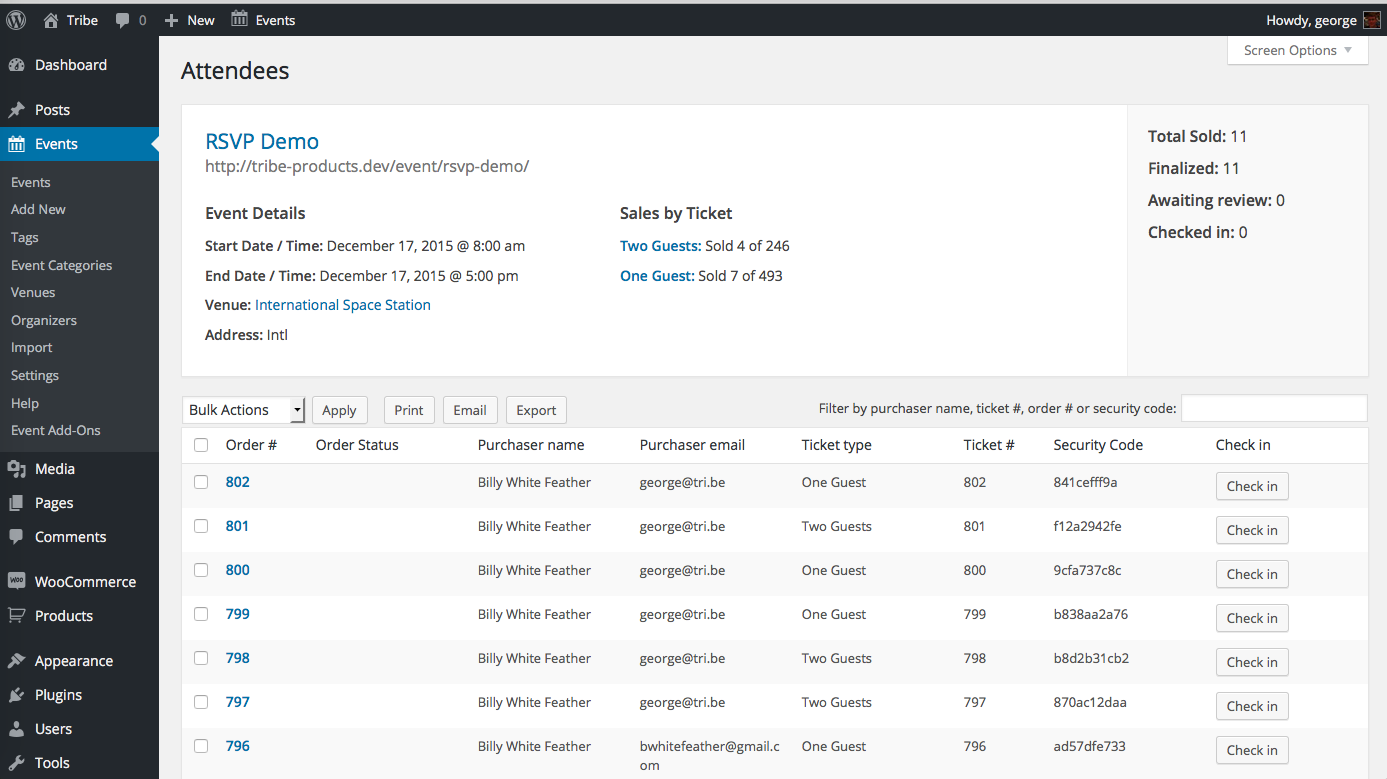
GuestI’m SO ready to get ETPro, but need you to send me a dummy example of the CSV Report (buyer list) the plugin generates. I need to be sure I can work with it before I but ETPro.
Thanks.
Dylan
February 18, 2016 at 8:04 am #1075125MemberHi Dylan,
Thanks for the interest in our plugins. I can answer your questions.
The information is the same as what is shown in the attendees list in this graphic:
https://theeventscalendar.com/content/uploads/2014/11/Screen-Shot-2015-12-02-at-2.11.49-PM.png
You can use the free version of Event Tickets and using the RSVP feature add attendees to an event and the exported list generated there is the same as Event Tickets Plus
If you have any further questions please create you own ticket and we can help out.
Cheers
March 4, 2016 at 8:35 am #1085235KeymasterThis topic has not been active for quite some time and will now be closed.
If you still need assistance please simply open a new topic (linking to this one if necessary)
and one of the team will be only too happy to help. -
AuthorPosts
- The topic ‘Pre Purchase Questions’ is closed to new replies.