

Forum Replies Created
-
AuthorPosts
-
Brian
MemberHi,
Thanks for using our plugins. I can help out here.
And sorry for the late reply here.
Do you have a link to where this is happening and I will take a look and come up with something to help.
Thanks for the feedback about messing up your changes on updates. It is something we are working on to prevent in the future.
Let me know.
Thanks
MemberFor this one:
You get a Green License Valid Message > I need to click “save changes” to have the License Valid Message.
That should automatically display a green message under the license field. If that is not displaying it sounds like there is a script conflict on the page.
Can you please follow our testing for conflicts guide:
And see if that can narrow down the cause of this and make it so you can save.
You can always manually update plugins too if you need to get them updated right away.
MemberHi,
Thanks for that. I took a look at your two sites and both of them are not finding the script that controls this in Month View.
Do you have any coding in place to disable ajax or any or out scripts?
March 1, 2016 at 4:42 pm in reply to: Issues with the "Tribe Bar" (the "view as" and "date" boxes) #1084107MemberGreat, glad it helps, I am going to go ahead and close this ticket, but if you need help on this or something else please post a new ticket.
Thanks!
MemberHi,
I am not seeing an application under those names.
Could you please resubmit and then let me know and I will verify it is in the system.
Thanks
MemberHi,
Thanks for using the Events Calendar.
Here on the pre-sales and translation forum, I’m afraid we do not provide technical support. I would ask that you take any technical support questions across to our wordpress.org forum – our staff scan it periodically and other community members may also be able to help out.
If you have purchased a plugin from us, please login and post in the premium forums for that plugin and we can help you out there:
https://theeventscalendar.com/support/forums/
Thanks again!
MemberHi,
Thanks for the interest in our plugins. I can answer your questions.
Personal is all you need to purchase for $89.00 to use on one site.
Cheers
MemberHi,
Sorry for the issues you are having. I can help troubleshoot this with you.
Do you have any default content options here:
Events > Settings > Default Content Tab
Does removing that stop the unnamed venue bug?
We are hoping to release 4.0.7 this week to fix this issue, but for now that would help stop it.
Let me know.
Thanks
MemberHi,
Sorry for the issues you are having. I can help troubleshoot this with you.
Can you confirm you created the tickets in an Event itself and let me know all the settings for the ticket from this image:
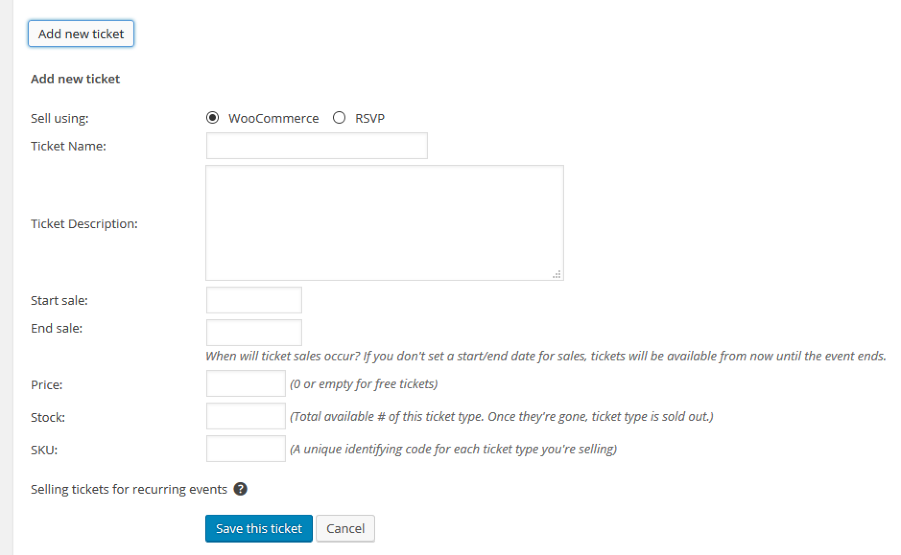
Let me know and we can go from here.
Thanks
March 1, 2016 at 8:06 am in reply to: Number of bought tickets reducing on all recurring events #1083869MemberHi,
Thanks for using our plugins. I can help out here.
Currently we do not support individual tickets for recurring events. So the behavior you are seeing is how the system currently works.
That is why we have warning messages on the Product Purchase page and on the ticket creation screen itself:
Selling tickets for recurring events?
Currently, Tickets will only show up on the frontend once per full event. For PRO users this means the same ticket will appear across all events in the series. Please configure your events accordingly.2. When I create a recurring event, is it possible in the admin panel to show this as one event? Currently it is showing every date the event is happening, at that creates a lot of chaos.
You can use the Advanced Post Manager to hiding recurring instances and clean up the admin event list:
As for the 3rd point it relates to the first, we do not support individual tickets for individual recurring events so there is not feature for this. The only way to get this to work with the current coding is to create the recurring series then go back and individually edit each recurring event.
It is something we are hoping to support in one of the next major releases after 4.1, but I do not have a timeline when it might be out.
Let me know if you have any follow up questions.
Thanks
MemberHi,
Sorry for the issues you are having. I can help troubleshoot this with you.
I am not clear what the issue is for you.
Can you provide some more steps on what is happening and I can help get this resolved.
Thanks
MemberHi,
Thanks for the interest in our plugins. I can answer your questions.
WE do not have any geolocation feature as you are looking for, it could be possible with a customization, but not something we support.
If you think that is something you would like as a feature I encourage you to visit our User Voice Page and either upvote an existing request or make a new request there.
As for filtering we do have the Filter Bar, which enables you to filter by a category out of the box. The Filter Bar is not included in Pro and is a separate purchase.
Let me know if you have any follow up questions.
Thanks
MemberHi,
Thanks for the interest in our plugins. I can answer your questions.
The plugin does create a Category View for each Event Category with the main views of month, list, map, etc…
For example if you have an event category of Lettuce the url is this:
yoursite.com/events/category/lettuce/
So you could have you main event views show all the events and then link to a category view and show the map view there.
Let me know if you have any follow up questions.
Thanks
MemberHi,
Sorry for the issues you are having. I can help troubleshoot this with you.
Many times the issue is saving before a valid message is shown, so the key saves, but it is not saving that it is valid.
Can you please confirm you are following all these steps:
Visit License Tab
Enter License Key
You get a Green License Valid Message
After you get the message you are then clicking “Save Changes”
Then you get a “License key(s) updated.” message near the top of the page.Also you can can always download the latest version from your account here on theeventscalendar.com and use this guide for manual updates:
Let me know if it is not working after following those steps and we can do some troubleshooting steps next.
Thanks
March 1, 2016 at 7:31 am in reply to: Default Calendar Month is always wrong for IE and FireFox #1083849MemberHi,
Thanks for using the Events Calendar.
Here on the pre-sales forum, I’m afraid we do not provide technical support. I would ask that you take any technical support questions across to our wordpress.org forum – our staff scan it periodically and other community members may also be able to help out.
Thanks again!
-
AuthorPosts