

Forum Replies Created
-
AuthorPosts
-
Brian
MemberSince I haven’t heard back from you here, I’m going to go ahead and close out this thread. Feel free to start a new thread if you have further issues. Thanks! 🙂
January 22, 2015 at 3:49 pm in reply to: Will upgrade to Pro overwrite events already entered into the free version? #936437MemberSince I haven’t heard back from you here, I’m going to go ahead and close out this thread. Feel free to start a new thread if you have further issues. Thanks! 🙂
January 22, 2015 at 3:49 pm in reply to: Calendar Widget only display events of the current month? #936435MemberSince I haven’t heard back from you here, I’m going to go ahead and close out this thread. Feel free to start a new thread if you have further issues. Thanks! 🙂
MemberSince I haven’t heard back from you here, I’m going to go ahead and close out this thread. Feel free to start a new thread if you have further issues. Thanks! 🙂
MemberHi Clare,
If you make the week view the default view in the setting it would look like this url:
yoursite.com/events/category/daily-specials/
If it is not the default view it would look like this:
yoursite.com/events/category/daily-specials/week/
Let me know if that helps.
Thanks
MemberHi,
That is quite the list of plugins!
I can help out. Looks like a css issue and nothing related to the plugins.
Try this css to hide it:
#ez-home-container-wrap .tribe_mini_calendar_widget img {

    display: none !important;

}
Add that css to your theme’s stylesheet or through a plugin such as Simple Custom CSS.
However, using !important is generally not a good idea as then that spinner may not show now when it is suppose to.
You can leave the css above off your site if you can modify this css to make it more specific or remove the !important:
#ez-home-container-wrap img, #ez-home-container-wrap p img {

    display: inline !important;

}
Not sure that is possible with Dynamik, so you may have to ask them if you cannot figure it out.
Let me know if that helps.
Thanks
MemberHi,
Thanks for purchasing our products, I can help you out.
When you login to your account on theeventscalendar.com go to here:
My Account > License Keys
Then you should see the licenses you have with the links to upgrade below the blue buttons like below:
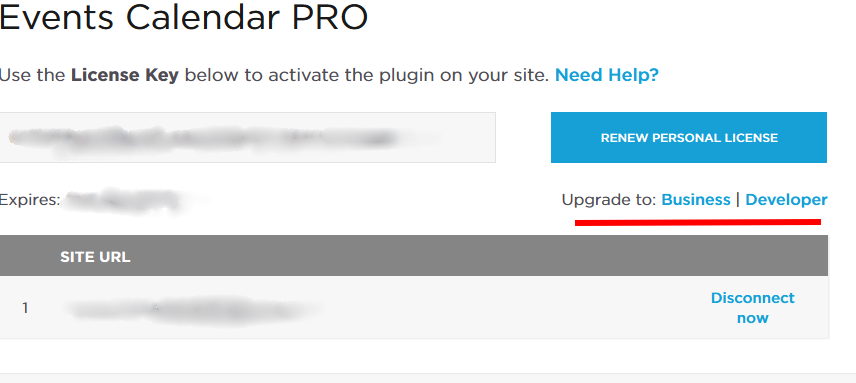
Let me know if that helps.
Thanks
MemberHi,
Thanks for using our plugins.
Unfortunately, there is no setting to refine the search. The Google API is suppose to return results closest to your events address, but Google is returning results from farther away.
We have a bug report to look into the issue and see if we can resolve it before the next release.
There has been a similar thread to this where the customer came up with their own solution to the issue for now:
Let me know if you have any follow up questions.
Thanks
January 22, 2015 at 2:12 pm in reply to: I am planning to charging posting fee from the end user. how to do that? #936394MemberHi,
Thanks for the interest in our plugins.
The Community Events Add On provides a way for visitors to create events without admin access.
You can do it with or without having them have an account. You can use the lowest WordPress role of subscriber as well to have to create events on the front end so they have no capabilities to edit other areas of the site in the admin. The plugin does not create a way for users to register that is something you will have to setup through WordPress.
We do not have a way to take fees for submissions though. We do not have a guide either for the customization and for the most part those are beyond the support we can provide. You could charge for membership and use a plugin like that for the fee.
Let me know if you have any follow up questions.
Thanks
January 22, 2015 at 2:07 pm in reply to: Possible conflict with change_tickets_text and theme_filter_text? #936390MemberHi,
I took a look at your coding on my site and it looks like it only wants to use one set of coding, but not both to change the text.
Not exactly sure why WordPress is doing that, not much we can do about that.
However, I was able to get it working to just add Tickets and Bookings to this array and drop that other filter:
array('Event', 'event', 'Events', 'events', 'Tickets'),array('Course', 'course', 'Courses', 'courses', 'Bookings'),
The other option is to follow our themer’s guide to move and edit the ticket template to change the name directly.
Let me know if you can get that to work.
Thanks
January 22, 2015 at 1:49 pm in reply to: Event view layout doesn't work well in IE and firefox #936382MemberHi,
Thanks for using the Events Calendar. Do you have a customer account here and can you post this question in the Pro forum?
If not we can help out on technical support questions in the WordPress.org Support Forum:
https://wordpress.org/support/plugin/the-events-calendar
It could be an issue with your theme and the Events Calendar, does changing theme’s help resolve the issue?
How about changing the event template:
Head to this page:
Events > Settings > Display Tab
Then change this setting:
Events Template to Default Page Template
That is about all I can suggest in the pre-sales forum. Please repost in the Pro forum the results or in the WordPress.org forum if you do not have an account.
Thanks
January 22, 2015 at 1:45 pm in reply to: Pro Install Telling me I must update after plugin install – Then hangs #936378MemberHi,
Sorry for the issues you are having. I can help troubleshoot this with you.
Since this is on Multisite are you activating the Events Calendar and the Events Calender Pro with a network activate or doing it on each individual site? It should be one or the other and not one is network activated and the other individually activated.
If done individually does the main site of the mulisite have either plugin active?
Let me know and we can go from there.
Thanks
January 22, 2015 at 1:35 pm in reply to: Upgrading to 3.9 causes front page causes index page widget context to be "drop" #936370MemberHi,
Sorry for the issues you are having. I can help out with this.
Are you by chance using JetPack and the visibility setting for widgets?
There is a bug that causes the widgets to not show.
Does the coding in this ticket fix the issue for you?
If not, which two widgets are not working for you?
Let me know and we can go from there.
Thanks
MemberOk that sounds more like a conflict then.
Can you please follow our testing for conflict guide and see if that helps narrow down where the issue is coming from:
Let me know what you find out and we can go from there.
Thanks
January 22, 2015 at 1:28 pm in reply to: Jetpack's Widget Visibility broken by updating to ECP 3.9.1 #936366MemberOk great glad it is working.
I am going to close this ticket as there is nothing more to do on it for now.
That fix should work out for now and the fix will be included in the next release.
If anyone has a similar issue and it is not resolved with the above coding, please create a new ticket and reference this one and we can help out.
Thanks
-
AuthorPosts