

Forum Replies Created
-
AuthorPosts
-
Brian
MemberHello,
So the refund process should still all be handled by WooCommerce we do not modify that process.
Did you go to the Orders section of WooCommerce and in that Order refund it? Did you see this button there like this:
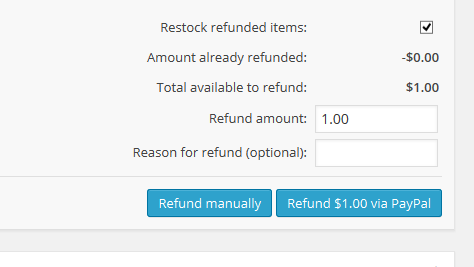
If Paypal did not do the refund using that button, you would have to go into your account to refund them in Paypal.
Also, refunding an Order in WooCommerce does not change the ticket in the Event, they are two separate systems and in the tickets for the event you have to delete them there.
Finally, the customer’s account is with all other Users in WordPress.
Let me know if you have any follow up questions.
Thanks
January 26, 2015 at 7:36 am in reply to: Tickets "Buy it Now Button" or move ticket options to top of the page #937596MemberHi no need to edit the code we have a guide to move the form here:
https://theeventscalendar.com/knowledgebase/moving-the-ticket-form/
For other customizations to I would suggest looking at our themer’s guide as it shows you how to move templates to your theme where you can edit them so they do not get overwritten on updates:
https://theeventscalendar.com/knowledgebase/themers-guide/
Let me know if that helps.
Thanks
MemberHi,
Thanks for the interest in WooCommerce Tickets. You do not need to purchase Pro to use WooCommerce Tickets. Each of our commercial plugins only requires the free Events Calendar to work.
For License upgrades we have this article to explain the process:
https://theeventscalendar.com/knowledgebase/upgrading-a-license/
Let me know if you have any follow up questions.
Thanks
January 26, 2015 at 7:31 am in reply to: Possible conflict with change_tickets_text and theme_filter_text? #937589MemberThat coding goes in the array you first sent me in this function:
function theme_filter_text( $translations, $text, $domain )
It replaces the existing arrays already there.
The ticket template is found here:
wootickets\views\wootickets\tickets.php
You can move and edit that file in your theme follow the themer’s guide:
MemberOk thanks for the information.
I will look into this more and file a bug report.
Thanks
MemberIs there any way I can make it import one page per minute or something like that?
Unfortunately, not without changes to the coding, there is not option for that.
In the next release for Facebook Events we are working on improving the efficiency of the script, but there is only so much we can do as it will still rely on Facebook for the results and the speed at which a server can process those results.
What are you currently setting the automatic import frequency to? Do you think you could manually import all the unimported events and then set that to hourly it would be able to keep up with the load?
January 26, 2015 at 7:13 am in reply to: WooCommerce Plugin conflict overwrites existing event titles #937569MemberGreat, glad it helps, I am going to go ahead and close this ticket, but if you need help on this or something else please post a new ticket.
Thanks!
MemberOk so I checked out the staging site and it is running Pro 3.8.1 and the Events Calendar 3.9.1 according to the readme.txt in both plugin directories.
On my site I downgrade Pro to 3.8.1 and I get the debug error in the console right away.
I then upgraded back to 3.9.1 and the error is gone.
So it appears to be caused with 3.8.1 Pro running with 3.9.1 the Event Calendar.
If you get the error after verifying you are running 3.9.1 for both plugins let us know so we can solve it.
Thanks
MemberWe do not have an updated list and do not maintain a list. We ask you go through the Testing for Conflicts Guide to see what the issue is on your site.
Did you follow the steps and find an issue with your theme?
MemberI am glad to see you were able to figure it out.
I am going to go ahead and close this ticket. If you have a similar issue or another in the future, please do not hesitate to create a new ticket.
Thanks!
MemberHi,
Thanks for using Eventbrite for the Events Calendar.
Glad you figured out how to move the box.
Instead of moving the hook, which may move other elements as well we have this guide to move the form:
iFrame
Unfortunately, the EventBrite API only enables us to create the ticket form using the iFrame so there is not way to modify the styling there and it comes directly from them.About the only thing that can be done is force different sizes on the iframe as you have done.
Let me know if you have any follow up questions.
Thanks
MemberHi,
Thanks for bringing this up and sorry for the issues you are having, but glad you found a solution.
The Events Calendar is only compatible with similar version numbers so 3.9 should be used with 3.9 for all the add ons (or 3.9.1)
If for whatever reason you are unable to upgrade one of the plugins it is best to not upgrade any and keep them at the same version number.
Although different versions may work together there might be issues such as the conflict you are running into and we do not have a way to fix those beside having you upgrade to the latest version.
Here is our write up on Version Compatibility for your information:
Let me know if you have any follow up questions.
Thanks
MemberHi Thomas,
Thanks for the interest in our plugins, it is an annual cost.
We offer 30% off the price for renewals.
MemberHi,
Thanks for using our plugins.
The plugins are compatible with the same version number. So 3.9 works with all 3.9 plugins.
However, Filter Bar was not released until version 3.4 so I do not think it will work in 3.2 as we would have had to change coding to get the Filter Bar to work.
If you are unable to update and cannot use Filter Bar then we can offer you a refund.
Thanks
MemberOk sorry it did not work for you.
If you have a link I could take a look and see if I can tweak it.
We are working on a better version of the list view for our next release in a couple months. Maybe that one will work better for you.
Let me know.
Thanks
-
AuthorPosts