

Forum Replies Created
-
AuthorPosts
-
Brian
MemberHi,
I can help you out here.
You can include the free version of the Events Calendar in your theme, but not Pro or other commercial plugins due to license restrictions.
The theme you linked to actually says this about our Commercial Plugins:
We support Event Calendar Pro, Filter Bar, Community Events, WooTickets but please note that these addons are not distributed with the theme due to licence restriction. Here is detailed info what they include in addition to the free Event Calendar version:
http://tri.be/shop/wordpress-events-calendar-pro/
http://tri.be/shop/wordpress-wootickets/
http://tri.be/shop/wordpress-community-events/
http://tri.be/shop/wordpress-events-filterbar/Let me know if you have any follow up questions.
Thanks
February 4, 2015 at 8:25 am in reply to: Remove iCal and Google Calendar links on single event if the event has passed #939981MemberGreat, glad it helps, I am going to go ahead and close this ticket, but if you need help on this or something else please post a new ticket.
Thanks!
MemberHi,
Thanks for using our plugins.
Unfortunately, there is not feature to have events without dates. All the views rely on the date field to show events so even if you do not include a date, the event will use todays date in that field when saving.
There are no good options around this.
Let me know if you have any follow up questions.
Thanks
MemberHere is what the Event List Widget should look like with the Event Category Filter at the bottom:
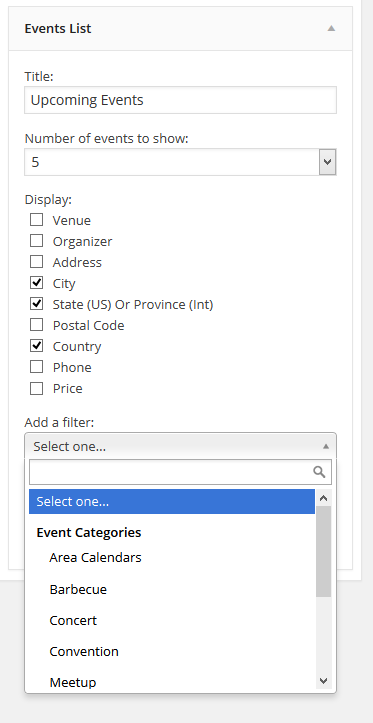
Are you not seeing that?
February 4, 2015 at 8:11 am in reply to: Email Ticket in WooCommerce Addon Demo Doesn't Work #939973MemberHi,
Thanks for the interest in WooCommerce Tickets.
The orders in WooCommerce have to be completed in order for tickets to be sent, since we are not completing the orders it is not sending.
There is coding from WooCommerce to automatically complete orders, but we do not include it on our demo site.
Here is what the tickets look like:
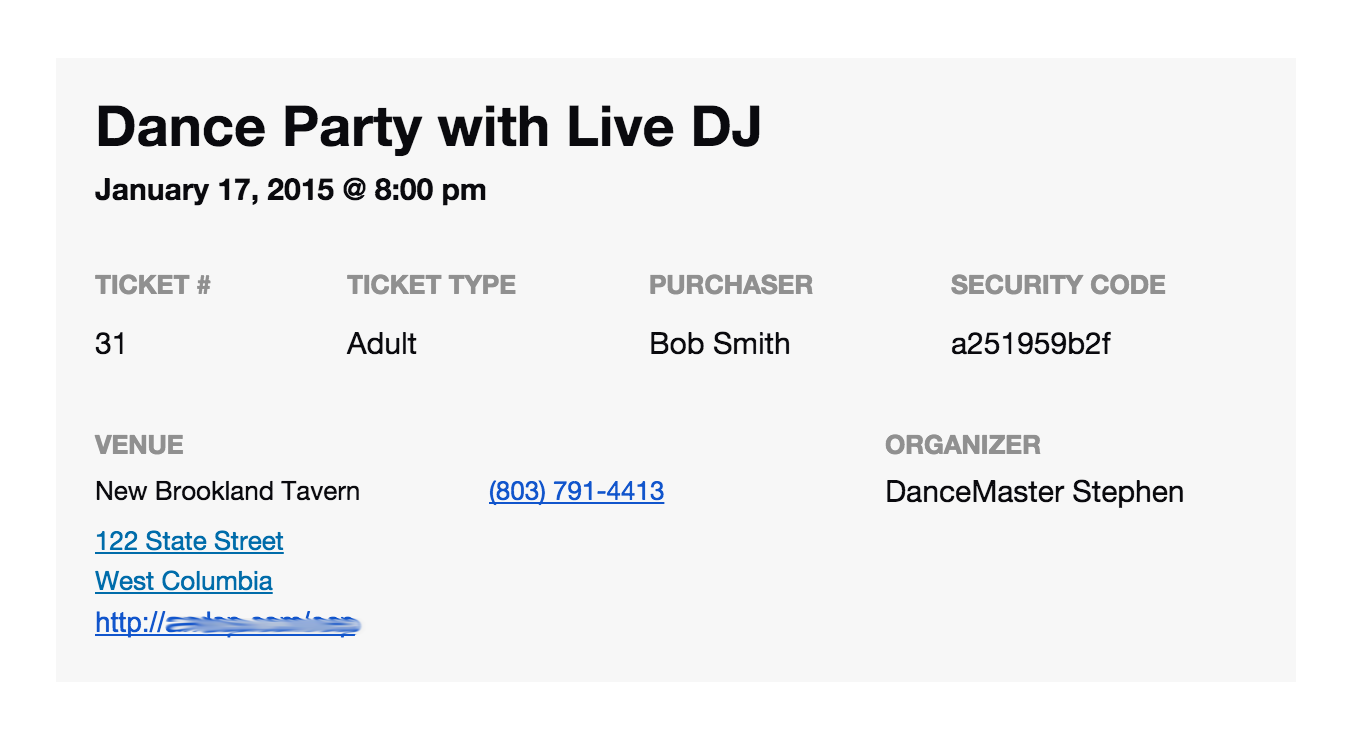
And you can modify them following our themer’s guide:
https://theeventscalendar.com/knowledgebase/themers-guide/
And you can find about the entire plugin’s features with the New User Primer:
https://theeventscalendar.com/knowledgebase/new-user-primer-woocommerce-tickets/
Let me know if you have any follow up questions.
Thanks
February 4, 2015 at 8:06 am in reply to: Transferring website to new host – transfer license? #939972MemberHi,
I can help out here.
Not to worry even if the License is not activated for Pro, Pro will still work right away on the new server.
You are able to disconnect the License in your Account on theeventscalendar.com under the license section of your profile, then you can go to the new site and add the license there.
Does that help?
MemberHi,
Sorry for the troubles you are having. I can help troubleshoot this with you.
I took a look at your site and getting this error:
You have included the Google Maps API multiple times on this page. This may cause unexpected errors.
http://maps.gstatic.com/maps-api-v3/api/js/19/9/main.js
Line 57Looks like your theme or another plugin is loading the Google Maps API as well as our plugin.
That could be part of the issue. See if fixing that helps and we can go from there.
Thanks
February 4, 2015 at 7:59 am in reply to: Remove iCal and Google Calendar links on single event if the event has passed #939970MemberHi,
I can help you out here. The tribe_is_past() only works in the loop and not on a single event.
We use this coding to detect if is is a past event, you maybe to modify it to work for you:
global $post;// Check if event has passed
$gmt_offset = ( get_option( 'gmt_offset' ) >= '0' ) ? ' +' . get_option( 'gmt_offset' ) : " " . get_option( 'gmt_offset' );
$gmt_offset = str_replace( array( '.25', '.5', '.75' ), array( ':15', ':30', ':45' ), $gmt_offset );if ( ! tribe_is_showing_all() && strtotime( tribe_get_end_date( $post, false, 'Y-m-d G:i' ) . $gmt_offset ) <= time() ) {
TribeEvents::setNotice( 'event-past', __( 'This event has passed.', 'tribe-events-calendar' ) );
}
Let me know if you have any follow up questions.
Thanks
MemberI am glad to see you were able to figure it out.
I am going to go ahead and close this ticket. If you have a similar issue or another in the future, please do not hesitate to create a new ticket.
Thanks!
MemberIt is possible to modify the coding, to get it to display more events from other months, but we do not have that coding available to do that.
We do have a tutorial to Fast Forward the Mini Calendar so if there are not Events in February, but there is one in March it would show March instead.
https://theeventscalendar.com/knowledgebase/fast-forward-list-widget-to-next-upcoming-event/
The Event List Widget displays all upcoming events regardless of month, that is another option to use as well.
Thanks
MemberHi,
Yes, the templates would be in your child theme.
As for this:
I’m struggling to understand which CSS file is being used for ‘default page template’ versus ‘default events template’.
They use the same stylesheet for either template from the Events Calendar. The default Events Template uses our templates in the plugin, the Default Page uses your themes, but both use the this setting for the stylesheet:
Events > Settings > Display Tab > “Default stylesheet used for events templates”
Please note we typically respond faster, but we may take up to 24 hours to respond, depending on the support demand.
Thanks
February 4, 2015 at 7:44 am in reply to: How to differ TICKET price (advance payment) from Event (total) price. #939963MemberHi,
It looks possible to what you are trying to do. The ticket form is customizable following our themer’s guide:
https://theeventscalendar.com/knowledgebase/themers-guide/
You can move and edit this file in your theme:
wootickets\views\wootickets\tickets.php
Maybe through a custom field setup in the product you could display the full price of the product there.
As for deposit payments, if you would like to request that feature please head to our UserVoice Page and add your own or upvote that feature as they will increase the chances of it being added to a future version.
http://tribe.uservoice.com/forums/195723-feature-ideas
Thanks
February 4, 2015 at 7:40 am in reply to: Fatal Error: Call to Undefined Function for Google_Data_Markup #939962MemberYou can either change get_the_permalink in that file to get_permalink or I can provide you with a copy of the Events Calendar Pro 3.8 and you can use that version until you can update.
Both The Events Calendar and the Events Calendar Pro will have to remain at 3.8.
Let me know.
Thanks
MemberI am glad to see you were able to figure it out.
I am going to go ahead and close this ticket. If you have a similar issue or another in the future, please do not hesitate to create a new ticket.
Thanks!
MemberNot exactly sure which ajax call.
This is the file that controls it in the filter bar:
the-events-calendar-filterbar\resources\filter-scripts.js
-
AuthorPosts