

Forum Replies Created
-
AuthorPosts
-
June 17, 2015 at 9:03 am in reply to: Month view: tribe-mini-calendar-today class not changed #970115
Brian
MemberHi,
Sorry for the issues you are having. I can help out.
I took a look at your site and then confirmed it on mine.
It appears if you select a date outside the current month then it does not remove the class “tribe-mini-calendar-today”.
I have filed a bug ticket to address this.
Let me know if you have any follow up questions.
Thanks
June 17, 2015 at 8:51 am in reply to: Eventlist categorie filter not working after update to 3.10 #970104MemberHI,
Sorry for the issues you are having. I can help troubleshoot this with you.
I was not able to reproduce the issue on my site.
I had an existing Event List Widget and added an event category to it and it displayed as intended.
If you delete the widget and reload and add an event category does that then work?
If not can you let me know all your settings for the widget and if you have any custom coding for the Events Calendar
Then we can go from here.
Thanks
MemberHi,
Thanks for the interest in our plugins.
Unfortunately, we do not have discounts for buying multiple plugins.
We from time to time do have sales and announce those on our newsletter or through twitter.
Cheers!
June 17, 2015 at 8:39 am in reply to: Events Calendar Pro 3.10 crashes homepage (only homepage) with 502 error. #970091MemberHi,
Sorry for the issues you are having with this.
So this comes down to one of our widgets causing the issue, correct?
Was this the Events List Widget or the Events Calendar Widget that caused this?
And this happened when no category filter is selected in the widget?
Please let me know so I can look into this and get it resolved.
Thanks
MemberWhat is the shortcode you used? Please include all the settings.
Do you have a page this is on so I can see the results?
You can provide that information as a private reply if you like.
Thanks
June 17, 2015 at 8:17 am in reply to: Trouble importing Eventbrite ID after re-configuring API #970063MemberIf you are seeing the Register with Eventbrite that means the event is not currently registered and if you do fill in all the information it would create a new event in Eventbrite.
If this event is already created in Eventbrite then you have to re-import to get the settings as shown in that image.
On that note, what I’m finding as I make small edits to events that have already been imported (copy changes for example), after I update the event, the tickets module continues to disappear in several cases.
Does the Display Tickets on the Event Page? option say yes, but it does not show on your site?
Does that setting change to no after you update?
If you toggle that setting does it resolve it?
Let me know so we can narrow down when this is happening it and release a fix.
Thanks
June 17, 2015 at 7:39 am in reply to: 3.10 – Disappointed that expired events on the day still show #970045MemberThis reply is private.
MemberHi,
Sorry for the issues.
Our documentation had it wrong.
The shortcode is:
[tribe_events_list]We were missing the s in events.
Let me know if that fixes the issue for you.
Thanks
MemberHi,
Sorry for the issues.
Our documentation had it wrong.
The shortcode is:
[tribe_events_list]We were missing the s in events.
Let me know if that fixes the issue for you.
Thanks
June 16, 2015 at 1:24 pm in reply to: Trouble importing Eventbrite ID after re-configuring API #969865MemberThanks for the info.
The display tickets on Event Page in the individual event editor and looks like this:
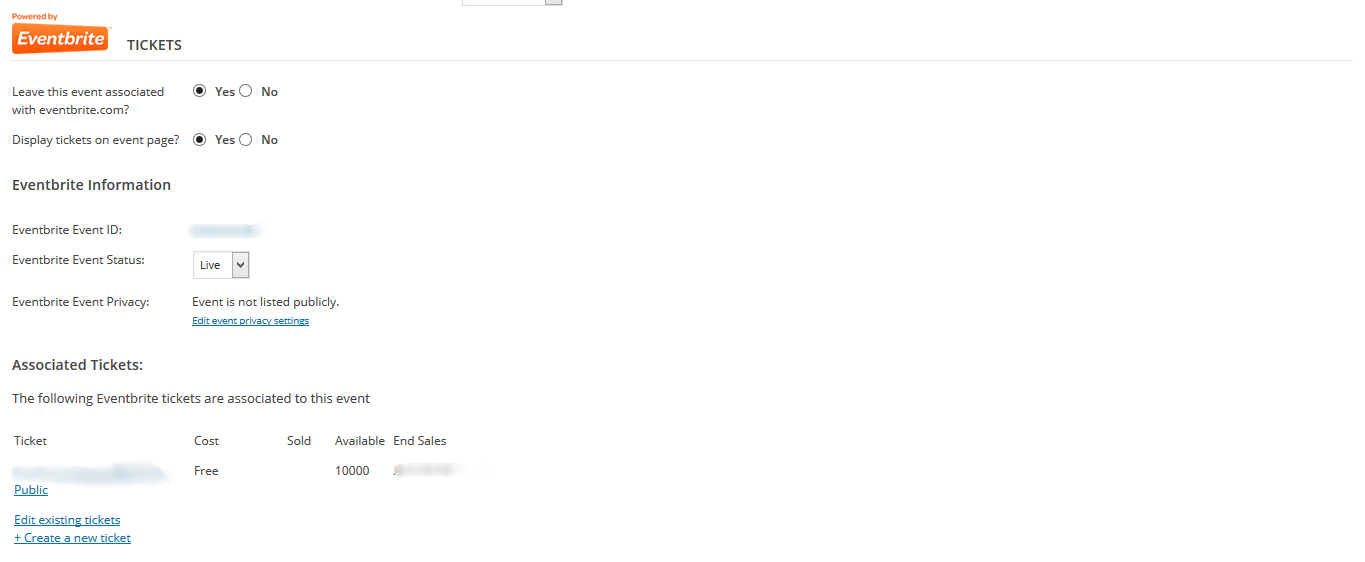
If you are not seeing those options you would want to re-import the event from Eventbrite.
Let me know if that does solve the issue for you.
Thanks
June 16, 2015 at 10:46 am in reply to: 3.10 – Disappointed that expired events on the day still show #969819MemberI wanted to let you know 3.10 is released however the release candidate for the core of the Events Calendar will not automatic update.
So you have to deactivate and delete it and then add it back from WordPress.org.
Sorry for the extra steps with that.
Let me know if you run into any issues.
Thanks
MemberHi,
I wanted to follow up with this again.
One thing to confirm is all the urls you have start with http:// as well making sure the url matches exactly with your site. So include the www if that is indeed part of your url.
Here is a sample of what everything should look like:
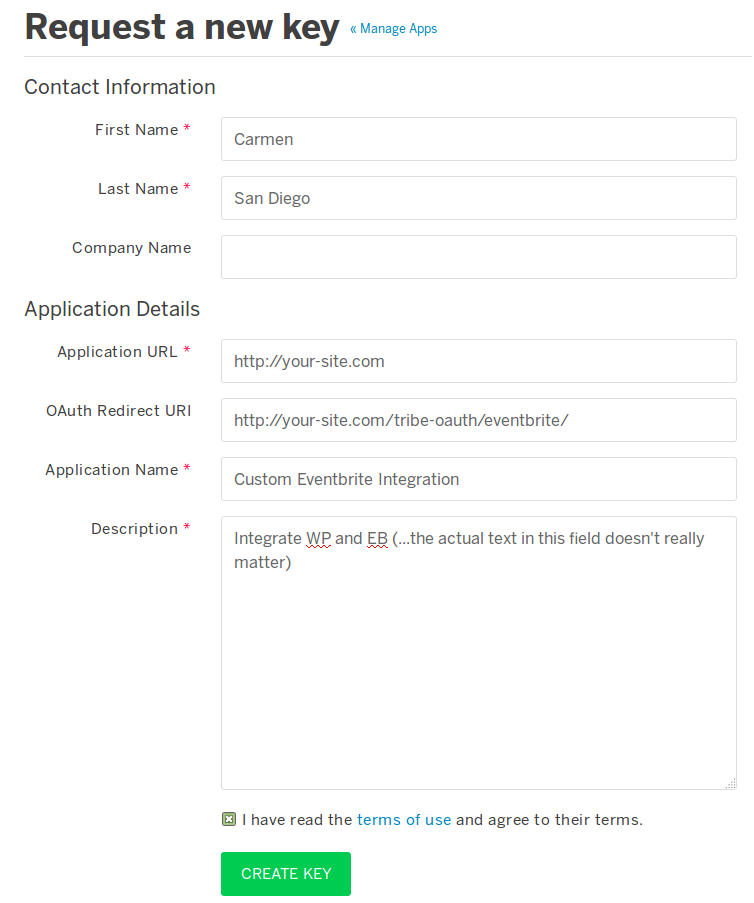
 Member
Hi,
Thanks for reaching out to us.
I can help out here.
Unfortunately, it is not possible to have the main event views on a sub pages as you describe.
You maybe to hard code it into the plugin, but that is not something we can support.
Let me know if you have any follow up questions.
Thanks
MemberHi,
Thanks for the interest in our plugins.
If you are using WooCommerce already you would want to purchase WooCommerce Tickets:
https://theeventscalendar.com/product/wordpress-wootickets/
We do not directly show the available tickets left, however, you can add that information, Barry has some coding to do it in this post:
And you can follow our themer’s guide to move and edit the template in your theme:
https://theeventscalendar.com/knowledgebase/themers-guide/
Let me know if you have any follow up questions.
Thanks
MemberThis reply is private.
-
AuthorPosts