

Forum Replies Created
-
AuthorPosts
-
October 21, 2015 at 7:49 am in reply to: Different number of results for list view and photo view. #1016581
Brian
MemberHi,
I have this snippet to show all the events in Photo View:
https://gist.github.com/jesseeproductions/96a6fcce931375c043cf
You can change the -1 to 100 in the snippet and add it to your theme’s functions.php and that will change just the photo view then.
Let me know if that works.
Thanks
MemberThanks for the DB.
I have the first recurring event created and it did not create an entry in the my log.
So it could just be legacy events. I will test one more day and then try out your db.
Thanks
MemberYeah it would seem easy, but for some reason an issue is being created.
We do have a ticket in to look into this and come up with something.
I am going to close this ticket to new replies, but the issue is still open and we will update this ticket once we release a fix.
If you have any new questions or issues please create a new ticket and reference this one.
Thanks
October 21, 2015 at 7:34 am in reply to: Can buddypress members be granted access to create events? #1016567MemberHi,
Pro is only needed if you want to use the features of Pro.
Beyond that you can use any of the add ons with just the core version of the Events Calendar found for free on WordPress.org: https://wordpress.org/plugins/the-events-calendar/
MemberI am glad to see you were able to figure it out.
I am going to go ahead and close this ticket. If you have a similar issue or another in the future, please do not hesitate to create a new ticket.
Thanks!
MemberWill do, we are still having a problem and been unable to solve it.
Thanks
MemberHi,
Glad you are getting closer.
The ticket email template is located here:
plugins/wootickets/src/views/wootickets/tickets.php
And you can move it to your theme and edit it there following our themer’s guide:
https://theeventscalendar.com/knowledgebase/themers-guide/
Is that what you are looking for?
MemberGreat glad it helps.
I am going to close this ticket, but if you need anything else related to this topic or another please post a new topic on the forum and we can help you out.
Thanks
October 21, 2015 at 7:28 am in reply to: Event Submission overwriting bottom Widget in Theme #1016557MemberHi,
Try this for the css:
.tribe_community_edit #sitewide-bottom-widget-area {display:none;}October 20, 2015 at 12:08 pm in reply to: Event Submission overwriting bottom Widget in Theme #1016343MemberHi,
I am not sure about Widget Controls.
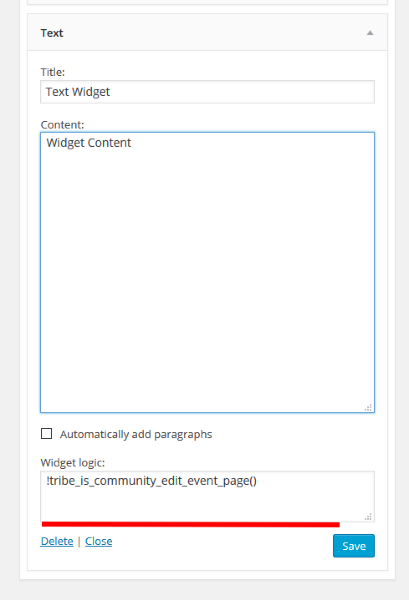
If you see this text: !tribe_is_community_edit_event_page()
It is in the wrong spot and not in the actual widget logic box.
This is where the coding goes:
 Member
Hi,
Where is the h2 tag still there? Is this on the ticket itself or a page?
MemberHi Lisa,
Thanks for the interest in Pro and recurring events I can help out here.
After you create a recurring series you can edit a single event in that series. However, after you edit the event it will break it out of the series and be a stand its own event.
So you will have the single event and the rest of the series.
Does that make sense?
Let me know if you have any follow up questions.
Thanks
MemberHi,
Thanks for using our plugins. I can help out here, but to do more troubleshooting we ask that you login and post in the premium forums.(so you might have to have you client provide that to you)
Anyway, you should run the same two version numbers of the Events Calendar and Pro so if Pro is 3.9.3, then Core should be 3.9.x as well.
If you upgrade to 3.12.x for core then Pro should also be on 3.12.x
Let me know if you have any follow up questions.
Thanks
MemberHi,
I did not see the link to the db, but I have recreated the first event and will let you know if I get the error.
I think it is happening when the recurring events tries to create a new event for the series every night.
And what I mean’t about creating was ending the recurrence and then creating a brand new event to replace it. However, lets wait on see if my site reproduces the error first.
We will get to the bottom of this yet!
Thanks
October 20, 2015 at 7:13 am in reply to: Event Submission overwriting bottom Widget in Theme #1016215MemberHi,
I looked at the widget, but not sure what the issue is.
However, I can tell you how to hide it on the community pages.
You can use a plugin called Widget Logic:
Then in the widget logic box which is now in each widget you can use this to hide it on the Community Events Edit Form:
!tribe_is_community_edit_event_page()If you want to hide it from all the Community Pages you could add this:
!tribe_is_community_my_events_page() || !tribe_is_community_edit_event_page()Let me know if that works for you.
Thanks
-
AuthorPosts