
Home › Forums › Calendar Products › Community Events › Event Submission overwriting bottom Widget in Theme
- This topic has 24 replies, 2 voices, and was last updated 10 years, 11 months ago by
Brian.
-
AuthorPosts
-
October 19, 2015 at 4:43 pm #1016024
karen
ParticipantIf you can help me find a way to disable this widget on the page, it would help. Since these pages are built on the fly, I have no way of knowing.
thanksOctober 20, 2015 at 7:13 am #1016215MemberHi,
I looked at the widget, but not sure what the issue is.
However, I can tell you how to hide it on the community pages.
You can use a plugin called Widget Logic:
Then in the widget logic box which is now in each widget you can use this to hide it on the Community Events Edit Form:
!tribe_is_community_edit_event_page()If you want to hide it from all the Community Pages you could add this:
!tribe_is_community_my_events_page() || !tribe_is_community_edit_event_page()Let me know if that works for you.
Thanks
October 20, 2015 at 8:00 am #1016238ParticipantThe issue is that the widget is picking up the content of the events form.
I tried the plugin, it did not hide the widget on the commnunity page form.
Do I understand that the text that you gave me goes in the space at the bottom of the widget that is now visible?
I see there are other plugins like this that might work.
I presume that you were able to verify that this works for you.
Thanks for all your help.October 20, 2015 at 8:54 am #1016259ParticipantCould you look at a plugin called Widgets Control which says it is compatible with the events Calendar. It just does not say what taxonomy or category to exclude. ?
thanksOctober 20, 2015 at 12:08 pm #1016343MemberHi,
I am not sure about Widget Controls.
If you see this text: !tribe_is_community_edit_event_page()
It is in the wrong spot and not in the actual widget logic box.
This is where the coding goes:
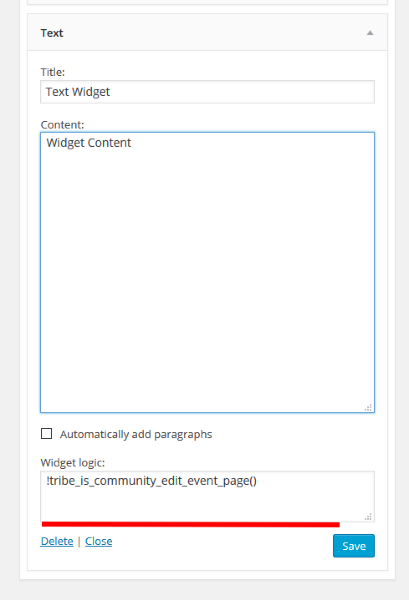 October 20, 2015 at 12:56 pm #1016366Participant
yep, that is what I thought.. does not work. 🙁
October 21, 2015 at 6:07 am #1016494ParticipantI seem to have a solution #2 below, but I do not know that there is actually a PAGE-ID for the Submit Result page since it it built on the fly.
Below that is another reply from the developer.
___________
2- If you want to hide that widget are on a page you can add the rule below in Main Options > Fonts & Custom > Custom CSS Rule Box.page-id-xxx #sitewide-bottom-widget-area {display:none;}
replace xxx by the page id # or remove that selector to hide on all pages
weaverweaver
October 19 edited October 19
Following the rules means using the WordPress core utilities exactly as they should be. If a plugin is altering or messing with the content of a widget area that leads to unexpected results, it is likely not following the rules of how to use the WP capabilities. Weaver is extremely careful to follow the rules.And i’m not really saying it is no one’s fault. I’m saying we don’t have the resources to debug either our theme or someone else’s plugin when that plugin is both a premium plugin and thus not available to us to even look at, and one that has less that 100,000 users. For popular plugins (say with more than 100,000 users), we will try to sort out incompatibilities, but we just can’t in this case.
October 21, 2015 at 7:28 am #1016557MemberHi,
Try this for the css:
.tribe_community_edit #sitewide-bottom-widget-area {display:none;}November 3, 2015 at 7:13 am #1021250ParticipantBrian,
I could not get this resolved by either developer, although I am still hopeful that one day..
I did however find a plugin called Widget-Control that works!.
Thanks for all your help!November 3, 2015 at 7:28 am #1021257MemberYou’re Welcome,
Sorry we could not help more.
Since this is marked resolved I am going to close this ticket, but if you need anything else related to this topic or another please post a new topic on the forum and we can help you out.
Thanks
-
AuthorPosts
- The topic ‘Event Submission overwriting bottom Widget in Theme’ is closed to new replies.