

Forum Replies Created
-
AuthorPosts
-
Brian
MemberHi,
Thanks for using the Events Calendar.
Here on the pre-sales forum, I’m afraid we do not provide technical support. I would ask that you take any technical support questions across to our wordpress.org forum – our staff scan it periodically and other community members may also be able to help out.
Before posting there I would run through our testing for conflicts guide and see if that narrows down the cause:
Thanks again!
MemberHi,
Thanks for using our Core Plugin.
I believe what you are looking to do is possible.
I tested it with these settings and it worked for me:
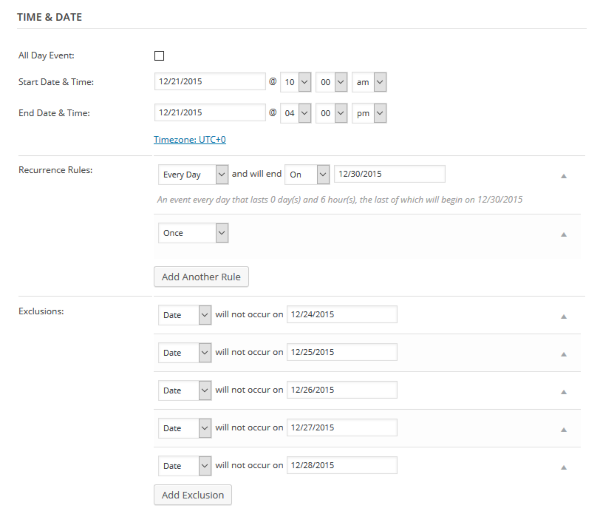
Although the exclusions have a bug in them so it might create all the events and then you would have to go back and delete those ones not wanted.
That bug should be fixed in 4.0.1, which we plan to release within a week of 4.0, which is due early December.
Let me know if you have any follow up questions.
Thanks
MemberHi,
The issue is the sizing is hard coded into the script so it does not take into account missing fields.
MemberHi,
Thanks for using our core plugin.
In Pro we have the shortcodes for our widgets that can display events:
https://theeventscalendar.com/knowledgebase/pro-widget-shortcodes/
They do not include a feature image, but we have this guide that might help you out:
https://theeventscalendar.com/knowledgebase/horizontal-list-widget/
For more changes you can follow the themer’s guide to editing templates:
https://theeventscalendar.com/knowledgebase/themers-guide/
Cheers
MemberHi,
Thanks for the interest in our plugins.
With the release of 4.0 we are releasing a free RSVP system for the Events Calendar that will enable people to “register” per event with their name and email address.
That form would be shown per event.
We are working on the final testing for 4.0 and hope to release it soon.
Thanks
November 25, 2015 at 7:17 am in reply to: Changing Language (WPML) on ajax calls on Calendar Widget #1030814MemberHi,
Thanks for reporting this issue.
I will create a bug ticket for this, but I am not clear about this statement:
“The problem I´m having is that when I change month on calendar, it still fails.”
Is that in the regular month view.
Also, I do have a timeline for when a bug might be fixed.
Thanks
November 25, 2015 at 7:11 am in reply to: Remove iCal and Google Calendar links from venue view #1030807MemberHi,
Thanks for using our plugins. I can help out here.
What about using css this like to hide it:
a.tribe-events-ical {

    display:none!important;

}
I looked at the coding as was not sure if we have a hook to get it from there otherwise.
Let me know if that works.
Thanks
MemberHi,
Thanks for the interest in our plugins.
We do not have any features to connect into UAM Groups.
All our events, venue, and organizers are custom post types so it is possible it could work with our events, but would take some customization on your end that we cannot support.
You can give it a try with the core version of the Events Calendar found for free on WordPress.org: https://wordpress.org/plugins/the-events-calendar/
Cheers
MemberHi,
Thanks for using our plugins.
There maybe a way to “add “next ajax pagination” to the list widget”
However, we do not have a feature to do that and for the most part customizations are beyond the support we can provide.
You can use our themer’s guide to see how to edit templates including the list widget:
https://theeventscalendar.com/knowledgebase/themers-guide/
Let me know if you have any follow up questions.
Cheers
MemberHi,
Thanks for using our plugins.
We are working on a feature to use QR codes for check ins. It is not ready for the 4.0 release, but we hope to get it out for the release after that.
I do not have a timeline when that might happen.
Let me know if you have any follow up questions.
Thanks
MemberHi Again,
Sorry for the issues here. I can help troubleshoot this with you.
Is this on the Front End using Community Event or the Backend users are not able to publish?
I was not able to reproduce the issue in Community Events on my test site. So I am not sure of the issue right now.
Can you please follow our testing for conflicts guide:
And see if that can narrow down the cause of this.
Thanks
MemberOh I see what you mean now.
I visited your site and with the sidebar it makes the area to small so the script kicks in for the Search Bar.
One way to change that is to make the area bigger for the calendar in your theme.
Or you could try css to disable the Collaspe of the Filter Bar, however, with responsive design it might mess it up in mobile views then.
I can try to help get you started on this, but limited in supporting theme compatibility issues.
Let me know.
Thanks
MemberHi,
Thanks for using Pro. I can help out here.
I visited your site and see what you mean.
I am getting this error in the console:
“NetworkError: 500 Internal Server Error – http://www.detroitjewishdirectory.com/wp-admin/admin-ajax.php”
Do you have any coding blocking the admin or any errors there? As it appears the script is not able to use ajax to get the next month of events.
If you are not sure please follow our testing for conflicts guide to see if this can narrow it down:
Let me know and we can go from here.
Thanks
November 25, 2015 at 6:20 am in reply to: Issue with event link for recurring event which occurs more than once a day #1030778MemberHi,
Thanks for using our plugins.
Unfortunately, you are running into a bug with events on the same day for recurring events.
I have added this thread to our bug ticket, but I do not have a timeline when this will be resolved and it is not going to be resolved in 4.0, which is our next release.
The only way around this right now is to make two different recurring events to not create this conflict.
Let me know if you have any follow up questions.
Thanks
MemberHi,
That feature is the Filter Bar and not included as part of Pro.
You can find all about it here:
https://theeventscalendar.com/product/wordpress-events-filterbar/
Let me know if you have any follow up questions.
Thanks
-
AuthorPosts