

Forum Replies Created
-
AuthorPosts
-
Brian
MemberThanks James
MemberHi,
I visited your site and I am able to go December 2016 now.
Are you seeing the same thing?
Let me know and we can help out.
Thanks
MemberHi Again,
We believed we fixed this issue in 4.0.2.
Please update to that and let me know if that resolves the issue for you.
Thanks
MemberHI,
Thanks for using our plugins.
I can try to help out here with some css.
Do you have a link you can provide where this is happening?
It is hard to say what is causing it without seeing the issue.
Thanks
MemberHi,
Thanks for using our plugins.
Unfortunately, we do not have any features to embed the month view in any other pages.
We only have shortcodes for the Pro Widgets:
https://theeventscalendar.com/knowledgebase/pro-widget-shortcodes/
If you would like to request that feature please head to our UserVoice Page and add your own or upvote that feature as they will increase the chances of it being added to a future version.
MemberHi,
Thanks for using our plugins.
I can help out here.
That can only be changed by editing the template:
plugins/events-calendar-pro/src/views/pro/widgets/this-week/loop-grid-day.php
In your theme following our themer’s guide:
https://theeventscalendar.com/knowledgebase/themers-guide/
Let me know if you have any follow up questions.
Thanks
MemberHi,
Thanks for the interest in our plugins.
Unfortunately, all our tickets are tied to events.
If you think that is something you would like as a feature I encourage you to visit our User Voice Page and either upvote an existing request or make a new request there.
MemberHi,
Sorry for the issues you are having. I can help out here.
Can you try this fix and see if it helps:
In this file:
event-tickets-plus/src/Tribe/Commerce/WooCommerce/Orders/Cancelled.php
on line 51
If you replace this:
if ( empty( get_post( $ticket_id ) ) ) {With this:
$ticket_post = get_post( $ticket_id );

if ( empty( $ticket_post ) ) {
Let me know if that works for you.
Thanks
MemberHi,
Sorry for the issues here. I can help out.
What are you settings for the RSVP on this page:
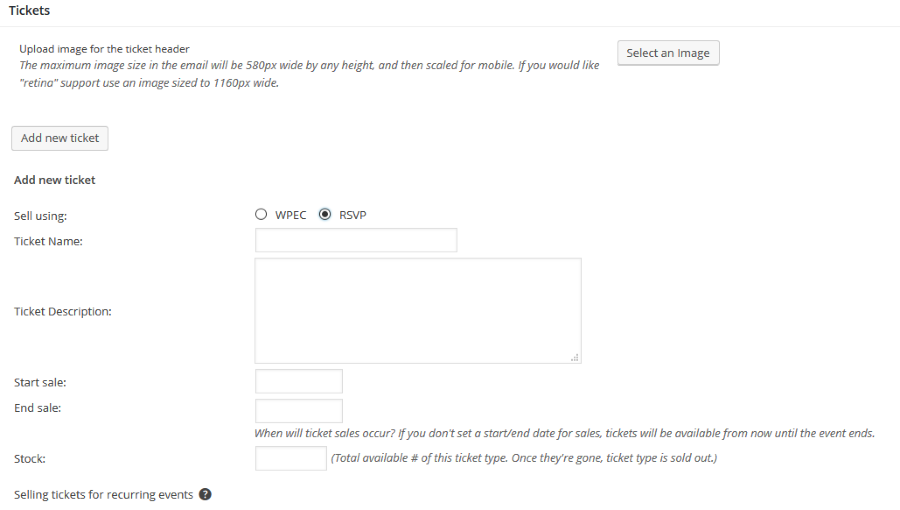
Are you able to create a rsvp there?
MemberHi,
Thanks for using our plugins. I can help out here.
I visited your site and see this css is causing the issue:
.site-inner {

    overflow: hidden;

}
That is hiding the tooltip.
December 18, 2015 at 12:44 pm in reply to: Event navigation broken for multiple events in one day #1043784MemberHi,
Sorry for the issues you are having.
We are seeing this bug and working to resolve it in an upcoming release.
It appears when single events have the same date and time it causes the next and previous links to skip over those events.
Do you believe that is what your issue is?
MemberHi,
Thanks for using our plugins.
Let me see if I can help you out.
I do have this snippet that disables AJAX
https://gist.github.com/jesseeproductions/e787d5dd5c0e943f172f
The other issue is do you have the wp-admin block for any reason? If some that can cause this issue as access to that is need for WordPress AJAX
Let me know if you have any follow up questions.
Thanks
MemberHi,
Thanks for using our plugins. I can help out here.
We do not create a category for the tickets anymore as it was not translated so it was not helping in languages besides English.
Tickets can only be created through events. We do not have a way to reverse the process.
Let me know if you have any follow up questions.
Thanks
MemberHi,
Sorry for the issues here.
In versions less than PHP 5.5 this error is occurring due to the incorrect use of the empty function.
In this file:
event-tickets-plus/src/Tribe/Commerce/WooCommerce/Orders/Cancelled.php
on line 51
If you replace this:
if ( empty( get_post( $ticket_id ) ) ) {With this:
$ticket_post = get_post( $ticket_id );

if ( empty( $ticket_post ) ) {
That should fix the issue for now.
Let me know if that works for you.
Thanks
MemberI am glad to see you were able to figure it out.
I am going to go ahead and close this ticket. If you have a similar issue or another in the future, please do not hesitate to create a new ticket.
Thanks!
-
AuthorPosts