

Forum Replies Created
-
AuthorPosts
-
October 12, 2017 at 3:01 pm in reply to: Category archive – Notice: Trying to get property of non-object #1362937
Barry
MemberDefinitely: I’ve attached the URL for this topic to the bug report so we can easily drop an update in here as soon as the fix ships 🙂
MemberHi Erica,
It’s really up to you 🙂
As I understand your situation I think setting up different sessions as different events makes a lot of sense (and you could either sell tickets for each individual session or else sell tickets to the whole thing through a dedicated page – just enable support for selling tickets on pages).
Does that help at all?
MemberHi Neils,
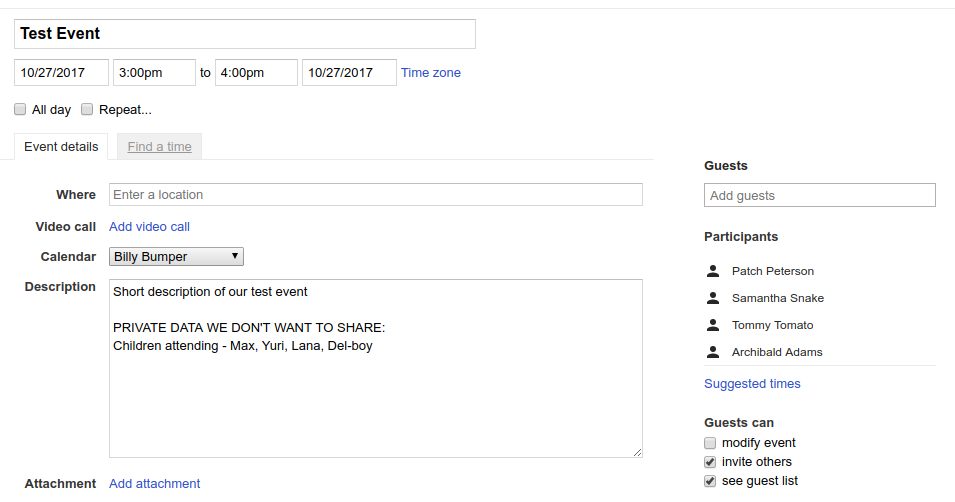
Taking the fictional event (above) as an example: once imported, I as the owner of the event will automatically show as the event organizer. The contents of the description field will also be imported and made public.
In my example, I’ve used the description field to store private data: consequently this would indeed be imported and would become publicly visible, if you configure Event Aggregator to automatically publish imported events at least.
On the other hand, the list of participant names (on the right, in my screenshot) would not become publicly visible and Event Aggregator in fact does not currently pull them in at all.
Some notes on this:
- You can configure the importer to save imported events as ‘drafts’, allowing you to edit them before publication if necessary
- It would be possible to write a customization that strips any information like that, as long as there is a consistent format that you can sure will be followed each time (in my example, that might mean relying on the presence of the keywords ‘PRIVATE DATA’ and stripping out that and anything that follows those words)
Does that clarify things? I’d further add that if a customization like I outlined were needed in your case, then while we’d happily point you in the right direction it’s not something we could write for you or that we’d be able to help you maintain.
I do hope that informs your picture of things and, again, a refund is available in the first 30 days so you can test this out (using a test Google Calendar account for example) to evaluate it.
Let me know if I can answer anything else!
October 12, 2017 at 2:21 pm in reply to: Chose the currency when publishing an event with Community Event #1362910MemberExcellent!
MemberHi!
Hi Barry, can you tell me why the change in the link class change would impact the javascript?
Sure: the class is what the widget uses to identify those particular links. By altering the class name, it is no longer able to find them and work with them.
How would you recommend I overwrite the function without modding the core plugin. Can I add the function to functions.php in the theme being used?
We provide hooks for this sort of thing. In this case, there is a filter named:
tribe_events_the_mini_calendar_day_link
You can use that to safely override the HTML produced by this function with code like this (simplified example just to illustrate how it works):
add_filter( 'tribe_events_the_mini_calendar_day_link', function() {
    return '<a href="#">Custom HTML for day view links</a>';
} );
This is safer and is the recommended way to make this sort of change 🙂
October 12, 2017 at 1:42 pm in reply to: Category archive – Notice: Trying to get property of non-object #1362890MemberHi Kevin,
That’s a great note: in the short term, I’d recommend turning off the display of errors (which is generally a good idea on production websites).
If all goes well we’ll have a fix for this available as soon as next week 🙂
Thanks for your patience and support in the meantime!
MemberThis reply is private.
MemberI guess it depends on how those details are tracked.
The importer can pull in most details that are provided in the iCal feed (the stream of data made available by Google Calendar which you’d be pulling from) however I don’t believe that includes information such as confirmed attendees.
However, if you/the owner of the Google Calendar account is managing this manually, by adding this information to the event description fields or something of that order, then yes it would be pulled in (simply because it would like like just another part of the event description).
MemberHi Iris,
The only difference I see between your custom version and the default version of that function is on the following line:
$html = '<a href="#">' . $day['daynum'] . '</a>'
Note the -NEW section in the class attribute — that’s something you’ve added and I’m not sure what to say except our Javascript doesn’t expect this and won’t work with it.
As a further note, I’m not completely sure how you are implementing this change but I felt it was worth highlighting that if you are overwriting the core function directly, this is not a great idea and will mean you need to continually revisit and update it with each new version of The Events Calendar.
MemberHi Sarah!
Please note that when it comes to custom coding efforts the degree and depth of support we can offer tends to be limited. With that said, I’d be happy to run over a few points that will hopefully be helpful 🙂
I have several custom filters, each one has a class that extends TribeEventsFilter
That will still work, but I’d recommend you update your code to extend Tribe__Events__Filterbar__Filter instead (assuming your copies of our plugins are up-to-date, that is).
However, I’ve noticed that when multiple filters are applied, only one seems to be effective at a time. Is TribeEventsFilter->setup_query_args such that it just overwrites the query args from other filters? Do I need to concatenate the args in some way?
It’s up to you / it’s the responsibility of each filter class to do things in a way that will play well with other filters.
If some of your filters are going to modify the same query properties, then concatenating or finding another logical way to merge these as needed is indeed going to be the best way ahead.
Good luck!
October 11, 2017 at 10:52 am in reply to: Running one conference – which plugins do I need? #1362183MemberHi there Erica,
Thanks for your interest in our plugins! Based on your notes I’d recommend a combination of the following plugins:
- The Events Calendar (free)
- Event Tickets (free)
- WooCommerce or Easy Digital Downloads (both are free)
- Event Tickets Plus (premium)
That means you only need to purchase a single plugin (Event Tickets Plus) which is currently available for as little as $89.00. Note that you can always find the current prices for different licensing options via the product page itself 🙂
I should clarify that it is the ecommerce plugin (in this case, WooCommerce or Easy Digital Downloads) that handles payments and receipts, etc – if you need clarification on how those things work I’d recommend researching both options and reaching out to their support teams for any further advice you may need on that front, as they are best placed to advise you on aspects relating to sales and payments.
I hope that helps and remember that we offer a 30 day refund period, so you can take our premium plugins for a spin and if they don’t work for you, we’ll be happy to return your money.
Thanks!
MemberHi there NielsRey,
Thanks for your interest in our plugins!
I’ve installed the free plugin on a test website, but can’t import from Google Calendar or .ics file without committing to the paid-for version.
Just to clarify things, it is a license for Event Aggregator that you would need to do this (and not Events Calendar PRO – which is also awesome but offers a different set of functionality) 🙂
Is it possible for us to somehow test how this works in a practical sense?
If you want to give Event Aggregator a shot – and find it doesn’t work for you – we’ll be happy to offer a refund in the first 30 days following your purchase. This is a great way to test things out and see if it works for you!
Also, is importing from Google Calendar a different/better system than importing from the .ics file
In fact, Google Calendar exports data in the ICS/iCal format, so really there’s not a huge difference. It just depends on where the data lives.
is the link to Events Calendar Pro kept ‘live’ and synced using either method?
We’ve got a whole range of options to let you control this. In essence, though, you can decide whether your locally imported copy of an event is updated to match any changes made at source and whether local changes should be preserved or not.
I’d stress though that it is not currently possible to ‘push’ local changes back to the source. For example, you cannot update a locally imported event and change the description and have that same change show up within Google Calendar. In other words, it only syncs in one direction.
I hope that clarifies things and please do consider checking out the Event Aggregator section of our knowledgebase which provides a bunch of detail on this and more.
Let me know if I can assist with anything else!
MemberHi there, Oliver.
It’s actually a common practice to use admin-ajax.php for frontend ajax requests (it could even be said to be a current best practice, as it is what the WordPress Codex itself recommends).
Is it possible for you to modify the .htaccess rules instead?
MemberSorry to hear that, Christopher.
Just to help me identify if this is indeed a known bug or not, can you confirm where or when you see this issue?
Is it on specific occasions such as frontend requests for month view, for example, or more general than that?
Thanks!
October 11, 2017 at 9:40 am in reply to: Category archive – Notice: Trying to get property of non-object #1362160MemberHi Charles,
Sorry to hear you’ve hit up against some problems.
I can replicate this – but only for categories that do not or no longer exist. If that’s also the case for you then the best solution may be to set up redirects for any category pages that are no longer in use.
Alternatively, if you have a live example of the problem you can point me to for an existing category I’d really love to take a closer look.
Either way, there’s certainly a bug here and I’ll submit a report so that we can get it fixed 🙂
-
AuthorPosts