
Home › Forums › Welcome! › Pre-Sales Questions › Import Google Calendar on demo?
- This topic has 14 replies, 2 voices, and was last updated 8 years, 11 months ago by
Support Droid.
-
AuthorPosts
-
October 10, 2017 at 8:35 am #1361558
NielsRey
GuestHi,
we’re looking to set up an online calendar system for our local community hall. Its website is produced in WordPress.
We’re looking at 2 systems, one is Events Calendar Pro.
I’ve installed the free plugin on a test website, but can’t import from Google Calendar or .ics file without committing to the paid-for version. We can’t export the Google Calendar to .csv format, which seems to be the only available import format on the free version.
Is it possible for us to somehow test how this works in a practical sense?
Also, is importing from Google Calendar a different/better system than importing from the .ics file – and is the link to Events Calendar Pro kept ‘live’ and synced using either method?
Thanks.
🙂
October 11, 2017 at 10:35 am #1362180Barry
MemberHi there NielsRey,
Thanks for your interest in our plugins!
I’ve installed the free plugin on a test website, but can’t import from Google Calendar or .ics file without committing to the paid-for version.
Just to clarify things, it is a license for Event Aggregator that you would need to do this (and not Events Calendar PRO – which is also awesome but offers a different set of functionality) 🙂
Is it possible for us to somehow test how this works in a practical sense?
If you want to give Event Aggregator a shot – and find it doesn’t work for you – we’ll be happy to offer a refund in the first 30 days following your purchase. This is a great way to test things out and see if it works for you!
Also, is importing from Google Calendar a different/better system than importing from the .ics file
In fact, Google Calendar exports data in the ICS/iCal format, so really there’s not a huge difference. It just depends on where the data lives.
is the link to Events Calendar Pro kept ‘live’ and synced using either method?
We’ve got a whole range of options to let you control this. In essence, though, you can decide whether your locally imported copy of an event is updated to match any changes made at source and whether local changes should be preserved or not.
I’d stress though that it is not currently possible to ‘push’ local changes back to the source. For example, you cannot update a locally imported event and change the description and have that same change show up within Google Calendar. In other words, it only syncs in one direction.
I hope that clarifies things and please do consider checking out the Event Aggregator section of our knowledgebase which provides a bunch of detail on this and more.
Let me know if I can assist with anything else!
October 11, 2017 at 11:35 am #1362204GuestThanks for your detailed reply Barry 🙂
Sounds like a trial would be a good thing – I’ll have to run it past the Trustees for approval.
No problem about ‘pushing back’ local changes – and thanks for the heads up on Event Aggregator – I thought that was a ‘bolt-on’ included within Events Calendar Pro.
One last question. Being a local community hall, they are used for events from children’s parties, fitness lessons, choir practice and so on. The Google Calendar tracks names and contact details of the people hiring the hall – but they don’t necessarily want those contact details to be publicly displayed (eg, for a private children’s party).
Can we decide what level of info we can ‘drill down’ to on a per-event basis?
Thanks.
October 11, 2017 at 4:05 pm #1362284MemberI guess it depends on how those details are tracked.
The importer can pull in most details that are provided in the iCal feed (the stream of data made available by Google Calendar which you’d be pulling from) however I don’t believe that includes information such as confirmed attendees.
However, if you/the owner of the Google Calendar account is managing this manually, by adding this information to the event description fields or something of that order, then yes it would be pulled in (simply because it would like like just another part of the event description).
October 12, 2017 at 2:36 am #1362440GuestThanks again Barry.
I just want to get this clear in my head…
For example.
The trustees take a booking for a children’s party. In their (private) Google Calendar they include the hirer’s name and contact details for their own use/records.
However, in making the calendar public on their own website via Event Aggregator, and therefore showing that the hall is booked for a children’s party, they don’t want the hirer’s name and contact details to be made public on the website (though still available on their Google Calendar). Can we choose which elements of the Google Calendar to make visible on the website?
Also, would we set up the calendar on the website using the free version of Events Calendar and then use Event Aggregator to keep the website up to date by linking it with Google Calendar?
Thanks,
Niels
October 12, 2017 at 2:41 pm #1362919MemberHi Neils,
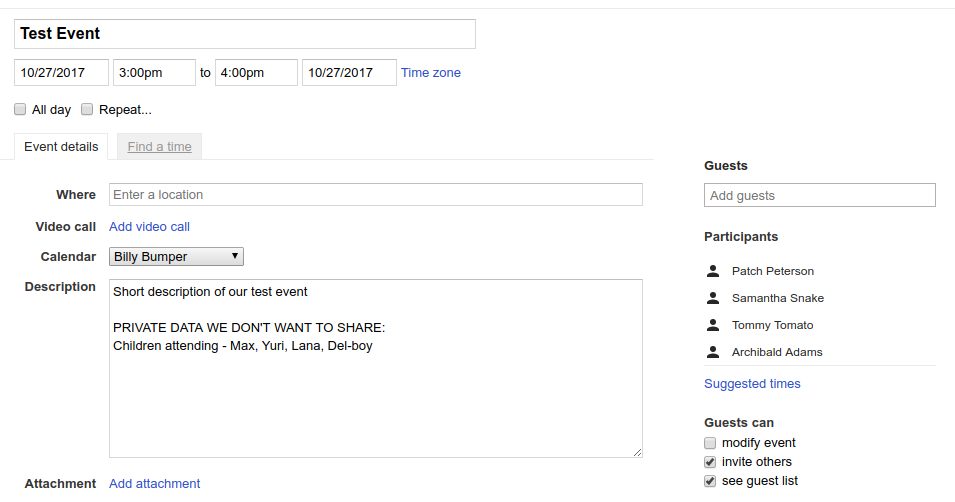
Taking the fictional event (above) as an example: once imported, I as the owner of the event will automatically show as the event organizer. The contents of the description field will also be imported and made public.
In my example, I’ve used the description field to store private data: consequently this would indeed be imported and would become publicly visible, if you configure Event Aggregator to automatically publish imported events at least.
On the other hand, the list of participant names (on the right, in my screenshot) would not become publicly visible and Event Aggregator in fact does not currently pull them in at all.
Some notes on this:
- You can configure the importer to save imported events as ‘drafts’, allowing you to edit them before publication if necessary
- It would be possible to write a customization that strips any information like that, as long as there is a consistent format that you can sure will be followed each time (in my example, that might mean relying on the presence of the keywords ‘PRIVATE DATA’ and stripping out that and anything that follows those words)
Does that clarify things? I’d further add that if a customization like I outlined were needed in your case, then while we’d happily point you in the right direction it’s not something we could write for you or that we’d be able to help you maintain.
I do hope that informs your picture of things and, again, a refund is available in the first 30 days so you can test this out (using a test Google Calendar account for example) to evaluate it.
Let me know if I can answer anything else!
October 13, 2017 at 2:15 am #1363071GuestOnce again, many thanks Barry – very clear and helpful as usual!
One last thing. To my mind I think it may well be easier/better for the community hall Trustees to achieve what they’re after by ditching Google Calendar entirely (well, as a feed source for the publicly viewed availability calendar on their website) and commit to working online entirely from within your system.
If that were the case, and they then set up all events booked at the hall through one of your systems, would it then be preferable to use Events Calendar Pro, rather than Event Aggregator?
🙂
Niels
October 13, 2017 at 8:35 am #1363223MemberYes – I think that might be a lot easier (unless there are other reasons for using Google Calendar beyond this specific need).
In fact (much as I’d love you to purchase a copy) you may not even require Events Calendar PRO. It certainly adds a bunch of useful features, but by the sounds of things our free, core plugin – The Events Calendar – could be all you need if you move to entering events directly on your own site.
That said, buying a premium plugin also opens up access to our premium forums which you might find useful if you require support. Some final notes:
- We have a further free plugin – Event Tickets – that might be useful to you as a booking tool
- I’m not quite sure how your organization is constituted but if you are a non-profit, you may be able to apply for a non-profit license for one of our premium plugins
Cheers!
October 13, 2017 at 9:42 am #1363353GuestMany thanks once again Barry.
I’ll put all these points to the Trustees – hopefully we’ll get their thoughts next week.
Thank you too for your offer to apply for a non-profit licence, much appreciated.
All the best,
Niels
October 13, 2017 at 1:43 pm #1363467MemberHappy to help 🙂
October 16, 2017 at 5:30 am #1364078GuestHello Barry,
sorry to pester!
I’ve installed Events Calendar and set up a (fictitious) event for one of the Trustees.
In setting up the event, I put in name, telephone and email details for the organiser. The Trustees will want to include this information for their own records. However, they will NOT want it made public on the website for private events, like private and children’s parties for example.
Is there a way of easily turning this off as required?
Also, the hall is a UK Registered Charity (Reg Charity Number 305230)
https://www.charitycheckout.co.uk/charity/eridge-village-hall/
and their (small, but soon to be growing!) website:
Would they qualify for your non-profit/charity licencing?
Thanks,
Niels
October 16, 2017 at 10:11 am #1364220MemberHi!
Yes, I believe they would qualify (though each application is assessed on it’s own merits). Definitely worth a shot!
The Trustees will want to include this information for their own records. However, they will NOT want it made public on the website for private events, like private and children’s parties for example.
Is there a way of easily turning this off as required?
So this would be custom dev territory and I can’t help with that here in the pre-sales forum – in fact, even for premium customers the level of support we can offer for custom coding is limited,
though we do try to at least point people in the right direction wherever we can.However it is certainly possible to make organizer information non-public (or, alternatively, you might be able to use a different mechanism such as non-public custom fields).
I hope that helps!
October 16, 2017 at 11:21 am #1364252GuestThanks again Barry.
Are you saying making organiser information non-public is possible within Events Calendar?
And/or that it is possible by making non-public custom fields?
Are either/both of these methods available within Events Calendar without custom programming? While the Trustees are happy to pay for a licence, I’m not sure they would stretch to custom programming.
Thanks,
Niels
October 16, 2017 at 12:18 pm #1364278MemberAre you saying making organiser information non-public is possible within Events Calendar?
Yes! It’s not a feature, as such – rather something that’s possible with either custom coding or some creativity.
And/or that it is possible by making non-public custom fields?
That too. You can make use of WordPress’s own custom fields facility to store anything you like. By default we don’t display that information, but do take the time to test things out with your theme of choice/with any other plugins you are using in place (since it’s possible they might expose this information – though generally speaking that will not be the case).
While the Trustees are happy to pay for a licence, I’m not sure they would stretch to custom programming.
The approach I outlined above is probably what you’d want to look at in that case.
As a sidenote, everyone’s skillset varies but often you will find existing snippets in our premium forums that you can copy and add to your own site, if you are comfortable doing so, so while we may talk of custom programming it isn’t necessarily the case that this involves hiring someone to do the work.
November 7, 2017 at 8:35 am #1377002KeymasterHey there! This thread has been pretty quiet for the last three weeks, so we’re going to go ahead and close it to avoid confusion with other topics. If you’re still looking for help with this, please do open a new thread, reference this one and we’d be more than happy to continue the conversation over there.
Thanks so much!
The Events Calendar Support Team -
AuthorPosts
- The topic ‘Import Google Calendar on demo?’ is closed to new replies.