

Forum Replies Created
-
AuthorPosts
-
October 31, 2017 at 3:04 pm in reply to: Category archive – Notice: Trying to get property of non-object #1372544
Barry
MemberHappy to help and thank you for confirming that worked 🙂
I’ll go ahead and close this topic however if we can assist with anything else, please don’t hesitate to create new topics as needed.
MemberExcellent!
We’ll go ahead and close this topic in that case, but of course please don’t hesitate to open new threads as needed should you need help with anything else 🙂
MemberThis reply is private.
MemberSharing this privately in case you prefer not to expose your site’s URL publicly:
As a quick test, do you find the same problem occurs with only a default theme, our plugins and Yoast running (but with everything else disabled)?
MemberIt’s interesting, because I can see the og:image tag in the markup for your single event pages.
I do see though that the W3C validator is tripping up over a number of aspects of your page and is even reporting what seem to me to be false positives, such as “stray head tag”. It could be worth resolving as many of the flagged issues as you can, in case these are also causing problems for Facebook’s parser.
MemberHi Joanna,
Just a note that I’m running some tests locally: if you can wait a little longer I’ll be able to give a more substantive update 🙂
Thanks for your patience in the meantime!
MemberThis reply is private.
MemberThanks, Joanna.
Can you share (by private reply):
- A Facebook URL you are importing from that results in the duplicated venues
- Though you noted this earlier in the exchange, can you confirm what your global and Facebook-specific settings are (from the Events ‣ Settings ‣ Imports screen)?
Thank you!
MemberThis reply is private.
MemberNeither!
I’m suggesting you can use those methods to extract the data you need.
Sending it to SalesForce (or cross-posting it to the order data so that the other plugin you are using can do so) isn’t really something we can help you with, I just wanted to give you a heads up as to what was available on our side to work with and pull our data 🙂
MemberHi Paul,
Could you provide a little additional explanation on the functionality to make an event private for users that are not logged in? Will this require any additional plugins to handle the permissions?
Certainly: just as with pages and posts, you can control this from the editor screen:
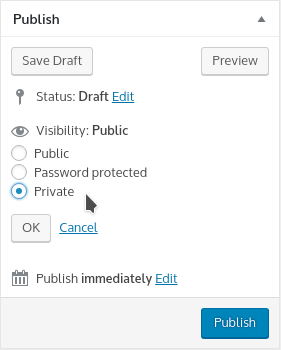
This is available without any further plugins and, once you set an event to ‘private’, only authenticated (logged in) users will be able to see it.
As an example, if you have two events taking place on November 5 (private) and November 15 (public), a logged in user will be able to access both and will see both when they visit month view. A non-logged-in user however will only see and be able to access the November 15 event.
It sounds as though, I don’t require the need to upgrade to Events Calendar Pro. Would you agree with this?
That’s right: based on what you’ve told me, it doesn’t sound like that will be required.
As far as the ability to customize the display of an event that spans multiple days, do you have anyone that you could recommend that can handle this type of customization, or is this something that can be handled by someone with reasonable CSS or PHP skills?
Great question!
We do have a list of independent developers and agencies who may be able to help (see here) however there is lots of talent available for hire in the WordPress space and you need not restrict your search to the people and organizations listed on that page.
In terms of skillset, this is of course rather subjective, but I’d suggest a developer/designer with moderate CSS and PHP skills, who is familiar with WordPress, and has strong Javascript skills is probably the sort of person you’d want to seek out.
Before you take that step, investing some time in searching for an existing solution (even if it’s only a partial solution or is incomplete) may be time well spent, as it could give you/any developer you might hire a jump-start on things and so reduce costs, if you really need this customization.
I do hope that covers your questions but let me know if I can provide more detail 🙂
October 25, 2017 at 1:59 pm in reply to: Paid events have the dollar sign on the right, not the left #1368890MemberYou bet!
MemberGotcha, so you’re referring to custom ticket meta fields here, is that correct? If so you can make use of the following methods:
- Tribe__Tickets_Plus__Meta::instance()->get_meta_fields_by_event()
- Tribe__Tickets_Plus__Meta::instance()->get_meta_fields_by_ticket()
You can use the former if you have the event ID or the latter if you have the ticket (product) ID available to work from 🙂
MemberThis reply is private.
MemberThis reply is private.
-
AuthorPosts