
Home › Forums › Welcome! › Pre-Sales Questions › Customizations of the plugin. Are these possible?
- This topic has 4 replies, 2 voices, and was last updated 8 years, 11 months ago by
Support Droid.
-
AuthorPosts
-
October 24, 2017 at 2:24 pm #1368374
Paul M Beauchemin
GuestI am an existing user of the free plugin I believe at the link below. http://kbifrm.psmfc.org/
I’ve got a few customizations that I’m not even sure are possible with the plugin, even with the addition of add-ons.
New calendar features that are required include login-based access to reveal “private” or “enhanced” events on the existing calendar (to be clear – both enhanced events and public events would be displayed to users with login credentials)
□ Login-based access to see additional (Private) events happening in addition to existing public events
□ Should be built in to the existing calendar (one calendar not two)
□ Ability to display multiple events per day in a month-based layout, colour coded to differentiate between internal events and external events
□ Ability to show multi-day events in a visually clear way (e.g. using bands like in Google Calendar)
□ Event submission feature. When participants want an event posted they should be able to go to the website and fill out a form that we can then either enter manually in WordPress, or better, simply approve prior to posting. This is only available to users who are logged in.October 25, 2017 at 11:48 am #1368834Barry
MemberHi Paul,
I do apologize for the delay in responding – and thank you for your interest in our plugins!
The first thing I’d like to highlight is that all of our premium event plugin offerings, such as Events Calendar PRO, build and depend upon the solid foundation provided by our free, core plugin — The Events Calendar. I just wanted to flag that – as some of what you are asking about should already be possible and you can test that out on your existing site and confirm if so.
Events for example can be set to “private” (the process is pretty much identical to what you would do if you made a regular WordPress page or post private). If you do this, those events will only be visible to logged in users.
Ability to display multiple events per day in a month-based layout, colour coded to differentiate between internal events and external events
More than one event can indeed be displayed for each day in month view. The exact amount is configurable (and if this number is reached, we provide a link that visitors can follow to see all events).
Colouring events is not something we support directly, but a third party plugin called The Events Calendar Category Colors does this on a per-category basis (so, you could install this and simply assign each event to one of two categories, specifying a specific colour for each).
Ability to show multi-day events in a visually clear way (e.g. using bands like in Google Calendar)
Currently we don’t handle this in quite the same way as Google Calendar. It would be possible to make it do this through some further customization work, however that’s something we are unable to guide you through.
Event submission feature. When participants want an event posted they should be able to go to the website and fill out a form that we can then either enter manually in WordPress, or better, simply approve prior to posting. This is only available to users who are logged in.
I believe our Community Events plugin would fit your needs here 🙂
In fact, given your list of requirements it sounds like that’s the only premium plugin you would require and the rest of your needs would mostly be met by The Events Calendar itself.
I hope that answers your questions, but do let me know if I can clarify anything else.
October 25, 2017 at 6:12 pm #1368956GuestHi Barry,
Thanks so much for the info, this is much appreciated.
Could you provide a little additional explanation on the functionality to make an event private for users that are not logged in? Will this require any additional plugins to handle the permissions?
It sounds as though, I don’t require the need to upgrade to Events Calendar Pro. Would you agree with this?
As far as the ability to customize the display of an event that spans multiple days, do you have anyone that you could recommend that can handle this type of customization, or is this something that can be handled by someone with reasonable CSS or PHP skills?
Thanks so much for your help. We’ll for sure be purchasing the Community Events plugin.
Thanks and regards
October 26, 2017 at 3:49 pm #1369635MemberHi Paul,
Could you provide a little additional explanation on the functionality to make an event private for users that are not logged in? Will this require any additional plugins to handle the permissions?
Certainly: just as with pages and posts, you can control this from the editor screen:
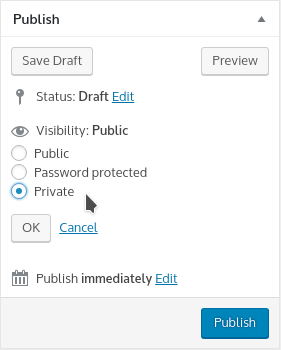
This is available without any further plugins and, once you set an event to ‘private’, only authenticated (logged in) users will be able to see it.
As an example, if you have two events taking place on November 5 (private) and November 15 (public), a logged in user will be able to access both and will see both when they visit month view. A non-logged-in user however will only see and be able to access the November 15 event.
It sounds as though, I don’t require the need to upgrade to Events Calendar Pro. Would you agree with this?
That’s right: based on what you’ve told me, it doesn’t sound like that will be required.
As far as the ability to customize the display of an event that spans multiple days, do you have anyone that you could recommend that can handle this type of customization, or is this something that can be handled by someone with reasonable CSS or PHP skills?
Great question!
We do have a list of independent developers and agencies who may be able to help (see here) however there is lots of talent available for hire in the WordPress space and you need not restrict your search to the people and organizations listed on that page.
In terms of skillset, this is of course rather subjective, but I’d suggest a developer/designer with moderate CSS and PHP skills, who is familiar with WordPress, and has strong Javascript skills is probably the sort of person you’d want to seek out.
Before you take that step, investing some time in searching for an existing solution (even if it’s only a partial solution or is incomplete) may be time well spent, as it could give you/any developer you might hire a jump-start on things and so reduce costs, if you really need this customization.
I do hope that covers your questions but let me know if I can provide more detail 🙂
November 17, 2017 at 8:36 am #1385676KeymasterHey there! This thread has been pretty quiet for the last three weeks, so we’re going to go ahead and close it to avoid confusion with other topics. If you’re still looking for help with this, please do open a new thread, reference this one and we’d be more than happy to continue the conversation over there.
Thanks so much!
The Events Calendar Support Team -
AuthorPosts
- The topic ‘Customizations of the plugin. Are these possible?’ is closed to new replies.