

Forum Replies Created
-
AuthorPosts
-
Barry
MemberHi Andrew,
The tribe_ical_feed_item hook allows you to filter every item that is added to the iCal feed so that would be one option.
Here’s an example:
https://gist.github.com/barryhughes/c711c10505f000510b4a
This could for instance be added to your theme’s functions.php file, or else a custom plugin. Does that help at all?
MemberHi Peter,
Though I appreciate both issues relate to a conflict with the same plugin, they do seem to be different in nature (one sounding like it relates to a script or styling conflict, the other potentially being a permissions-based issue).
Let’s deal with the first issue in this topic: if it so happens that resolves the second item that’s an added bonus – but it’s probably best to deal with that in a separate topic 🙂
1. The event picker for all users is overlapping but can be edited manually
That’s really strange – my guess is they are enqueuing scripts or stylesheets on all admin pages rather than just their own.
I have also submitted this for WPMU support.
Can you confirm with them if the above theory is valid and, if it is, ask if they can furnish you with a snippet to restrict the cases where this happens?
MemberHi Amanda,
Unfortunately I can’t view the page you linked to (“This website is currently under development”) so I’m a little unclear as to the actual problem – are these events that are taking place in a different location assigned to the same category?
Can you provide a little more context?
Thanks!
MemberHi Thomas,
You’re welcome to use private replies but can I ask you reserve them for those occasions where you are sharing confidential information (for instance, a URL you prefer not to disclose publicly)? When overused, private replies tend to render forum topics unreadable for other members of the community who might benefit from them in the future 🙂
The web-tool on your side is not working properly with my file. So I have to try on and still need some time. Do you have any tip?
Sorry to hear that.
How are you creating the file in the first place – does that application you are using provide any options to change the way the file is saved?
MemberHi Annie,
Can I just add the code you suggested at the end to the custom css file I already have in my theme?
Give it a shot and if it works, great!
And one more spacing question: there seems to be two spaces between all of the venue names and the comma that comes before the address on each event. Is there a way to fix that?
So you’re referring to list view in this case? If so, it appears that there is a custom rule in relation to your theme (defined in suffusion/custom-styles.css):
article.page span.author {
    float: left;
    padding-right: 10px;
}
Removing the padding-right rule would resolve this, or alternatively you can follow a similar approach as before and add a new rule like this:
#tribe-events-content-wrapper .author { padding-right: 0px; }MemberApologies, when I wrote “the steps described here” I meant to link to this guide:
MemberHi Annie,
Worked this time, thanks!
Following the steps described here, can you create a new sub-directory within your theme, something like this:
wp-content/themes/[YOUR_THEME]/tribe-events
Within that, add a new file called tribe-events.css so in your case you should end up with:
wp-content/themes/suffusion/tribe-events/tribe-events.css
In this new file, please try adding:
.single-tribe_events .tribe-events-content {
    width: 96%;
}
Does that help?
MemberHi Peter,
Actually, there’s no need to test that – I’m pretty certain the problem is indeed with the Danish translation:
<p>Indstillingerne herunder styrer visningen af din kalender. Hvis det ser
forkert ud så prøv at skifte mellem de tre style sheet muligheder eller
vælg en sideskabelon fra dit theme.</p><p>Der vil være situationer, hvor
ingen standardskabelon er 100% perfekt. Se <a href=”%s”>vores themer’s
guide</a> for instruktion om tilpassede modifikationer. Vil du oprette en ny
visning? Snup en kopi af <a href=”%s”>The Sample Agenda View plugin fra
Github</a>Note how there are two cases of %s – there should only be one.
So, essentially, the translation is out of date and that is causing this problem. Thankfully, it seems to have been corrected in the code for our upcoming release – which should arrive shortly 🙂
MemberCould it be your theme is running one or more loops before the main loop itself is rendered – whether in some functions.php code or in a template like header.php – and might it be missing some cleanup code?
If you can identify anything like that, can you try commenting them out to see what impact there is?
July 17, 2015 at 1:02 pm in reply to: Eventbrite imported events are not shown on the map view #987485MemberYou could try installing and activating this plugin – called The Events Calendar: Test Geoloc Connectivity.
As soon as you activate it you should see some feedback at the top of the screen. In the best case, it will connect to Google and retrieve coordinates for a known location and would look something like this:
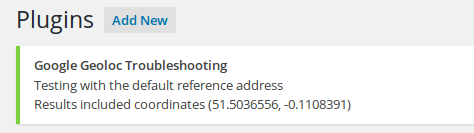
It’s possible it will say something else in your case though – but if you can give it a try and let me know what comes back that might be useful.
MemberHi Annie,
Unfortunately none of those URLs finish loading when I try to view the pages … a quick check with a third party tool suggests it wasn’t just on my end.
Can you confirm they are working/there isn’t some other problem at work? I’ll be happy to try again a little later 🙂
July 17, 2015 at 7:35 am in reply to: Eventbrite imported events are not shown on the map view #987366MemberHi @cliffy,
It’s not actually the theme that is responsible for finding the coordinates – this is something our plugin tries to do and it relies on Google’s geolocation API to do so.
There are a number of reasons this may fail. Invalid addresses is one, but it’s also possible that Google will refuse to serve data to a specific site (or to a specific IP address – an important difference if you are using shared hosting).
A quick test you can perform is as follows:
- Create a new venue
- Initially, do not expand/enable the long/lat settings
- Enter a complete and valid address and publish
- Once the editor reloads, check the long/lat settings – do you see any coordinate values in here?
July 17, 2015 at 7:29 am in reply to: Month view: previous / next navigation loses category filter #987363MemberNope – it’s not directly connected to that setting – and ajax navigation still occurs by default when paging between months even if that is disabled.
MemberHi Marianna,
I’d recommend using CSS and applying floats in the relevant directions to some of those elements – this is really custom development/design territory, though, so I’m afraid we can’t write this for you – but there are certainly lots of great resources on writing CSS online (and it looks like you’ve got a good handle on applying CSS within WordPress).
As we can’t really go much further I’m going to go ahead and close this topic – but I hope the customization work goes well 🙂
MemberOddly, it seems to randomly drop back to a different (non-WP) site as I navigate across it, but thanks – I’m able to take enough of a look.
In any case, I’d suggest trying this one more time – however you need to save your CSV data in UTF-8 format (as described in the CSV import screen):
Upload a properly formatted, UTF-8 encoded CSV file. Not sure if your file is UTF-8 encoded? Make sure to specify the character encoding when you save the file, or pass it through a conversion tool.
Right now it appears to be encoded using some other scheme.
Can you give that a try?
-
AuthorPosts