

Forum Replies Created
-
AuthorPosts
-
Barry
MemberAwesome!
July 23, 2015 at 1:45 pm in reply to: How to get the right format / url for events at ical and google #989642MemberHi Bill,
To take the first URL you shared:
http://www.co.contra-costa.ca.us/common/modules/iCalendar/iCalendar.aspx?catID=87&feed=calendar
The contents of this are as follows:
BEGIN:VCALENDAR
VERSION:2.0
PRODID:iCalendar-Ruby
END:VCALENDAR
So it’s got the beginnings of an iCal feed but is incomplete and not valid by itself. Unfortunately, there’s not too much we can do to control external sources.
http://www.co.contra-costa.ca.us/common/modules/iCalendar/iCalendar.aspx?catID=90&feed=calendar
For this second URL, at least at the point in time where I visited it (it could of course have contained something else when you last accessed it) it was a valid iCal feed with three events in it, which I had no problem importing:
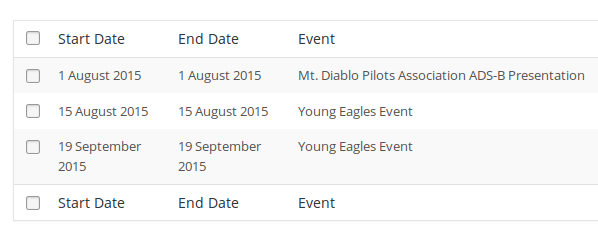
I’m not sure why you experienced something other than this unless it was indeed populated with some other content – perhaps it was empty like the first feed – when you accessed it.
It’s also possible you were up against some kind of conflict – what I would suggest is trying this particular feed again, and if you hit the same problem we can explore testing for conflicts.
For the third URL you provided:
webcal://espn.go.com/travel/sports/calendar/export/espnCal?teams=6_23
I also experience problems – but not only through iCal Importer. Other online and local calendar tools I would expect to understand this – were it valid – do not work. Might the problem be with the feed itself in this case also? Where did you originally find the link for this?
MemberHmm, there are definitely some oddities in there 🙂
Undefined variable: woocommerce in /.../wp-content/plugins/the-events-calendar/src/views/single-event.php on line 87
I would not expect to see this error in a “stock” installation (and the log entry is timestamped today). Is it possible you or someone working on your behalf has directly modified core plugin code?
Was this just the result of some experimentation while you were troubleshooting? Might there be other places in the plugin codebase that were also altered?
Please do note we’d advise you never modify core plugin code directly unless you have an overwhelming reason to do so. Typically, for templates, there is never a good reason as they can easily and safely be overridden by other means 🙂
MemberHi Melissa,
Does the suggestion I provided here help?
MemberHi guys,
We did make some improvements to better support various cost formats (and cost ranges, where multiple prices exist for a single event).
That may have got in the way here, but a short snippet like this one should provide the behaviour you are seeking:
https://gist.github.com/barryhughes/21c4e2fc52aec514cc9c
You could add this (typically, you can strip out the opening <?php tag) to your theme’s functions.php file, a custom plugin or any other suitable place.
Does that help?
MemberHi @cliffy,
I’m sorry you’ve hit up against difficulties.
You don’t seem to have provided your system information so I’ll need you to check this manually – but if you go to the Events → Settings → Default Content screen, is automatically replace empty fields with default values checked?
If it is not, can you check it, save the change and see if things then work as expected?
Let me know how you get on!
July 23, 2015 at 12:37 pm in reply to: Event manager do not get confirmation and log in email #989577MemberHi Shah,
Moving to a dedicated email provider is just a suggestion – I’m afraid beyond that, in this case, I don’t think there is too much we can do to help (especially as these emails are standard WordPress registration emails – rather than something directly generated by our plugin).
I have another request. Can you let me know of functional site(s) that actually use, The Calendar PRO, Community Events and Woocommerce Tickets plugins combination??? I believe browsing those sites will be of great help.
Please do feel free to browse our showcase 🙂
I’m afraid I don’t have any other examples of sites using the specific combination of plugins you highlighted, though.
MemberSure – there may been a reason for that – I don’t think it’s needed here just yet, though. As in my previous reply, I’m wondering:
I missed your note explaining it is definitely a child theme issue. That being the case, what is in there to differentiate it from the parent theme?
Can you try selectively removing items to see what the problem might be?
Is that something you can try or if you already did, can you confirm the outcome? Honestly, I’m not sure how much more we’ll be able to do for you in this case since it is related to a (custom?) child theme, rather than being a more general incompatibility issue.
MemberI’m afraid we cannot accept WordPress logins, due to our current support policy.
However, how did you implement that restriction? Was it through custom code and might that itself be impacting?
MemberNot at all, thank you for your cooperation and patience while we work through this.
I wish I could offer a more obvious solution without having you do those steps, but primarily because we’re seeing few/no similar reports and cannot replicate locally, it does “feel” like a conflict.
Let me know what you find!
MemberAh, I see.
Yes that is only used for the frontend editor and “My Events” list pages, for instance:
example.com/events/community/add
example.com/events/community/listIt has no impact on actual events – the URL for individual events, once published, follows exactly the same pattern as they would if created by an administrator or editor through the admin environment.
Does that clarify things?
MemberCould all the 404’s on the dev site be because you asked me to turn off all the other plugins
I’m inclined to think not – some related to your theme stylesheet, for instance.
I’ll sort the data out but it may be tomorrow as we are long past the end of the office day here.
Awesome, thank you for your patience and cooperation as we work through this. It would be fantastic if we could pin down the cause 🙂
MemberHi Doug,
I’m not quite sure I understand: the normal and expected URL structure for event views (and individual events) remains the same even with Community Events activated.
Where do you see this change/what did it change from? Or, how would you prefer it to work/for the URLs to be structured?
MemberI’m afraid that under the terms of our current support policy we are unable to do so:
- Could you provide a database dump (from the dev site)? While you cannot upload them to the forum directly, if you could upload it to your own/another site like Dropbox and share the link via a private reply, that could be useful
- On looking at the frontend of your dev site, numerous 404s occur in relation to JS/CSS assets – this may be particular to the dev site and the way it’s configured but it did make me curious – are you familiar with using your browser’s developer tools and, if so, do you notice any comparable problems in the WooCommerce orders screen (can you list them here if so)?
MemberGot you – thank you taking the time to clarify, it’s much appreciated.
Are you in a position to do some further testing as outlined above? I realize it involves some extra work, but since we’re unable to replicate it seems like the best way to move forward.
-
AuthorPosts