

Forum Replies Created
-
AuthorPosts
-
September 26, 2016 at 7:58 pm in reply to: Events list – upcoming events widget – not displaying events #1168994
Barry
MemberHi David,
I’m sorry to hear it isn’t working as expected.
One thing I wondered is if you have applied any filters to the widget: it is possible for example to set it to display only events from a specific category (and perhaps right now there are no events in whatever category that is). Could that be the cause of this?
Alternatively, there could be a straightforward conflict with your theme or with another plugin and our standard troubleshooting steps would help to confirm or eliminate that possiblity.
It’s not always desirable to perform that kind of troubleshooting on a live site, but most web hosts make it very easy to create an additional WordPress installation inside a sub-directory (example.com/test-site or similar). If you do this, you could start with just our plugins and a default theme and see if the problem still occurs.
Assuming it doesn’t happen under those conditions, begin adding the same plugins and ultimately the same theme as you have on the live site: do you find one of them triggers the problematic behaviour?
September 26, 2016 at 3:45 pm in reply to: Some assistance sorting out the event date order on an upcoming events module #1168943MemberHi James,
I’m sorry to hear you’ve experienced some difficulties. As before, I do need to highlight that the amount of support we can provide for custom code is rather limited.
Could you share the code you are using for your query in its entirety? If you haven’t already done so, can I ask if you’ve tried using tribe_get_events() for this purpose as Brian suggested in your previous thread?
Thanks!
September 26, 2016 at 3:37 pm in reply to: Tagged events list, click to pages 2 and higher? #1168942MemberHi Vic,
To some extent, The Events Calendar does indeed support URLs of the pattern you described (ie, /events/tag/{name}/) however they aren’t in general use and there would be various shortcomings if you do try to use them, such as you have outlined.
So far as I was aware we do not automatically generate any links that use that sort of URL. Can I ask how you came across them?
MemberHi Andrew,
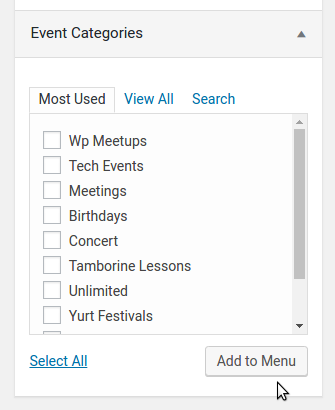
There are a couple of ways you could do this. If you want to add event categories to a regular WordPress menu, you’ll find that you can simply locate the correct category (in the Appearance → Menus admin screen), check the box and add it that way:
Alternatively, you could visit the list of event categories in the admin environment and find the URL of the ones you are interested in by following the view link, or by right clicking and copying the URL to your clipboard (via the Events → Event Categories admin screen):
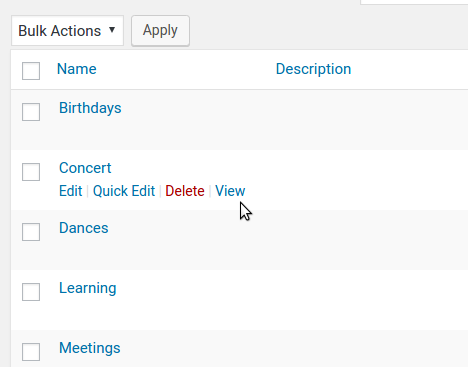
The first approach is the easiest as you would never have to manually craft the link, but the second approach can be useful if you need to do something more creative than that.
In summary, though, the process would be almost exactly as it is for a regular WordPress post category 🙂
I hope that helps!
MemberHi Andrew,
Thanks for your interest in our plugins!
A combination of Event Tickets, Event Tickets Plus and optionally The Events Calendar is a great way to sell tickets for your events and we actually have a live demo available so you can get a sense of how it might look to your prospective customers.
I do have to highlight however that – at least right now – recurring events are not officially supported by our ticketing solutions.
Can I have an events calendar on PAGE 1 which shows all paid classes (i.e. shows category a) and an events calendar on another page which shows social events etc (i.e. category b)?
You could certainly categorize your events as paid and unpaid and then generate links to each of those categories, which would basically let you achieve this (and, in an upcoming release, we’ll be adding a new shortcode to provide even more flexibility in this regard).
For this kind of setup would I need to buy both Events Calendar Pro and Events Tickets Plus?
To sell tickets, all you would need to buy is Event Tickets Plus: this depends on Event Tickets which is freely downloadable.
Events Calendar PRO provides additional views and capabilities like support for recurring events but, as above, I’m afraid that currently recurrence and ticketing are not a supported combination.
I hope that answers your questions, but please do let me know if I can help with anything else 🙂
Thanks again!
MemberGlad to hear it worked 🙂
I’ll go ahead and close this topic, but of course feel free to create new topics as needed should anything else crop up and one of the team will be only too happy to help.
September 14, 2016 at 4:33 pm in reply to: Modifying public submission form values before saving to database #1164339MemberHi Jarno,
That’s a great question!
The first thing I should highlight is that for custom development tasks like this one we tend to be pretty limited in terms of just how much detail we can go into. That said, I’d be happy to point you in the right direction if I can 🙂
In terms of validating fields and throwing custom errors, this knowledgebase article may be a help:
theeventscalendar.com/knowledgebase/required-fields-for-events-submission-form
It doesn’t cover modifying submitted values but given your objectives it is definitely worth reading. In terms of altering the events after submission, you may also be interested in the following hooks:
- tribe_community_event_created (for new events)
- tribe_community_event_updated (for pre-existing events)
By adding your own callbacks for these actions (the event ID of the relevant post will be passed to your callback) you can take further action and potentially modify the saved post and its post meta data if you wish to do so.
Again, this is a fairly bespoke customization to make so we can’t go into too much depth, but hopefully this will be enough to get you started.
Good luck!
MemberHi Lisa,
Where did you add that code exactly? I do see a cached and minified stylesheet which contains the following CSS:
.tribe-events-tooltip a{color:#d35254}However this lacks both the paragraph selector and the !important modifier. I do appreciate use of !important is generally frowned upon, but it would be useful in this case. If you did add those things, perhaps they were stripped out by whatever tool you are using to minify, cache and concatenate the CSS?
MemberThanks Mathew, I’ll share that with the team.
If you’re able to, adding that image to the relevant UserVoice request (simply by providing a Dropbox link or similar, seeing as uploads aren’t allowed) would be worthwhile – and please don’t let the lack of upload capabilities prevent you from upvoting the idea.
Cheers!
MemberHi @madmen,
I’m sorry to hear you’ve hit up against problems.
It’s important to understand though that one of the reasons we provide a range of different views is so that you can select and use those which are a good fit for your calendar data: the reality is, not every view is going to provide a a great fit all of the time and much depends on the frequency and number of events you are publishing.
With that in mind, it may be worth evaluating (and enabling) other views as needed.
Beyond that, can I ask what you’d like to see here? Condensing more than two events in parallel seems like it would – potentially – be a readability nightmare. Did you have a different vision of how it might work? While we may not be able to do anything in the short term feedback like this is definitely valuable in helping us to shape future versions of the plugin.
Remember also you can submit feature requests for our consideration over on UserVoice:
Thanks!
MemberHi Lisa!
You appear to be using The Events Calendar Category Colors. Some of the CSS generated by that plugin is ‘bleeding’ into this event and is altering the color of the links to white (for events falling within certain categories).
If you are able to add a new rule to your stylesheet, or via a custom CSS plugin perhaps, you can probably workaround this and achieve a consistent link color everywhere:
.tribe-events-tooltip p > a {
	color: blue !important;
}
Does that help at all?
MemberThis reply is private.
MemberHi Jason,
Thanks once again! I’m going to ask a colleague to cross check everything as I’m unsure where things are going wrong here exactly, and the debug output you shared also puzzles me.
- My assumption has been that you are selling tickets via WooCommerce (plus, you are using WooCommerce and Event Tickets Plus and have kept those active for testing which would seem to confirm this is the case) – but just so I can be absolutely sure, is that the case? Are you using RSVP functionality at all?
- Looking at the system information you shared, ACF Pro seems to be active: this is a great plugin and widely used so I’d like to think there are no conflicts arising from it, but to be sure we should re-test with that plugin deactivated.
- One other thing that caught my eye was the system information under Settings: in your case there isn’t a lot there (it reads something like “Array 4.2.3 hidden Array…” – can you confirm if that is an accurate representation of what you see there, or if you manually redacted it or hit up against copy and paste problems or something along those lines?
Regarding the license key, please don’t worry about it: you are free to use the plugins on a dev/staging site and need not add the key there.
Thanks again for your continued cooperation and patience while we investigate this.
MemberHi again Jason – a couple of others thoughts:
- Could you share your system information with us
- Did you have any success setting up a dev zone or testing site – if so, do you happen to know if this solution works there under ‘default conditions’ (no other plugins but our own running and only a default theme)?
Thanks again!
MemberI’m sorry to hear that. Just to confirm – you obtained exactly the same result and there was nothing else similar to the following?
Checking Tribe__Tickets_Plus__Commerce__WooCommerce__Main
-
AuthorPosts