

Forum Replies Created
-
AuthorPosts
-
Barry
MemberI’m glad it’s working!
Out of interest, could you let me know the theme name and version number?
Thank you 🙂
MemberHi Mark!
You should find an Event Categories option in the admin menu:
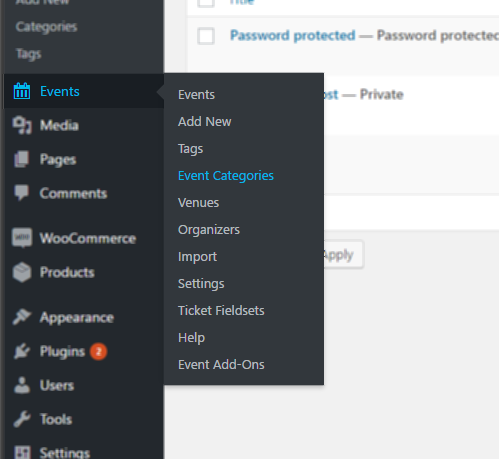
If you go to that screen, you should then find a list of event categories and should be able to delete those you no longer require.
Does that help?
MemberHi Elizabeth,
I’m sorry to hear that you’ve experienced difficulties.
I refunded their order through WooCommerce, but the tickets were still listed as sold in Event Tickets Plus
I can understand why this might be confusing, but it is actually intentional.
A refund can happen for many different reasons and does not always mean that stock has been ‘released’. For instance, a refund may be issued for customer service reasons/as a goodwill gesture, with the customer retaining the tickets and continuing to attend the event with the management’s blessing.
To accommodate such cases we don’t automatically restock the event or even remove the tickets from the attendee screen – though we do clearly annotate them as having been refunded. If however you select those attendees and delete them you should find that the event is indeed “re-stocked”.
This means that someone could buy a ticket, get a refund, and then still show up at the event and get in because your system still lists them as an attendee for the event.
The hope is that staff performing check-in will either see that the ticket has been refunded (and will have been equipped by management with the knowledge necessary to determine if that means the ticket is consequently invalid or not, depending on the situation) or that the attendee will have been deleted from the list.
There are pros and cons to both approaches, but actually retaining the attendee on the list – clearly marked as refunded – may well help prevent confusion (vs having a customer arrive with what appears to be a valid ticket, yet check-in staff have no record of it).
…because it still counts the refunded sale as a sold ticket
True, though again this is intentional: the fact an order was refunded – or perhaps even cancelled – does not mean the sale did not take place.
Once a decision has been taken to re-stock the ticket inventory (or not), the critical information in terms of how many tickets are remaining for sale remains present on the attendee screen and should be accurate.
Please tell me this is a bug and not how you intend for the software to work?
I’m afraid to say that much of what you have asked about actually is intentional, though I’m sorry to hear it has led to a poor experience in your case.
How we handle order statuses and ticket inventory is something we’ve been refining through successive releases and we’ll continue to do so: it’s important to bear in mind however that we need to meet the needs of many different businesses (not all of whom have the same processes or who would like automatic re-stocking to happen the moment a refund is issued).
With all that said and having explained why a number of things work the way they do … are there specific changes you would like to see to make the experience a better one for you and your team?
MemberAwesome!
MemberIt’s probably possible – but I’d be reluctant to play with that too much as under the current architecture the “child” events (ie, the current and future events within the series) inherit the properties of the “parent”.
So, maintaining some kind of distinction that lets us easily hide some of those expired parents could be fiddly and brittle work that might lead to problems elsewhere.
Again, possible – just not something we’d recommend modifying.
Sorry!
MemberHi James,
Would a solution like this work for you?
function maybe_remove_rec_tooltip( $template ) {
	// Do not interfere if this isn't the list view
	if ( 'list/content.php' !== $template ) {
		return;
	}

	// Safety check, in case PRO has been deactivated
	if ( ! class_exists( 'Tribe__Events__Pro__Main' ) ) {
		return;
	}

	// Disabled recurrence tooltips
	Tribe__Events__Pro__Main::instance()->disable_recurring_info_tooltip();

	// Restore once list view has finished rendering
	add_action( 'tribe_after_get_template_part', 'restore_rec_tooltip' );
}

function restore_rec_tooltip( $template ) {
	// Do not interfere if this isn't the list view
	if ( 'list/content.php' !== $template ) {
		return;
	}

	// Disabled recurrence tooltips
	Tribe__Events__Pro__Main::instance()->enable_recurring_info_tooltip();
}

add_action( 'tribe_before_get_template_part', 'maybe_remove_rec_tooltip' );
(This could be added to a custom plugin or even to your theme’s functions.php file, though if the latter is not a custom theme you’d want to be wary of losing changes upon future updates.)
The idea is that it detects list view is being rendered, disables the recurrence tooltips, then restores them afterwards. If you prefer to disable them entirely, across all views and not just list view, you could use a similar – but simpler approach.
Does that help at all?
MemberHi Michael,
Thanks for contacting us.
On searching for the event you referenced (hopefully I did indeed hit upon the right one!) I noticed the following:
- There is an event from last year, dated July 11
- There are no further events in that same series until December 12
- The weekly pattern resumes from this point onwards
If this is the sort of pattern you are noticing – ie, a single event in each sequence is being ‘left behind’ and isn’t being cleaned up – then that is actually the expected and intentional behaviour of the plugin.
The event which is not being cleaned up is the “parent” for the series (ie, the very first event in the series) and is, in a sense, the glue used to bind the other events in the sequence together. Owing to that, we deliberately do not clean them up in the same way we clean up all of the other recurring events.
We fully appreciate this may seem slightly odd and it’s something we intend to address in a future re-working of the recurrence system, but I’d reiterate that – at this point in time – it is intentional and expected.
Does that clarify things?
MemberHey there, Huiwen: I’m afraid Community Tickets itself does not offer any other options for disbursement that would help.
MemberWouldn’t it be helpful that EC runs a trial with Live Mode so that you know what has been changed on the paypal side and maybe you could update your knowledge base accordingly and thoroughly? Just an idea…
I’ll certainly pass that idea on 🙂
MemberHappy new year!
If your live app has now been approved and you continue to hit issues, please do let us know. Thanks 🙂
MemberAbsolutely – we’ll continue to update and improve the knowledgebase as things change. Unfortunately, there can be an element of lag (which is a little more pronounced at this time of year, as many team members are enjoying some vacation time), but a further review of the Community Tickets/split payment articles has indeed been scheduled 🙂
As far as recent community experiences involving split payments go, that’s a great question! If any other users out there have relevant notes they wish to share, please don’t be shy!
MemberHi Huiwen,
It’s difficult for me to be certain, but based on what you relayed it sounds as if final approval has not yet been granted, even though you have (perhaps provisionally) been granted a live API key.
If there is any confusion on this point the best thing to do is to approach the PayPal team for further assistance. I’m afraid that, until we know categorically that you’ve received final approval, there probably isn’t too much point in us running through further troubleshooting efforts.
I also made all my paypal accounts verified. This also turned out to be an important condition but was mentioned nowhere in the knowledge base – and it took me the whole night to figure it out!
We’ll have a think about adding this to an appropriate knowledgebase article, too.
With that said, while we try hard to support you and other customers directly here on the forums, as well as indirectly through the knowledgebase and other resources, we are just one part of this. The service provided by PayPal themselves is critical to success here and they provide their own support channels and fairly extensive documentation.
Working with them and making yourself aware of how things work on that side therefore is pretty important for you as a merchant and – while we can try to draw attention to key points about the setup process – realistically we can’t mirror everything (and if we tried, it would probably periodically fall out of date with the official PayPal docs – as things can and do change on their side).
You’re quite right that this isn’t the first time a customer has hit up against issues during adaptive payment setup, though, and of course we’ll continue to revise the documentation on our side as needed.
MemberThis reply is private.
MemberThis reply is private.
MemberSo there were two attempted transactions and, this time, two email addresses/accounts were specified when communicating with PayPal, which is great.
Of course, they still failed and the returned error this time was The X-PAYPAL-APPLICATION-ID header contains an invalid value: if this was an attempt at a live transaction and you haven’t yet received approval from PayPal, then that might be why this error was returned.
-
AuthorPosts