

Forum Replies Created
-
AuthorPosts
-
Barry
MemberGreat: with that done, hopefully you’ll be able to successfully sell tickets while utilizing split payments.
If after approval you still hit up against difficulties, please do share the most up-to-date adaptive payment logs (and provide me with the relevant failing order IDs so I can identify the relevant log entries).
Thanks again!
MemberI don’t think those specific settings should impact, but you raise a good point. Has your live application been submitted for review by PayPal and has it been approved? If not, you would need to complete those steps.
Please see here (step 4 in the “How to Get Started” guide in particular) for details.
MemberOK, so this confirms that the basic mechanics of the plugin seem to be functional, as the sandbox environment is essentially identical to the live one (on a technical level at least).
I’m sure you’ve checked and double checked this, but now you are trying to get things running in a live environment it is important to be sure that all email accounts in use relate to live PayPal accounts and not to sandbox accounts. If you’re positive this is the case, please try another transaction and then determine what the order number is (this can be found in the WooCommerce → Orders admin screen).
Next, please copy the most up-to-date adaptive payment error log from the WooCommerce → System Status → Logs screen and share this via a private reply (please do remember to let me know the matching order number here so I can match the order with the relevant section of the log).
We’ll see what the error is and take things from there.
MemberHi there!
Wow good news! I tested with my sandbox -buyer@ account as event organiser and looks like the transaction can go through!
Sounds like we’re making progress even if we still need to iron out a few details 🙂
Although, I do recommend you (or your team) updating the knowledge base.
I agree. We actually have some work scheduled in this area already but I’ll certainly review the specifics and see if any further improvements could be made based on this exchange.
Well LIVE mode doesn’t work…
That’s disappointing. To focus on the remaining sandbox-testing issue, though:
I do not have an account (I’ve already used my -buyer and -facilitator account and I don’t know what to put there).
You would need to create a further sandbox account, letting you test from the perspectives of:
- The merchant
- The organizer
- The end customer
If you log in to PayPal → Developer → Sandbox Test Accounts you should be able to locate a Create Test Account button and be able to create a third account.
Does that help here, at least in terms of achieving a successful baseline test within the sandbox environment?
MemberThanks again for your patience, having had a chance to review things I picked up on this comment about the customer email address you have been using during sandbox testing:
and real paypal account
If you mean it’s not also a sandbox account then yes, that would definitely be a problem.
You can think of PayPal’s sandbox as an isolated world. It has no knowledge of real PayPal accounts – so if you try to mix and match sandbox and live credentials during sandbox testing, or vice versa, then you can generally assume things won’t work as expected.
I do have your latest database dump set up and ready to go – but perhaps we should confirm if this might be the source of the problem before proceeding any further?
I’ll check in on this through the day so if I’ve misunderstood I’ll be able to pick things up for another look.
MemberI’m afraid our policy is not to login to customer websites; we can make exceptions in some cases but it’s very much a last resort (this is designed to protect both of us).
Let me get your most recent database dump in place and we’ll see if that gets us any further.
MemberThanks!
I did notice that sandbox-mode was not enabled; additionally the Enable Split Payments option was unchecked (both of these settings can be found in the Events → Settings → Community screen).
I enabled both, but I suspect the credentials contained in your database dump were your live credentials and so didn’t work in sandbox mode.
That naturally caused a bit of a problem when troubleshooting however the outcome was not completely negative:
[receiver] => Array
(
    [0] => Array
    (
        [amount] => 100.00
        [email] => [email protected] # redacted
        [primary] => true
    )

    [1] => Array
    (
        [email] => [email protected]
        [amount] => 90
        [primary] => false
    )
)
As you can see from the above extract, when testing with a customer with an email address defined via the frontend Payment Options screen, the correct receiver breakdown (given a 10% fee) took place.
In my testing, the transaction still failed but for the following error:
Account not found. Unilateral receiver not allowed in chained payment
On this occasion, I suspect the problem was that your live/production credentials were in place in the database dump and so, in a sandbox context, it could only identify one account.
Can you confirm which customer-type user (from your database) you tested with?
MemberThanks for the update: given that you are using valid email addresses/PayPal accounts, I’m not sure why that would be either.
I apologize also for the increased delay in response times; getting a good handle on what exactly is going wrong here hasn’t been too easy. I’m curious: would you be happy to share a database dump (of your site, complete with testing/sandbox credentials) purely so we can debug using your actual configuration?
We would of course destroy it immediately after completing our troubleshooting efforts.
If that is something you can accommodate please do send a full database dump across by private reply. It’s quite possible that such a file, even when compressed, will exceed the size allowed by the forum for uploads – that being the case, you could possibly use Dropbox or a comparable service to facilitate this.
Please let me know if that’s viable here (and if it isn’t that’s fine – we’ll try to think of other angles from which to approach this).
MemberOK, thanks for confirming.
I’m sorry this is taking so long without a clear fix in sight, but bear with us a little further while we explore this – and the information and logs you shared so far – in some more detail.
MemberHi Huiwen,
So we have a range of different errors now but the last few in particular caught my eye. Here’s the error I’m interested in:
[message] => Invalid request parameter: email is invalid
Here is the relevant receiver data (the two accounts that should each receive part of the payment):
[receiver] => Array
(
    [0] => Array
    (
        [amount] => 1.00
        [email] => [email protected] # modified so I could share publicly
        [primary] => true
    )

    [1] => Array
    (
        [email] =>
        [amount] => 0.9
        [primary] => false
    )
)
The same pattern can be seen in a number of the logged transactions. Essentially, we’re missing the email address for the second account (the event organizer). Are you positive that was set up for the purposes of these most recent tests?
MemberHi Huiwen,
I cannot solve it immediately and might need to contact Paypal Developer for further assistance. That said, please if you could leave the thread open for a while that would be great.
We must have posted at approximately the same time and so I didn’t see this post before making my last reply.
In any case, absolutely: let’s leave it open and see if anything else comes to light. I do think reviewing your API credentials is worth a shot though, as detailed in my last reply, especially given the error reported in the logs.
MemberHi again Huiwen,
Let’s explore the authentication issue in a little more depth, as the logged errors you shared pretty clearly suggests the problem is with your API credentials. For the purposes of this exploration, let’s use the PayPal Sandbox.
Can you log into the developer dashboard over at PayPal.com? With that done, let’s start by looking in Sandbox → Accounts.
You should see a list of test accounts organized by email address. Please select the business-type account you are using for test purposes, click on Profile and then open the API Credentials tab:
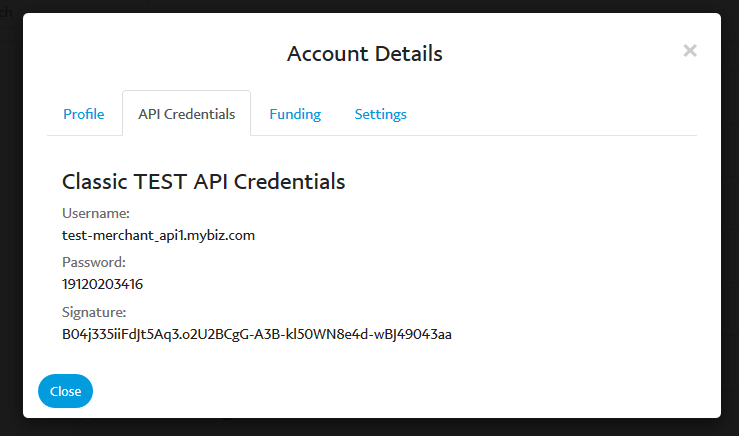
The username, password and signature found here are the ones you should use in the Events → Settings → Community screen when configuring Community Tickets. I wanted to highlight this because the username and password found here are distinct from those you would have used when logging in.
Once you’ve confirmed/updated your settings to use those credentials, please navigate to Dashboard → My Apps & Credentials (in the PayPal dashboard), scroll down to Rest API Apps and click on the app you set up:
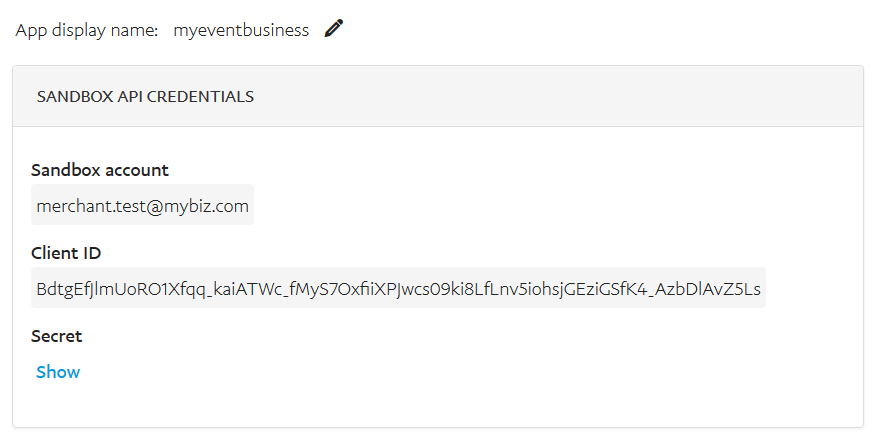
The Client ID found here should be used when populating the PayPal Application ID field within your Community Tickets settings and the Sandbox Account email address is what you should use when populating the Receiver Email field.
With all those bases covered, do you still experience the same problem and can you share the most recent log files if so?
Thanks!
MemberThanks for the info.
As you might have noticed, the prevalent error is Authentication failed. API credentials are incorrect.
This can happen if you’re using something other than a Rest API-type PayPal account or of course if the credentials have simply been entered incorrectly.
I do realize you already confirmed both these things are in order, but it could be worth double checking them. Also, if you bear with me a little longer, I’ll have a think about other possible causes of this response.
MemberGreat! In that case, can you share the contents of the debug log?
To re-cap, you should now find you can select the adaptive payments log using a dropdown in the top right corner of the WooCommerce → System Status → Logs screen, looking something like this:

If you click view you will hopefully see quite a bit of logged data – please feel free to copy and paste that in its entirety into your next reply (or upload it to Dropbox or a similar service and provide a link).
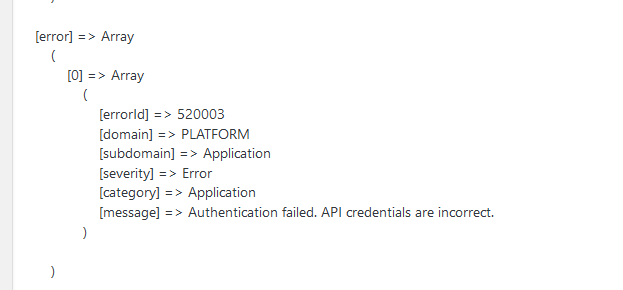
The above shows what the adaptive payments log data may look like (and that particular example shows an error indicating that PayPal credentials haven’t been set up correctly – though that’s not necessarily going to be the same in your case – but is the sort of thing we’re looking for).
Thanks!
MemberHi Huiwen,
I’d be happy to help further 🙂
A typical WordPress installation has a wp-content directory. Within this, create (or ask your developer to create) a mu-plugins directory – unless of course it already exists. Within that, add a new file called customizations.php with the following code:
<?php
add_filter( 'tribe_community_tickets_woocommerce_paypal_debug', '__return_true' );
To reiterate, this should live at wp-content/mu-plugins/customizations.php and with this in place debugging (of adaptive/split payments) will be enabled – you should then be able to re-test and collect debug data from there.
I hope that helps!
-
AuthorPosts