
Home › Forums › Ticket Products › Community Tickets › Problem with Split Payments (paypal)
- This topic has 65 replies, 4 voices, and was last updated 9 years, 9 months ago by
Huiwen.
-
AuthorPosts
-
December 8, 2016 at 1:21 pm #1203461
Huiwen
ParticipantThis reply is private.
December 8, 2016 at 3:13 pm #1203574Barry
MemberThanks for the info.
As you might have noticed, the prevalent error is Authentication failed. API credentials are incorrect.
This can happen if you’re using something other than a Rest API-type PayPal account or of course if the credentials have simply been entered incorrectly.
I do realize you already confirmed both these things are in order, but it could be worth double checking them. Also, if you bear with me a little longer, I’ll have a think about other possible causes of this response.
December 12, 2016 at 8:32 am #1204738ParticipantThanks Barry for all your help thus far. I’m deeply sorry that the problem remains on my side. I cannot solve it immediately and might need to contact Paypal Developer for further assistance. That said, please if you could leave the thread open for a while that would be great. I’ll come back soon.
Thanks.December 12, 2016 at 9:33 am #1204759MemberHi again Huiwen,
Let’s explore the authentication issue in a little more depth, as the logged errors you shared pretty clearly suggests the problem is with your API credentials. For the purposes of this exploration, let’s use the PayPal Sandbox.
Can you log into the developer dashboard over at PayPal.com? With that done, let’s start by looking in Sandbox → Accounts.
You should see a list of test accounts organized by email address. Please select the business-type account you are using for test purposes, click on Profile and then open the API Credentials tab:
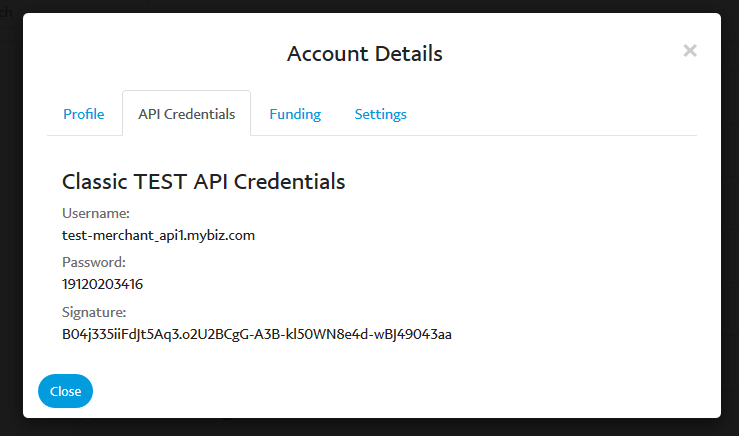
The username, password and signature found here are the ones you should use in the Events → Settings → Community screen when configuring Community Tickets. I wanted to highlight this because the username and password found here are distinct from those you would have used when logging in.
Once you’ve confirmed/updated your settings to use those credentials, please navigate to Dashboard → My Apps & Credentials (in the PayPal dashboard), scroll down to Rest API Apps and click on the app you set up:
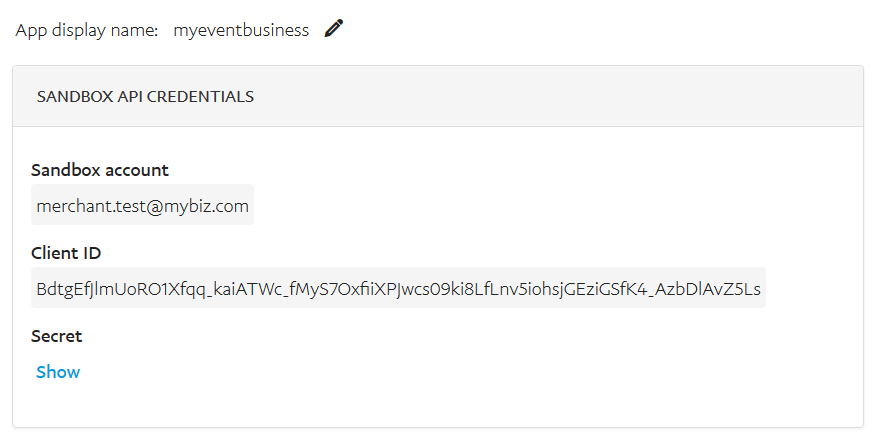
The Client ID found here should be used when populating the PayPal Application ID field within your Community Tickets settings and the Sandbox Account email address is what you should use when populating the Receiver Email field.
With all those bases covered, do you still experience the same problem and can you share the most recent log files if so?
Thanks!
December 12, 2016 at 9:39 am #1204763MemberHi Huiwen,
I cannot solve it immediately and might need to contact Paypal Developer for further assistance. That said, please if you could leave the thread open for a while that would be great.
We must have posted at approximately the same time and so I didn’t see this post before making my last reply.
In any case, absolutely: let’s leave it open and see if anything else comes to light. I do think reviewing your API credentials is worth a shot though, as detailed in my last reply, especially given the error reported in the logs.
December 12, 2016 at 3:24 pm #1204962ParticipantThis reply is private.
December 13, 2016 at 7:30 am #1205174ParticipantThis reply is private.
December 13, 2016 at 9:13 am #1205359MemberHi Huiwen,
So we have a range of different errors now but the last few in particular caught my eye. Here’s the error I’m interested in:
[message] => Invalid request parameter: email is invalid
Here is the relevant receiver data (the two accounts that should each receive part of the payment):
[receiver] => Array
(
    [0] => Array
    (
        [amount] => 1.00
        [email] => [email protected] # modified so I could share publicly
        [primary] => true
    )

    [1] => Array
    (
        [email] =>
        [amount] => 0.9
        [primary] => false
    )
)
The same pattern can be seen in a number of the logged transactions. Essentially, we’re missing the email address for the second account (the event organizer). Are you positive that was set up for the purposes of these most recent tests?
December 13, 2016 at 9:49 am #1205413ParticipantHi Barry, yes I’m positive. I just created a new event with my real valid paypal account email being registered, and tested again, it doesn’t work.
December 14, 2016 at 1:16 pm #1206126MemberOK, thanks for confirming.
I’m sorry this is taking so long without a clear fix in sight, but bear with us a little further while we explore this – and the information and logs you shared so far – in some more detail.
December 14, 2016 at 1:18 pm #1206127ParticipantNo problem Barry. Please, take your time and thank you so much for taking care of this.
December 15, 2016 at 11:20 am #1206586ParticipantThis reply is private.
December 15, 2016 at 4:26 pm #1206836MemberThanks for the update: given that you are using valid email addresses/PayPal accounts, I’m not sure why that would be either.
I apologize also for the increased delay in response times; getting a good handle on what exactly is going wrong here hasn’t been too easy. I’m curious: would you be happy to share a database dump (of your site, complete with testing/sandbox credentials) purely so we can debug using your actual configuration?
We would of course destroy it immediately after completing our troubleshooting efforts.
If that is something you can accommodate please do send a full database dump across by private reply. It’s quite possible that such a file, even when compressed, will exceed the size allowed by the forum for uploads – that being the case, you could possibly use Dropbox or a comparable service to facilitate this.
Please let me know if that’s viable here (and if it isn’t that’s fine – we’ll try to think of other angles from which to approach this).
December 16, 2016 at 10:13 am #1207146ParticipantThis reply is private.
December 19, 2016 at 7:50 am #1207681MemberThanks!
I did notice that sandbox-mode was not enabled; additionally the Enable Split Payments option was unchecked (both of these settings can be found in the Events → Settings → Community screen).
I enabled both, but I suspect the credentials contained in your database dump were your live credentials and so didn’t work in sandbox mode.
That naturally caused a bit of a problem when troubleshooting however the outcome was not completely negative:
[receiver] => Array
(
    [0] => Array
    (
        [amount] => 100.00
        [email] => [email protected] # redacted
        [primary] => true
    )

    [1] => Array
    (
        [email] => [email protected]
        [amount] => 90
        [primary] => false
    )
)
As you can see from the above extract, when testing with a customer with an email address defined via the frontend Payment Options screen, the correct receiver breakdown (given a 10% fee) took place.
In my testing, the transaction still failed but for the following error:
Account not found. Unilateral receiver not allowed in chained payment
On this occasion, I suspect the problem was that your live/production credentials were in place in the database dump and so, in a sandbox context, it could only identify one account.
Can you confirm which customer-type user (from your database) you tested with?
-
AuthorPosts
- The topic ‘Problem with Split Payments (paypal)’ is closed to new replies.