
Home › Forums › Ticket Products › Community Tickets › Problem with Split Payments (paypal)
- This topic has 65 replies, 4 voices, and was last updated 9 years, 9 months ago by
Huiwen.
-
AuthorPosts
-
December 1, 2016 at 10:28 am #1200434
Huiwen
ParticipantHi,
My web developer and I have read all the relevant topics in this forum re. this issue and we’ve pretty much tried everything but still cannot figure out why the split payments function doesn’t work:
“An error has occurred while processing your payment, please try again. Or contact us for assistance”
Can anybody take a look and help us?
Many thanks.
HuiwenDecember 2, 2016 at 1:59 pm #1201057Barry
MemberHi there Huiwen,
I’m sorry to hear you’ve hit up against difficulties. A few questions/thoughts:
- Did you do any sandbox-based testing and did you have positive results at that stage?
- Can you confirm that you are indeed using a Rest API App (in terms of what you registered with PayPal)? We’ve found in the past that people have sometimes registered for other types of account and that can lead to problems like this
- Is WooCommerce’s own PayPal gateway also enabled?
Thanks!
December 3, 2016 at 3:12 am #1201155ParticipantHi Barry,
Thanks for trying to help.
To your questions:
1- No it doesn’t work either with Sandbox or Live.
2- Yes I am using REST API App with Paypal Developer.
3- We are only using Event Calendar and Event Calendar Pro; we don’t use WooCommerce. Is it still relevant then?December 5, 2016 at 4:34 pm #1201806MemberHi Huiwen,
Community Tickets actually requires WooCommerce to be activated – along with Event Tickets Plus, Event Tickets, The Events Calendar and Community Events.
theeventscalendar.com/knowledgebase/new-user-primer-community-tickets
In the case of WooCommerce, the reason for this requirement is that our payment adapter (which facilitates split payments) works by building on top of facilities provided by WooCommerce itself. Without WooCommerce and the other plugins I listed Community Tickets simply won’t work as expected.
So, right now, you would need to follow the instructions in the New User Primer linked to above and meet all of the requirements detailed there.
I hope that helps!
December 6, 2016 at 2:16 am #1201923ParticipantMany thanks Barry for your response.
My apologise but we do have WooCommerce plugin installed and enabled. In addition to that, we also have community tickets, community events, event calendar, event calendar pro, event tickets, event tickets plus, all installed and enabled. But the split payment still doesn’t work.
December 6, 2016 at 6:53 am #1201980MemberThanks for clarifying. In that case, I’d love some more information:
- How are split payments configured in terms of the type and size of fee? (Please refer to the settings in Events → Settings → Community → Community Tickets → Per-Ticket Fee Type for this)
- Are you positive that the community organizers had registered valid email addresses that were linked to their PayPal accounts? (They typically would do this via example.com/events/community/payment-options)
- After problems like you described occur, are any error messages being recorded within WooCommerce → System Status → Logs and could you share them if so?
- Additionally, it may be useful if you could share your System Information (which can be found in the Events → Help screen – please remember to mark your reply as ‘private’ to prevent others from seeing this information)
Thanks for your patience while we look into this 🙂
December 6, 2016 at 8:55 am #1202148ParticipantThis reply is private.
December 6, 2016 at 9:56 am #1202185MemberThanks!
Could you additionally share the system information provided by The Events Calendar, as described in the following knowledgebase article?
theeventscalendar.com/knowledgebase/sharing-sys-info
(The information you shared in your last reply appears to be debug information provided by WooCommerce.)
December 6, 2016 at 10:02 am #1202192ParticipantThis reply is private.
December 7, 2016 at 9:03 am #1202757MemberThanks for your patience so far, Huiwen.
I also owe you an apology: on asking you to check the WooCommerce error logs I had missed a key step, so let’s try that again.
- We need to add a small snippet of code to enable debugging
- This can be done by creating a small, standalone plugin (or a ‘must use’ plugin) or else you could add it to your theme’s functions.php file – let me know if you need further assistance on that count
- The snippet itself is just one line of PHP code (note the double underscore in __return_true):
add_filter( 'tribe_community_tickets_woocommerce_paypal_debug', '__return_true' );
With that in place, please go ahead and try things out again. I’m going to assume you will receive the same result, but this time if you visit WooCommerce → System Status → Logs you will hopefully be able to retrieve some useful data:
- You should see a dropdown in the top right hand side of the screen
- Select the most recent log file with a name that begins with tribe-paypal-adaptive-payments-…
- Click view
This will hopefully provide more insights into the specific problem you are facing – please copy and paste what you find and share it here (by private reply, please).
Thanks again!
December 7, 2016 at 11:09 am #1202810ParticipantThis reply is private.
December 7, 2016 at 11:18 am #1202816ParticipantThis reply is private.
December 7, 2016 at 4:06 pm #1202931MemberHi Huiwen,
I’d be happy to help further 🙂
A typical WordPress installation has a wp-content directory. Within this, create (or ask your developer to create) a mu-plugins directory – unless of course it already exists. Within that, add a new file called customizations.php with the following code:
<?php
add_filter( 'tribe_community_tickets_woocommerce_paypal_debug', '__return_true' );
To reiterate, this should live at wp-content/mu-plugins/customizations.php and with this in place debugging (of adaptive/split payments) will be enabled – you should then be able to re-test and collect debug data from there.
I hope that helps!
December 8, 2016 at 10:14 am #1203350ParticipantThis reply is private.
December 8, 2016 at 12:17 pm #1203404MemberGreat! In that case, can you share the contents of the debug log?
To re-cap, you should now find you can select the adaptive payments log using a dropdown in the top right corner of the WooCommerce → System Status → Logs screen, looking something like this:

If you click view you will hopefully see quite a bit of logged data – please feel free to copy and paste that in its entirety into your next reply (or upload it to Dropbox or a similar service and provide a link).
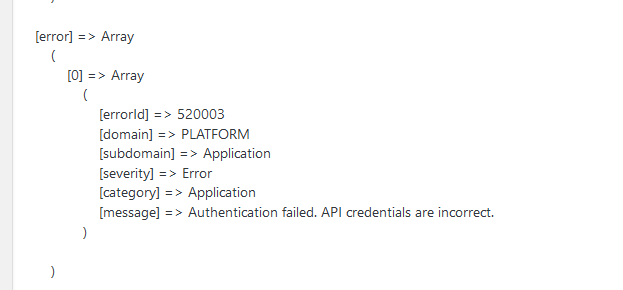
The above shows what the adaptive payments log data may look like (and that particular example shows an error indicating that PayPal credentials haven’t been set up correctly – though that’s not necessarily going to be the same in your case – but is the sort of thing we’re looking for).
Thanks!
-
AuthorPosts
- The topic ‘Problem with Split Payments (paypal)’ is closed to new replies.