

Forum Replies Created
-
AuthorPosts
-
Andras
KeymasterSo, if you want to show the events by event start date and ‘oldest first’, then try this snippet:
https://gist.github.com/andrasguseo/f4c078f8239ce44a8be82abd51ea1aec
This will also re-order your blogposts.
Does this do the trick?
Andras
KeymasterHi Damian,
I’m sorry it doesn’t work for you either.
Usually this kind of help is beyond the scope of our support but I’ll try to ask the dev if he can help out. I cannot promise anything. I’ll let you know.
Andras
KeymasterHey Dan,
You are very welcome. I hope at least one of those plugins will be helpful.
Since this is marked resolved I am going to close this ticket, but if you need anything else related to this topic or another please post a new topic in the forum and we will help you out.
Cheers,
AndrasPS: If you like our plugin, and you didn’t yet do so 🙂 we would be happy to receive a review in the wordpress.org repository. Thanks!
https://wordpress.org/support/view/plugin-reviews/the-events-calendarKeymasterHey Detlex,
Thanks for using our plugins and welcome to the forums!
Do I understand correctly that you would like to create a recurring event, that repeats several times, but every day at a different time?
You can do some custom recurrence rules that will allow you to choose different times, but it might be limited compared to what you need. You can also use exclusions.
If you can write me an event with a detailed recurrence, then I might be able to help you figure out a good rule set.
Wenn du möchtest du kannst auch auf Deutsch schreiben. 😉
Grüsse
Andras
November 29, 2016 at 4:03 pm in reply to: Is there a way to find and delete double entries/attendees? #1199454KeymasterHello again Jack,
Thanks for the great question!
I’m sorry to say that out of the box it is not possible to limit RSVPs / tickets. However, there are some things you can do.
E.g. Create a template override that limits the number of RSVPs done at a time.
These 2 guides should help you get started:
https://theeventscalendar.com/knowledgebase/themers-guide/
https://theeventscalendar.com/knowledgebase/template-overview/You will need to override this file:
wp-content\plugins\event-tickets\src\views\tickets\rsvp.php
Create a copy it here:
wp-content\themes\twentysixteen-child\tribe-events\tickets\rsvp.php
And change the max value of the input field to 1 (Line 54). Or you can make the field readonly and set the value to 1.
It would be pretty difficult to stop people from submitting again. With some further customization it could be done that if someone has already registered / RSVPd, then they cannot any more, but it’s impossible to stop them from doing it with a different email address / name.
I’m sorry I don’t have a better solution at this time. Let me know if the above helps or if you have another question.
Cheers,
AndrasNovember 29, 2016 at 3:39 pm in reply to: Restrict number of words in "preview" on front page shortcode #1199438KeymasterHello Rich,
Super question you have there!
Unfortunately it is not possible to limit the number or words with the shortcode.
You might be able to do that with a template override, which would also override the original photo view as well.
To get started I recommend these 2 articles:
https://theeventscalendar.com/knowledgebase/themers-guide/
https://theeventscalendar.com/knowledgebase/template-overview/
Once you read through those, you will need to create an override for this file:
wp-content\plugins\events-calendar-pro\src\views\pro\photo\single-event.php
and copy it to:
wp-content/[your-theme]/tribe-events/pro/photo/single_event.php
You will need to modify line 52, which says:
<?php echo tribe_events_get_the_excerpt() ?>
One other solution might be running tribe_events_get_the_excerpt through a filter.
I hope this helps, let me know.
Cheers,
AndrasKeymasterAh sorry, that’s my bad! :blush:
I checked a single event page that has a ticket and an rsvp on my local install and it looks OK. This is what I see:
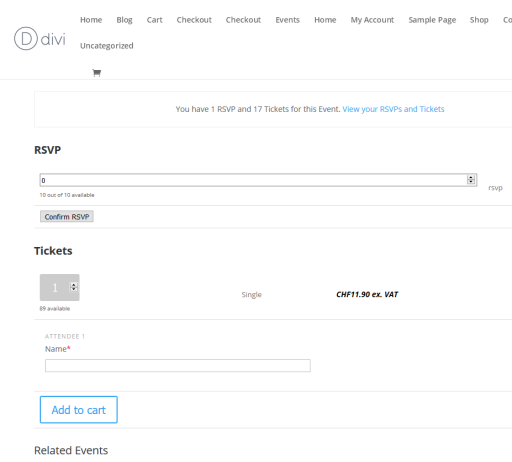
Do you possibly have a screenshot, maybe a dev site where we could take a look at the issue?
Andras
KeymasterHi Rob,
I managed to talk to one of the developers. I will need some help from you in order to be able to help you out.
I see the calendar plugins are updated and you have a default theme so no work needed there.
First, please deactivate all plugins, and leave only The Events Calendar active. Check if the site is still sluggish.
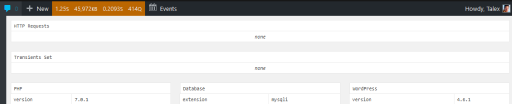
Then secondly, install Query Monitor and activate it and go to the page that is really slow. On that page check the Query Monitor menu on the top for 1) Slow Queries and 2) http requests and please send me a screenshot of those.
Here are some sample screenshots:
Query Monitor menu:

Slow queries:
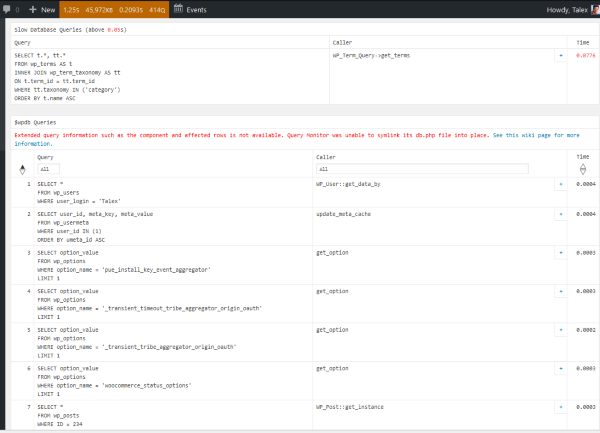
HTTP requests:
And a third and last: could you share with us who your host is and what hosting package is the site running on?
Looking forward to your reply!
Thanks and cheers,
AndrasKeymasterHi Diane,
I’m sorry the above didn’t help. I understand how frustrating that is and want to assure you that we are here to help.
One possible immediate action you could take until we get a handle on what’s actually going wrong is
- remove your EA license key under Events > Settings > Licenses
- install a cron manager plugin and killing any cron jobs with
tribe_aggregatorin their names
Here are some cron managers that could help:
Could you please also share the feed / file that you were trying to import? We would like to test it if that if causing the issue.
I would also like to ask you to share with me your full system information in a private reply. Here is a guide that gives you the details on how you can do that. (There is also a short “checkbox” option, however this time I would like to ask for the copy-paste version.)
Thanks and hang in there! We are going to figure this out.
Cheers,
AndrasKeymasterHi Manuela,
I checked and though it is not in the same order as on the attendee list in your admin, this is the order it comes in when sent via email. It is not only your case, everyone gets it in this order.
In order to modify the column order, that would require custom coding which is out of the scope or our support. Here’s a list of developers from the community though, who might be able to help you out with this in case you want this changed.
https://theeventscalendar.com/knowledgebase/find-a-customizer/
Let me know if there’s anything else I can help you with.
Cheers,
AndrasNovember 29, 2016 at 2:13 pm in reply to: How to replace CSS files not listed in Themer's Guide #1199401KeymasterHey Mike,
I need to apologize, there was a misunderstanding on my side.
Yes, with that code at the beginning of your latest post, you can indeed replace the stylesheet, if you want.
Depending on your setting under Events > Settings > Display tab > Default stylesheet used for events templates these files will be replaced:
Setting: Skeleton styles
tribe-events-skeleton.css
tribe-events-pro-skeleton.cssSetting: Full styles
tribe-events-full.css
tribe-events-pro-full.cssSetting: Tribe Event Styles
tribe-events-theme.css
tribe-events-pro-theme.cssThis one confuses me the most. Where does it fit in? Is it just the Pro CSS plugins for?
Events Calendar Pro comes with an enhance calendar widget. Those stylesheets are for that.
I do hope these answer your questions so far.
I need to know how to replace the CSS in the Event Tickets and Event Tickets Plug plugins. Is there someone who can assist me with this?
I will need to ask for a bit of patience on this one. Let me look / ask around if this can be done easily and if there is something for this available.
Thanks for hanging in there!
Andras
KeymasterHi wma333,
Thanks for letting me know.
On my local install I have updated a while back to 3.0.21 and didn’t notice any issues.
I just did a rollback to .16 and did an update to .21 to compare. Everything looks pretty much ok on the month, list, day, single event views. Only notable little difference is the header / top menu height, but not much.
I’m not sure if it was a local issue on your install due to some customization or maybe a failed update… Hopefully the ET guys will be able to help you out with this.
Since this is in their ballpark would you be OK if I closed this thread?
Thanks for letting me know.
Cheers,
AndrasKeymasterHi weknow,
It seems like this is a bug. I have filed an internal bugticket for this, so our developers will take a look at it. I ask for your patience until a fix for this arrives.
Until then unfortunately you will need to set the maps individually for each event.
I am going to close this ticket to new replies, but the issue is still open and we will update this ticket once we release a fix.
If you have any new questions or issues please create a new ticket and reference this one.
Thanks and cheers,
AndrasNovember 29, 2016 at 8:43 am in reply to: "The URL provided did not have events in the proper format. #1199188KeymasterHey Leeron,
I tested both feeds and both gave me a same error.
When I downloaded the files, they could be imported, so for the time being that could be a workaround.
It looks like this is a bug. I will file a bugticket for this so our developers can look into it. I ask for your patience.
I am going to set this ticket to ‘pending fix’ status, but the issue is still open and we will update this ticket once we release a fix.
If you have any new questions or issues please create a new ticket and reference this one.
Thanks and cheers,
AndrasKeymasterHello Richard,
I am really sorry. I did write a reply and even submitted it, I am totally clueless why it didn’t get saved. My sincerest apologies. It was definitely not my intention to shortchange you on anything.
We are offering bundles to users who are using more of our plugins and are focusing on one area, e.g. Community Events in your case. The prices of the bundles already discounted vs. if you buy the plugins separately and the discount value for the bundles is around 30.
Thus, the Black Friday / Cyber Monday discounts were not valid for the bundles, only for the standalone plugins.
I hope this answers your question, and again, I do apologize for the untimely response.
Please, let me know if you have any other question.
Best,
Andras -
AuthorPosts