
Home › Forums › Ticket Products › Event Tickets Plus › Admin panel times out
- This topic has 8 replies, 4 voices, and was last updated 9 years, 10 months ago by
Rob.
-
AuthorPosts
-
November 24, 2016 at 8:08 am #1197022
Rob
ParticipantMy admin panel regularly times out… after many many discussions with my host they were able to pinpoint it:
The site is a development copy of my production site (hence all installed, but no license keys on the dev site)It seems that the issue is quite sporadic since I tried few more times the mentioned operation and I was now able to reproduce it as well as the same takes quite a long time and eventually hits the above discussed server side execution_time_out limits.
I tried using the Linux strace utility to allocate the process/call that takes that long but due to the fact that there are over 40 plugins at the moment, I could not allocate the once causing the delay. So what I tried next was to disable/enable multiple plugins at a time instead all of them and doing so, I was able to pin-point the exact plugin causing the problem, which seems to be the The Events Calendar one, which returns multiple calls like the below one:
Code:
GNAL, NULL, 0) = 4328
recvfrom(4, 0x340ceb8, 8196, 16384, 0, 0) = -1 EAGAIN (Resource temporarily unavailable)
poll([{fd=4, events=POLLIN}], 1, 5000) = 1 ([{fd=4, revents=POLLIN}])My best advise would be to either re-install the or to get in touch with the plugin developers so they can have a further look into this.
Best Regards,
Deyan Serkov
Senior Technical SupportNovember 25, 2016 at 3:44 am #1197294Andras
KeymasterHello again Rob,
Thanks for reaching out! I’m sorry you are having issues with your site.
Do I understand correctly, that when you deactivate <span style=”text-decoration: underline;”>only</span> The Events Calendar plugins, then the lag doesn’t appear any more? Is it all the TEC plugins, or the issue seems resolved already when you switch or EC Pro only, or Event Tickets Plus only? This can help us better pinpoint the issue at hand.
Also, to be able to give you full support, please share your system information with me?
Thanks and cheers,
AndrasNovember 25, 2016 at 4:11 am #1197302ParticipantThis reply is private.
November 28, 2016 at 2:28 am #1198163KeymasterThis reply is private.
November 28, 2016 at 2:42 am #1198166ParticipantThis reply is private.
November 29, 2016 at 2:09 am #1198958KeymasterHey Rob,
Thanks for sharing that. I’m trying to pull in some extra muscle to investigate this.
Meanwhile did you manage to re-test the issue? Does it still happen?
Thanks,
Andras
November 29, 2016 at 3:21 pm #1199429KeymasterHi Rob,
I managed to talk to one of the developers. I will need some help from you in order to be able to help you out.
I see the calendar plugins are updated and you have a default theme so no work needed there.
First, please deactivate all plugins, and leave only The Events Calendar active. Check if the site is still sluggish.
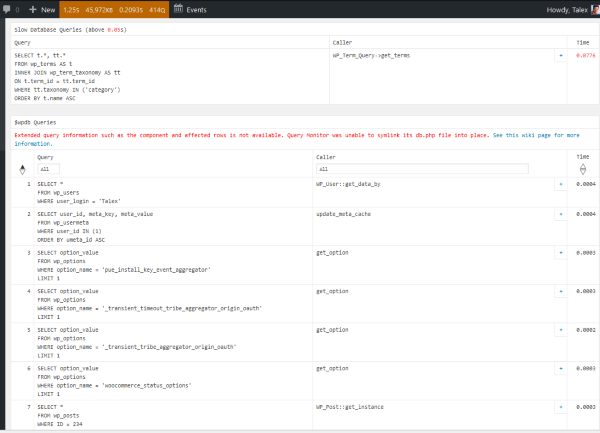
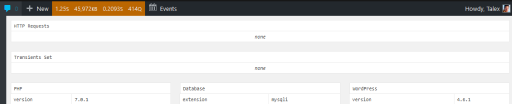
Then secondly, install Query Monitor and activate it and go to the page that is really slow. On that page check the Query Monitor menu on the top for 1) Slow Queries and 2) http requests and please send me a screenshot of those.
Here are some sample screenshots:
Query Monitor menu:

Slow queries:
HTTP requests:
And a third and last: could you share with us who your host is and what hosting package is the site running on?
Looking forward to your reply!
Thanks and cheers,
AndrasDecember 21, 2016 at 8:35 am #1208914Support Droid
KeymasterHey there! This thread has been pretty quiet for the last three weeks, so we’re going to go ahead and close it to avoid confusion with other topics. If you’re still looking for help with this, please do open a new thread, reference this one and we’d be more than happy to continue the conversation over there.
Thanks so much!
The Events Calendar Support Team -
AuthorPosts
- The topic ‘Admin panel times out’ is closed to new replies.