
Remove Past Events
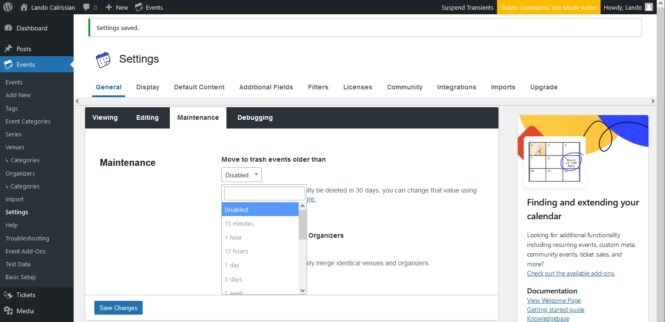
Important! After activating or deactivating this extension, head over to the “Move to trash events older than…” setting and re-save it!
The Events Calendar gives you the functionality to automatically trash events from your calendar that have passed a certain selected time ago. These settings can be found under Events > Settings > General tab > Maintenance.
By default, the earliest time you can choose is “1 month”, so events older than 1 month will be removed.
This extension adds a few more frequencies to that setting. Here’s the new list, bold indicating the new options:
- Disabled
- 15 minutes
- 1 hour
- 12 hours
- 1 day
- 3 days
- 1 week
- 2 weeks
- 1 month
- 3 months
- 6 months
- 9 months
- 1 year
- 2 years
- 3 years
Note that the removal happens on a schedule (via a cron job), which runs every 15 minutes in the most frequent scenario. So it can happen that the removal was done 1 minute before an event is over. In that case, you will still see the passed event for 14 minutes in the calendar.
It would be possible to run the removal (the cron job) more often, even every minute. However, that would put an unnecessary load on your website and the server, thus it’s not recommended for this operation.
Changelog
- version 1.2.2
- 2024-10-11
- Fix – Add compatibility for the new admin UI. [TECEXT-335]
- Feature – Make the extension translatable.
- version 1.2.1
- 2023-12-11
- Fix – Added compatibility to The Events Calendar 6.0 data structure. [ECP-1604]
- version 1.2.0
- 2023-06-23
- Fix – Update to use the new Service_Provider contract in common
- version 1.1.1
- 2023-01-22
- Fix – Added a filter call to make the extension work with TEC 6.0.5 and above.
- version 1.1.0
- 2022-06-20
- Fix – Added a missing variable declaration, which prevents the accidental deletion of recurring events.
- version 1.0.0
- 2022-01-20
- Initial release