What is Headless WordPress?
Estimated reading time:
1 minute
A WordPress theme is the front-facing part of a WordPress website, and for years, we’ve used themes as the exclusive way to display the content that we create in WordPress.
But more recently, you may have heard the term “headless WordPress” thrown around. It’s an odd thing to say out loud. But the concept is actually pretty straightforward: It has to do with the way WordPress passes data to the front end of a website, regardless of the presence of a theme.
What it means to lose our heads
Let’s break down the concept of “headless WordPress.”
WordPress is a content management system, and themes are usually the presentational layer. Stated differently: WordPress is the back end and themes are the front end. An illustration of this common setup would refer to WordPress as the body, while themes are the head.
However, in a headless WordPress setup, when we publish content in WordPress and save it to a database on our server, we’re free to serve that content anywhere we like, and it doesn’t have to be served to a WordPress theme template.
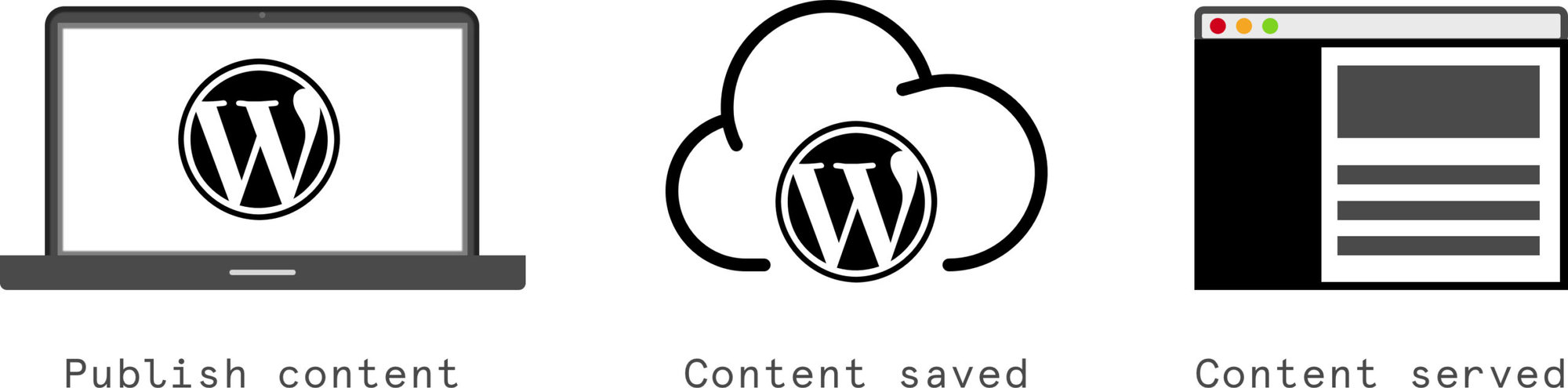
A “headless” WordPress setup separates — or decouples — WordPress from themes. Simply put: we remove the theme as the head of our website. What’s left is WordPress as a headless body used strictly for content management.
Examples of how to use headless WordPress
There are a number of use cases for headless WordPress and examples of when it may be a good option. These can include:
- Using WordPress to manage the content of a web application or mobile app.
- Creating a single page application in React, Vue, or some other JavaScript framework while using WordPress as the content management system.
- Distributing content to more places beyond a single WordPress website.
- Rendering the front end using JavaScript instead of PHP.
Headless WordPress opens our data up and allows us to display it in more places beyond WordPress theme. This makes WordPress more versatile than ever and capable of powering even more of the web.
How does WordPress content end up on a non-WordPress site?
We can thank the WordPress REST API for that. It was released in WordPress 4.7 and it’s one of the more interesting recent WordPress features. It’s comes built in to WordPress—no need to install it manually—and it creates the framework that allows non-WordPress sites to tap into the data stored by WordPress without relying on theme templates.
So, in addition to saving content in a database on a server, WordPress exposes the data as JSON, which is a format for storing and structuring data. Unlike a database that stores data in tables, JSON data is organized by a set of attributes and values.
You can see the JSON for all of the blog posts on this very site for yourself. (I know, it looks like a hot mess.) Here’s a sample from one post:
[
  {
    "id":2279464,
    "date":"2021-06-08T10:47:57",
    "date_gmt":"2021-06-08T17:47:57",
    "guid": {
      "rendered":"https:\/\/theeventscalendar.com\/?p=2279464"
    },
    "modified":"2021-06-08T10:47:58",
    "modified_gmt":"2021-06-08T17:47:58",
    "slug":"learning-php-how-and-where-to-start",
    "status":"publish",
    "type":"post"

    // and so on...

  }
]
Pretty neat, right? When our data is exposed in a URL like this, we can pull exactly what we need into any webpage. Want to show the 10 most recent posts with the title, excerpt, slug, and featured image for each one? There’s an endpoint for that at:
https://theeventscalendar.com/wp-json/wp/v2/posts?page=1&per_page=10As a result, we now have all the content we need to build our page — in whichever application we want!
The benefits of going headless
Here are a few reasons you might want to use headless WordPress:
- WordPress becomes a true content management system. Divorcing it from themes removes the presentational burden from WordPress, so you can use WordPress to focus exclusively on content management.
- Your content is more portable. Since headless WordPress is not tethered to themes or PHP, it can be used in many more places, from static websites to single page applications and beyond. Content in WordPress becomes much more portable than ever before.
- It can result in better performance. Requesting data from the server is called server-side rendering. That’s a fancy way of saying the server processes the HTML, CSS, and JavaScript at the time a user visits a page. That’s often slower compared to client-side rendering where everything is processed in advance. In other words, the browser doesn’t need to wait for things to process. In addition, we can cache (or store a static version) of data in the REST API so content loads even faster.
- You gain more control. We’re no longer bound to the rules of theming. We simply plug the data into the code. That’s a lot more flexibility than having to worry about the WordPress template hierarchy and other theming conventions.
- It’s framework-agnostic. Want to change frameworks? Moving from one framework to another is the hard part. The content doesn’t care whether you’re using React, Vue, Svelte, or any other framework du jour.
You can gain a lot by going headless. At the same time, there are some drawbacks to going headless. Chris Coyier sorts those considerations out over at CSS-Tricks.
Wrapping up
Going headless involves breaking WordPress away from themes and allows users to display WordPress content on a non-WordPress site. This opens up countless opportunities to distribute content in new and interesting ways.
We’re still in the early days of what headless WordPress can do. In addition to the Block Editor, the REST API makes WordPress more flexible than ever. Who knows? We may begin to see WordPress used more as a content management system and become an even more powerful engine that’s less concerned with how or where the content is displayed.
Headless WordPress resources
Are you interested in learning more about headless WordPress? Check out these tutorials, working examples of headless WordPress sites, and tools for getting started.
- Using New Gatsby Source WordPress Plugin — Ganesh Dahal writes an extremely thorough tutorial on how to integrate WordPress with Gatsby, a React-based front-end framework.
- How To Create A Headless WordPress Site On The JAMstack — I wrote up a little something on Smashing Magazine with the talented Sarah Drasner.
- How to Use QL Events to Open Up Calendar Data for Non-WordPress Sites — This tutorial shows to expose data from The Events Calendar so that it can be converted to GraphQL.
- GraphQL API for WordPress — This plugin intercepts the WordPress REST API and converts it to GraphQL. As a result, integrating WordPress with a JavaScript framework is easier. The plugin includes a useful visual interface for writing GraphQL queries.
- How To Use Frontity To Create A Headless WordPress Theme With React — This video explains the code used for a headless WordPress site using Frontity, another React-based framework like Gatsby.
- wp-11ty — This simple template shows how WordPress integrates with a static site generator like Eleventy.

Jaime
View author page