Featured Calendar: Blueprint Coffee

Estimated reading time:
1 minute
At The Events Calendar, we’re always thrilled to showcase how our users strengthen their communities by utilizing our products. Blueprint Coffee is a wonderful example of how to use the free version of The Events Calendar to effortlessly manage and showcase their events, from workshops to special gatherings.
With their simple and user-friendly calendar, Blueprint Coffee is able to keep their customers engaged with experiences that make their space unique. Keep reading to see how Blueprint Coffee is brewing up a successful calendar.
The Main Events Page
First up, we’ll look at their main events page, highlighting its strengths—like ease of use and functionality—while also addressing its weaknesses, such as a limited number of upcoming events.
General Design
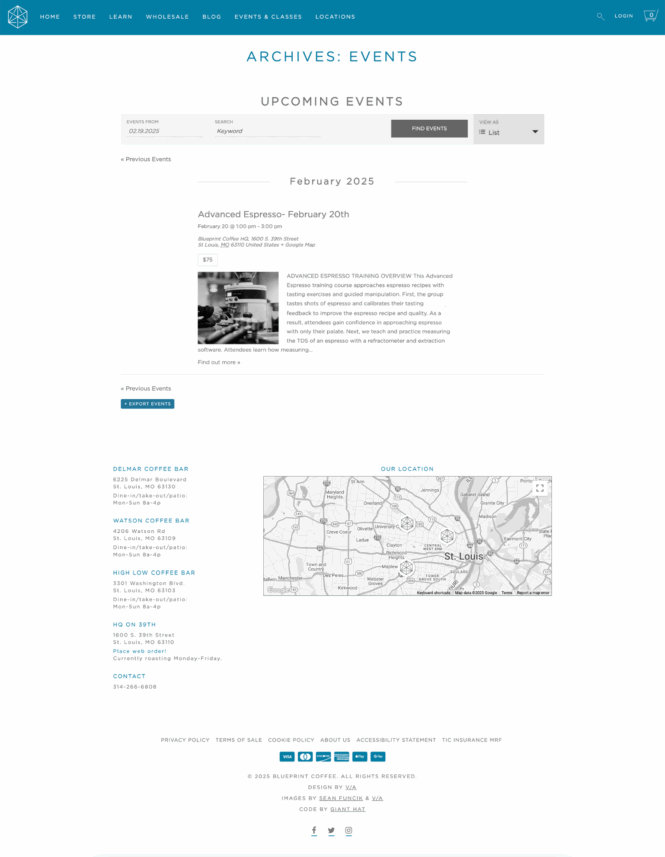
This simplistic design with a color palette of white, blue, and gray creates a visually calming and organized events page. These tones allow important details to stand out clearly without distraction. The subtle contrast between the colors helps guide users’ attention to key information, making it easier to navigate.
Featured Images
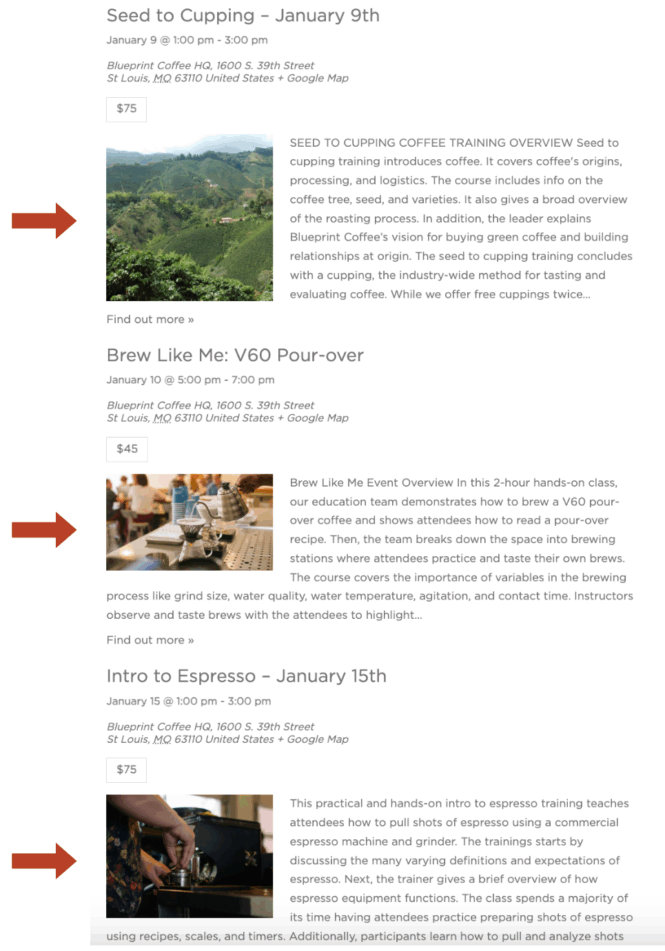
The featured images are spot on with the brand, which is great! The photos are also of good composition. However, each image has a different aspect ratio. To make the calendar pop even more, keeping the image sizes consistent would give the page a more polished and visually smooth flow.
Views
The events are shown in a list by default, which works really well for this type of calendar. With event images and titles, you can quickly spot events at a glance. You’ll be able to see the title, date, address, and price, along with the event description. That said, the description is a bit lengthy— a shorter summary would do the trick!

Navigation
The bar at the top of the page lets users search for events by date and keyword (which is available with our free version of The Events Calendar.) These two categories are helpful for people searching for events. Due to the limited number of events that Blueprint Coffee has each month, we think these are sufficient for navigation.

If you’re looking to make navigation even easier, our Filter Bar add-on is a great premium option! It lets users search by category, tag, venue, organizer, and more. Plus, by using both Events Calendar Pro and Filter Bar together, you can create custom filters that are perfectly tailored to your needs.
Overall Takeaways from the Main Events Page
Blueprint Coffee is rocking our free plugin to create a simple calendar that perfectly matches their brand, and we’re all for it! Here are a few takeaways from their main events page:
- The website’s use of color helps key details stand out without any distractions.
- The featured images are well aligned with the brand, but giving them a consistent aspect ratio would take it to the next level in terms of uniformity.
- The events page permalink is spot on—clear and easy to follow. For the best results, we recommend keeping it simple, like using “/events,” just like Blueprint Coffee does with blueprintcoffee.com/events.
- For February 2025, there’s only one event on the calendar. If more events are coming in February or March, we suggest getting them up soon so people have plenty of time to register and plan!
Single Events Page
Next, let’s shift focus to the single event page, where all the event details come together! We’ll scope out the layout and see how they’re using it to highlight their events.
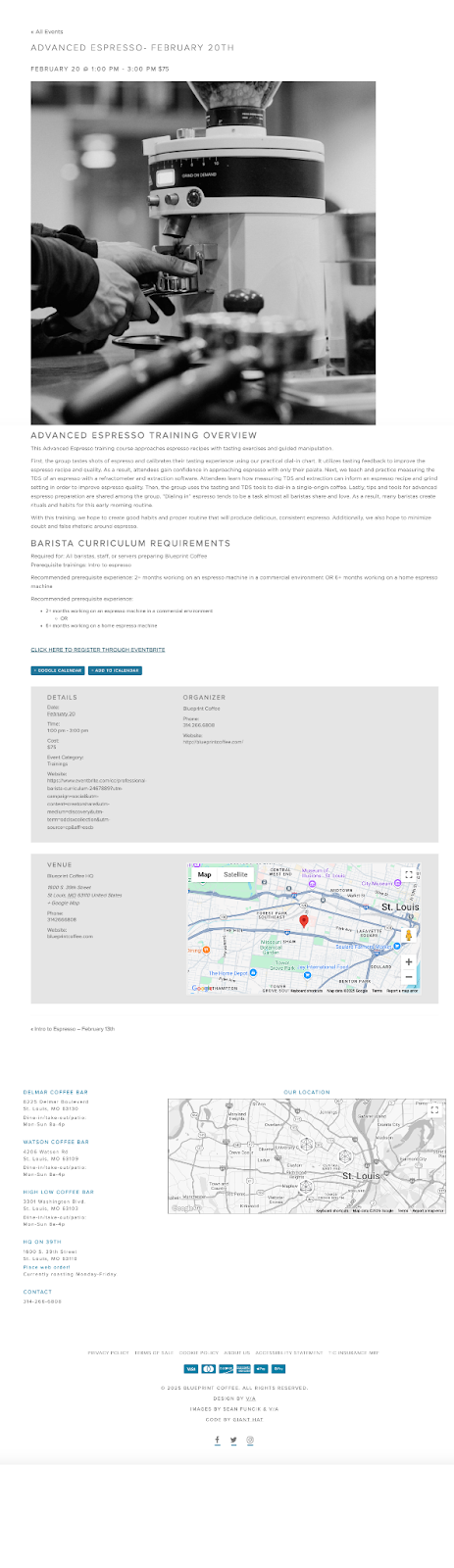
The page really matches the branding, and Blueprint Coffee does a great job with that! That said, the large photo is the first thing users notice. If it were smaller, the key details could stand out more, making the page easier to digest.

Also, removing the coffee shop locations and map at the bottom could help streamline the page, since they’re not essential for the event details.

Aside from that, they did an awesome job with the event description, even adding helpful course prerequisites! Plus, the title and featured image clearly convey what the event is all about, making it easy to understand at a glance!
For this event, tickets are required, and they’re using Eventbrite for purchases, which is a solid choice. However, our Event Tickets plugin makes managing tickets super easy right on your own website, offering a more streamlined experience. By using Event Tickets with The Events Calendar, you could eliminate third-party sites and avoid extra ticket processing fees, making the whole process even smoother!
Event Listing Best Practices on Display
This calendar does a great job showcasing some best practices that every event calendar should have:
- Easy-to-find event calendar: Navigating to the event calendar is a breeze! With a dedicated “Events & Classes” tab in the menu, it is super simple to get to the events calendar. Plus, they highlight three upcoming events right on the homepage, which is one of the primary calls to action.
- Sharp and cohesive branding: The clean and consistent branding on this website really shines through. It’s a great example of how strong, consistent branding not only looks great but also helps create a seamless and enjoyable user experience from start to finish.
- Clear event titles and descriptions: A well-crafted event title immediately conveys what the event is about. Paired with a concise, informative description, it provides all the necessary details without overwhelming the reader. This straightforward approach helps people quickly decide if they’re interested, which means better engagement and higher event attendance.
- Uncluttered main events page: A tidy events page is crucial for maintaining a smooth and enjoyable user experience. By keeping the layout simple and organized, visitors can easily find the information they need without feeling overwhelmed. By limiting distractions and focusing on key details, you make it easier for users to navigate through the events and discover what interests them.
Brewing Up Successful Events with The Events Calendar
By utilizing our free version of The Events Calendar, Blueprint Coffee successfully managed and showcased a variety of events while maintaining a simple and user-friendly calendar. This enables them to connect with their customers and offer unique experiences that make their space truly special. While there are some tweaks that can be made to further elevate the calendar, we are impressed with their use of our product.
We have a full suite of plugins available to help with all of your event and ticketing needs, some of which we talked about today (The Events Calendar, Events Calendar Pro, Event Tickets, and Filter Bar). Try them out for free today using our demo site! Here’s to even more successful event calendars that foster your communities and mission.

Sarah
View author page