

Forum Replies Created
-
AuthorPosts
-
May 2, 2017 at 6:37 am in reply to: Fatal error after Event Ticket Plus update 4.4.6 if WooCommerce is disabled #1277208
Nico
MemberBuen trabajo encontrando el error Jairo 🙂
Muchas gracias por avisarme de la resolución del problema. Sin dudas es algo que podes reportar a los autores del tema.
Voy a cerrar este hilo, pero si surgen nuevas dudas o errores no dejes de ponerte en contacto con nosotros.
Saludos,
NicoMemberExcelente Xus! Me alegro de escucharlo 🙂
Voy a cerrar este ticket, pero si vuelve el error o surge alguno nuevo no dudes en contactarnos nuevamente!
Saludos,
NicoMemberThanks for following up Christopher. In these cases the best might be to contact the theme author and ask about it. Are you using a premium theme?
In the mean time you can try changing the value of this option ‘WP-Admin > Events > Settings > Display > Events Template’, and re-testing to see if this affects the front-end display of the tickets form. Is this a problem just for ‘preview’? I mean does it work well when the event is published?
Also, is the license validation error gone?
Best,
NicoApril 28, 2017 at 3:58 pm in reply to: Warning reset expects parameter 1 to be array… ERROR #1276100MemberThis reply is private.
MemberThis reply is private.
MemberSorry to hear you are still struggling to set up the plugins 🙁
You actually need to install Event Tickets and Event Tickets Plus. Please review this getting started guide: https://theeventscalendar.com/knowledgebase/new-user-primer-event-tickets/
If after reading the guide you have further issues just let me know about it. If that’s the case: Can you please tell me a bit more about the site and what you are using the plugins for? Are you using the plugins alongside The Events Calendar? This is not required but most of our customer use them together.
Best,
NicoApril 27, 2017 at 5:59 pm in reply to: Fatal error after Event Ticket Plus update 4.4.6 if WooCommerce is disabled #1275503MemberGracias por tus comentarios y buen trabajo haciendo que el sitio vuelva a la vida!
Estoy al tanto de lo que sucede a nivel tecnico pero la cuestion es que no puedo reproducir el error en mi instalacion local. Es decir instalo las mismas versiones de los plugins que vos estas usando y al activarlas sin WooCommerce instalado no da ningun error.
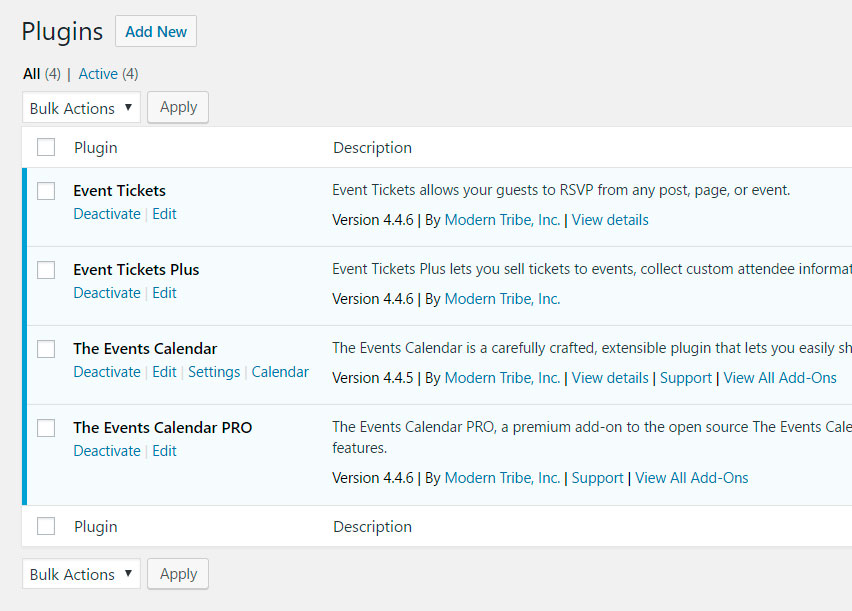
De todas maneras voy a pedirle a uno de los desarrolladores que heche un vistazo. Mientras tanto si tienes un sitio de pruebas para poder checkearlo desde tu lado:
Podrías verificar esto en un sitio de pruebas, con las ultimas versiones de nuestros plugins y WordPress, utilizando un theme default (como por ejemplo TweentySeventeen)?
¿Te preguntarás por qué tenía instalado Event Ticket Plus y WooCommerce estaba desactivado ? Porque aun no lo hemos usado, vamos a hacer unas pruebas de ventas desde la web pero mientras tanto usamos un código embebido de Ticketea.
Es curioso su caso, pero de hecho hay muchas personas que usan Event Tickets Plus sin Woo (u otra plataforma de e-commerce) por algunos de sus features ‘premium’.
Desde ya muchas gracias espero que podamos llegar pronto al fondo del error,
Saludos!
NicoMemberHi there,
Good news, I was reviewing this issue to help developers code a fix for it in the next maintenance release and it looks like it’s already fixed in the current version. I’m referring specifically to ‘exclusions not being honored in the case of all day events’.
Please update the plugins to the current version and let me know if this is true for your site (might need to re-save the event to get it working),
Best,
NicoApril 27, 2017 at 7:33 am in reply to: Recurring events with exclusions… Excluded event dates still show. #1275186MemberHi there,
Good news, I was reviewing this issue to help developers code a fix for it in the next maintenance release and it looks like it’s already fixed in the current version. I’m referring specifically to ‘exclusions not being honored in the case of all day events’.
Please update the plugins to the current version and let me know if this is true for your site (might need to re-save the event to get it working),
Best,
NicoApril 27, 2017 at 6:02 am in reply to: Community Events adding new event date and time format is not working #1275149MemberHey Saraliina,
Andras is out this week, so I’ll help you out on this!
The date picker format in the Community Events submission form follows the date-picker format setting defined in WP-Admin > Events > Display > Datepicker Date Format. Just change that setting and it should reflect in the form.
Also, the fix for the time format bug is hopefully coming soon in the next maintenance release.
Please let us know if there’s anything else you need help with,
Best,
NicoMemberStoked to hear you could sort this out Tyler! Awesome work 🙂
I’ll go ahead and close out this thread, but if you need help with anything else please don’t hesitate to create a new one and we will be happy to assist you.
Best,
NicoMemberJo,
I was informed that this is not something we’ve done in the past (special terms for special cases). Can you please let me know which products and license levels you are looking forward to purchase?
Thanks,
NicoMemberHi there Daniel,
Thanks for getting in touch with us and sorry to hear about this issue with your license. Let’s see what’s going on…
The issue you started this thread from seemed to be caused by a different reason (we had a bug with site domains containing a hyphen in the address). From what I see in your account the license is just connected to milkthecow.com.au, which seems to be the site you are using. I just disconnected the site from the license key, just to be sure this step is not failing. Can you please go to your site WP-Admin and re-save the license key? I hope this solves the issue or gives us a bit more information about it at least!
Thanks,
NicoApril 26, 2017 at 4:57 am in reply to: How to create a ticket with Event Tickets Plus but without Calendar? #1274584MemberHi there Belina,
Thanks for getting in touch with us! Let’s start from the beginning 🙂
Please start by reading the getting started article for Events Tickets and Event Tickets Plus → New User Primer: Event Tickets & Event Tickets Plus. This article will lead you to others, probably the most import at this point is the one to make tickets → https://theeventscalendar.com/knowledgebase/making-tickets/
On your other question is not necessary to have events in order to sell tickets, you can add tickets to other post types like posts or pages. To enable this, just go to ‘WP-Admin > Events > Settings > Tickets > Post types that can have tickets’.
Please let me know if things are clearer after reviewing the articles I shared with you,
Best,
NicoMemberHi there Michael,
Thanks for getting in touch with us! Let’s see if what you are trying to achieve is possible …
After inspecting the site, it looks like something pretty similar can be achieved by using the ‘This Week Widget’. Check out this article → https://theeventscalendar.com/knowledgebase/configuring-the-this-week-widget/ on the settings available for the widget. Also please note you can embed the widgets via shortcode.
Hope this helps!
Best,
Nico -
AuthorPosts