Forum Replies Created
-
AuthorPosts
-
Gustavo Bordoni
KeymasterHi Shane,
Thanks for reaching out to us in the first place.There is a few plugins that will allow you do what you want, and Simple Share button Adder is one of the easiest ones to use.
Depending on where you want to display you will need a bit of WordPress templating knowledge:
-
This reply was modified 11 years, 9 months ago by
January 28, 2015 at 11:50 am in reply to: Events Calendar not respecting WP date format settings #938619KeymasterHi immeemz,
Thanks for reaching out to us in the first place.
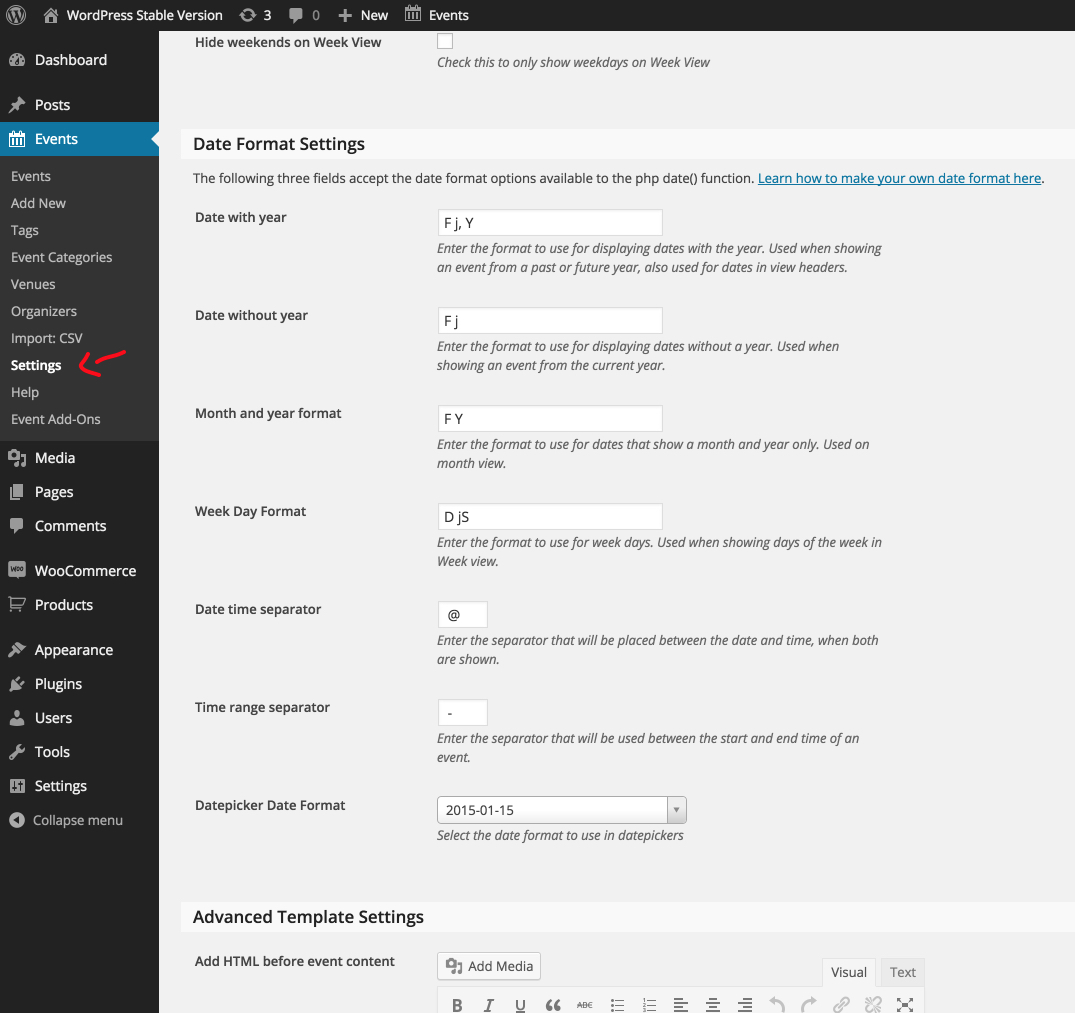
In our plugin Settings » Display you would have some options on changing the date/time display. You can see where they are in the screenshot below:

If changing that options doesn’t solve your issue, please reply here and I will try to solve your issue.
My Best regards,
KeymasterNot that I’m aware of, but I will test it, rest assured. I’m also glad that you resolved your issue, if in the future you have issues again don’t hesitate and come here to the forum.
KeymasterHi Brad,
Thanks for reaching out to us, first can you test the things pointed out on our Testing for Conflicts page? Normally issues like yours tend to be theme or plugin conflicting of some sorts.
You can also refer to the Knowledge base article about 404 Errors which might solve your issue, if none of that works please don’t hesitate to reply to us here and I will try my best to solve your issue.
My Best Regards,
January 28, 2015 at 10:04 am in reply to: Error Populating Event Calendar page with Eventbrite Ticket Information #938558KeymasterHi Kelleen,
Thanks for reaching out. I have one request for you before I can try to help you – I would like to know if there are any error messages when trying to populate the Eventbrite section. If there is any indication of what is the problem is, please send that to us…and I will try to help you from there.
Just to be sure that the problem is indeed coming from one of our plugins, can you try the Testing for Conflicts tutorials? This would help us very much.
My Best Regards,
KeymasterI’m very glad that you found out the source of the issue, I’m marking the correct answer and closing the topic.
My Best regards,
-
This reply was modified 11 years, 8 months ago by
KeymasterHi mauitime,
Thanks for reaching out to us for a solution.
I’ve built a snippet that you can place inside of your theme’s function.php, that will do what you’ve requested.
https://gist.github.com/bordoni/b23ccd0fb5f3000ca753
If you have any other questions or that doesn’t solve your issue please don’t hesitate to talk to us again.
My Best Regards,
KeymasterHi mllibre,
Thanks for reaching out to us.
First it would help us very much if you could try out the steps pointed at our Testing for Conflicts page.
If the above doesn’t solve your issue I would like to take a look at the site where this problem is happening so that I can see if I find a good solution for your man.
My Best Regards,
January 28, 2015 at 5:46 am in reply to: Link to an event or the events page is not (always) working #938423KeymasterHi JG,
First of all, thanks for reaching out to us.
Now your theme is loading things on the fly using AJAX, so to solve your issue you will need to follow me on how to do it. My best bet on the solution would be to include the missing JavaScript variable on your homepage.
If you open up the Browser console on your site and click the button it will try to load everything and then show an error because the page is missing an Variable:
Uncaught ReferenceError: tribe_js_config is not defined
To solve your issue we will enqueue this variable on your homepage, like the following.
https://gist.github.com/bordoni/a1c7248d60f4726f0845
If this doesn’t solve your problem please don’t hesitate to come back here, and I will try to help you further.
My Best Regards,
KeymasterHi letsgo,
You are right there is not information specifically about how to do this, but to change this behavior it’s a simple snippet that you will need to paste in to your Theme’s function.php file.
https://gist.github.com/bordoni/5e1e16cd3fc6cba242e4
Thanks for reaching out to us, if you still have any questions about how to make this work, please don’t hesitate to contact us here in the forums.
I found that this issue was already reported in our tickets and it should be solve in one of the next versions, in the meanwhile the snippet I’ve sent you will solve your issue.
My Best Regards,
-
This reply was modified 11 years, 8 months ago by
-
This reply was modified 11 years, 9 months ago by
-
AuthorPosts