

Forum Replies Created
-
AuthorPosts
-
George
ParticipantHey @Kiki!
This is possible, but not by default with our plugins. You can use comments within WordPress; you can make a new post type; you can find another plugin that adds “reviews” et cetera.
I hope this helps!
Cheers,
GeorgeOctober 26, 2015 at 9:00 am in reply to: [Bug Report] Missing parameter in action tribe_tickets_ticket_email_bottom #1017940ParticipantHey @Marco,
Thanks for sharing this! While this is not a bug, it’s a useful thing regardless and we appreciate your input here. I’d personally recommend a Pull Request on The Events Calendar’s public GitHub repo here so that this becomes a part of our plugin code → https://github.com/moderntribe/the-events-calendar
Otherwise, I have logged this idea and so it might end up in the plugin eventually anyways.
Cheers!
GeorgeOctober 26, 2015 at 8:54 am in reply to: Error in community events, plugin conflict with Jetpack #1017935ParticipantHey Gisela,
If you keep Jetpack activated, but remove your customization of the menu item, does anything change? I doubt it; but am just curious because I went through trying to reproduce this on my local testing site and could not cause this error to happen.
Can you share two pieces of information with us? Namely:
1. What are your site’s Permalink settings?
2. Can you share your site’s “System Information” with us? Here’s how → https://theeventscalendar.com/knowledgebase/sharing-sys-info/
Thanks,
GeorgeParticipantHey Jennifer!
No, you do not need to purchase the Events Calendar Pro add-on. All add-ons are wholly independent of each other; you just need the free core plugin, The Events Calendar. 🙂
I hope this helps!
GeorgeParticipantHey Farhad,
It should work about 70-80% successfully. We have several known bugs with WPML, but are working hard to maintain as much compatibility as possible.
We have an article about how to set up our plugins with WPML for maximum compatibility → https://theeventscalendar.com/knowledgebase/setting-up-the-events-calendar-with-wpml/
If you set up your site with those methods, and find bugs with WPML, then we can issue a refund for your purchase from us within 30 days of your purchase. So you may find it easiest to just try the plugins out, see if it works for your site, and if not, request a refund.Cheers!
GeorgeParticipantDo you have any clue how to make ou events recognized by virtual composer ?
Hey Sylvain,
Unfortunately we do not have any insight on these questions and do not have any specific things within our code that integrate with Visual Composer, et cetera – your best option is to contact the “Meet-up” theme support team and/or the Visual Composer team.
Best of luck with your project!
Sincerely,
GeorgeParticipantHey @Tristan,
While we cannot help with custom coding, there are two things that might help here. First is to just try out different values for the “Events template” setting within The Events Calendar – head to Events > Settings > Display and scroll down until you see this “Events template” option. Try out every different value for it, save changes, and check on the event display to see if it’s improved at all.
If that doesn’t help, custom coding would be required. We cannot help with that but we do have a “Themer’s Guide” here which covers much of the customization process → https://theeventscalendar.com/knowledgebase/themers-guide/
Beyond these two methods your best bet is to contact Avada theme support specifically.
Sincerely,
GeorgeOctober 26, 2015 at 8:24 am in reply to: Is there a way to make TEC integrate with the Javo Directory WordPress Theme? #1017911ParticipantHey @David,
Pulling something like this off is possible but requires custom code which we unfortunately cannot help with 🙁
If you’re not familiar with coding this solution yourself your best option is to hire someone to make customizations for you – we also have a Knowledgebase article here that might help you get started on the process of making a customized Map View like you described → https://theeventscalendar.com/knowledgebase/themers-guide/
Best of luck with your customizations!
– George
ParticipantHey @ckas,
Do you have the ReCaptcha features of Community Events enabled? If not, please enable them and see if that helps – you can find these features in Events > Settings > Community in your admin; follow the on-screen directions for activating these Captcha features.
One additional step might be to add and activate the plugin called “Akismet” to your site.
Other than these two solutions, this unfortunately falls outside our control or the control of our plugin; you should take these two steps and then if problems persist you should also contact your web host for further assistance.
Thank you,
GeorgeParticipantHey George! 🙂
Your question is as follows:
I want to know if I can add a button or a link in the list view of the event calendar.
Ultimately the answer is “Yes”, but doing so requires custom code which we are unfortunately not able to help with here on the forums 🙁
Editing code like this just to add a link can be done using the methods outlined in our Themer’s Guide here → https://theeventscalendar.com/knowledgebase/themers-guide/
I’d recommend checking that out to get an idea of the process.
As for the general question about whether Avada is a good theme for our plugin: I don’t use Avada and haven’t used it myself, and my personal tastes push me towards other themes, but I do know that Avada’s developers are nice people; responsive in terms of support and such; and that many, many people use The Events Calendar with Avada and love the combination.
I hope this all helps!
— George
ParticipantHey Sean,
Thanks for reaching out!
To be absolutely clear about this: The Events Calendar has no bearing on payment methods, SSL, or eCommerce on your site whatsoever.
There are no payment methods “integrated with” The Events Calendar or even our ticketing add-ons at all.
This is all handled by eCommerce plugins themselves. So, if you have WooCommerce on your site for example, than it is WooCommerce itself that integrates with PayPal and such. The Events Calendar just handles events; that is it.
I hope this clarification helps a bit!
— George
ParticipantHey @Annette,
When you say “prior post”, can you link to which exact post you are referring to? Also, as for this question:
I am not a programmer and don’t feel comfortable adding any new code, deactivating plug-ins or changing themes. Is there a way just to deactivate the tooltip?
Depending on what tooltip is being referred to (which is unclear, hence my asking for the specific link to the “prior post” you mentioned!), then unfortunately adding or editing custom code will likely be the only way to go about achieving this. 🙁
— George
ParticipantHey @josh,
As Barry noted in that thread, there’s no easy way to achieve this at this time 🙁
The simplest way would be to customize plugin templates outright, which is a custom-coding project. We unfortunately can’t help with custom code but you can see this Knowledgebase guide to get an idea of the process → https://theeventscalendar.com/knowledgebase/themers-guide/
Otherwise, I would echo Barry’s original recommendations in that thread and post this as a feature request on our UserVoice page → http://tribe.uservoice.com/
Sincerely,
GeorgeParticipantHey @Edwin,
Thanks for purchasing Community Events!
Once it is installed and activated on your site, users will be able to submit events at [yoursite.com]/events/community/add
You cannot make a new page for this – do not make a page, in fact, as that could break the submission form. The form will be auto-generated at [yoursite.com]/events/community/add.
So if the Site where you have this installed is http://upstairslounge.net then the form should be generated at http://upstairslounge.net/events/community/add
You cannot make a new page where events can be submitted in addition to this one.
I hope this helps!
— George
ParticipantHey @Stacey, do you mean that in your edit-event screen you literally do not have these fields:
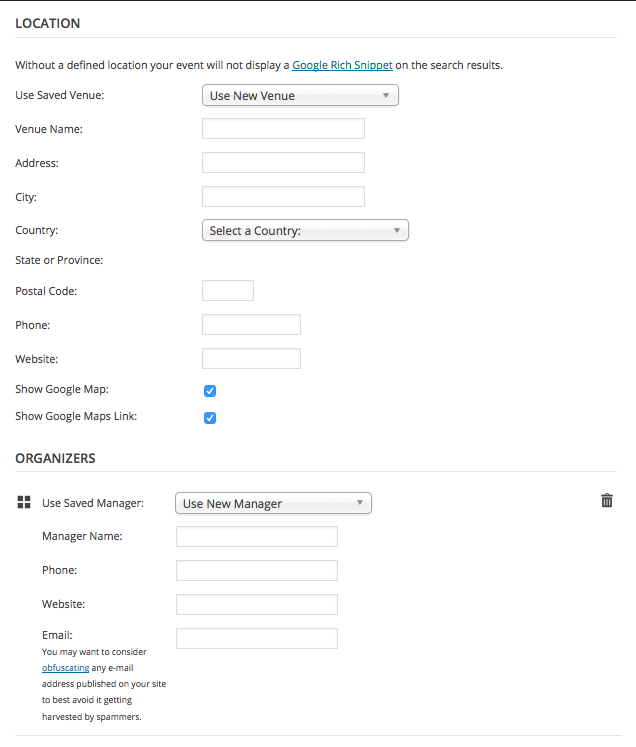
If so, this is not default behavior and could be the result of code conflicts or something, in which case can you reply with your “system information” as described here: https://theeventscalendar.com/knowledgebase/sharing-sys-info/?
Thank you!
George -
AuthorPosts