

Forum Replies Created
-
AuthorPosts
-
October 24, 2016 at 7:15 am in reply to: Looking for events slider that works with "Importer Bundle" #1181860
George
ParticipantHey Diane,
Thanks for your followup.
can I choose to have images import or NOT IMPORT by feed?
☝️ At this time, no, this is not possible with our plugins. It may be technically possible by way of some extensive custom coding, but not “out-of-the-box” with our plugins.
One question that I do not see the answer to is how thorough the duplicate remover feature is. Can you elaborate on that?
To be clear, are you referring to a feature of Event Aggregator? If not, then can you be specific about what plugin’s “Duplicate remover” you are referring to and also include a link to the page on our site where you say this “Duplicate remover” mentioned? I just want to make sure I am addressing your question accurately, as there have been several iterations on the idea of a “duplicate remover” over the years in a number of our products.
Thank you!
GeorgeParticipantGlad to hear it! 😀
ParticipantHi Damian,
The idea of a user history is still being fleshed out by our developers and may not ever arrive in our plugins; however, it may arrive in our plugins at some point in the coming months and beyond.
In either case, it is unfortunately not on the horizon any time soon. 🙁 Please do post your ideas for features like this to our UserVoice page here → http://tribe.uservoice.com. Other customers can vote on ideas there, and we pay close attention to what our customers are saying on this page when it comes to new features! 😀
As for your second question, yes, we agree that redirecting to the wp-admin is not ideal for now. We are hoping to change this at some future date although it is currently not possible. I do not have a specific ETA for when this change will arrive, though again it could take many weeks or several months at best before it arrives in our plugins.
Finally, for your third question:
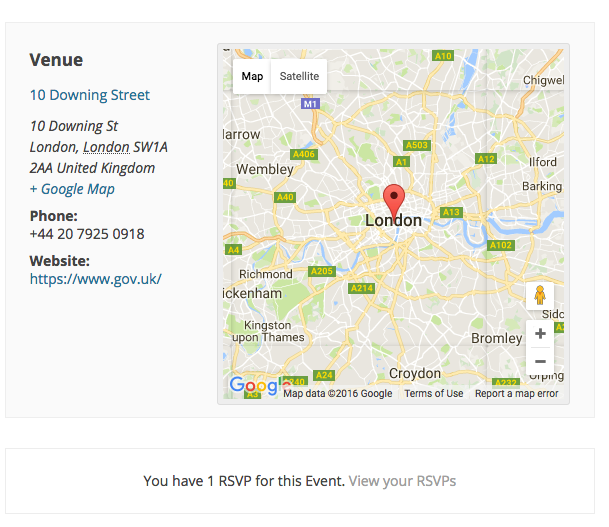
1. Are you saying that you do not see the “You have 1 RSVP for this event. View your RSVPs” text on an event you’ve bought tickets for?
2. If so, then can you please clarify if you bought tickets or did a free RSVP?
Thank you,
GeorgeParticipantThis reply is private.
ParticipantHi Cameron,
Our team is not available for this kind of work. Please consult this page full of customization resources to find out the numerous options for realizing the sort of custom development services you need here → http://theeventscalendar.com/customizations
Best of luck with your project!
GeorgeParticipantHey folks,
We have actually just confirmed that this is a bug. We have logged a bug ticket for this and thus can hopefully publish a fix in the coming weeks some time.
I do not have a specific ETA for the arrival of this fix, but would like to note two things:
- The PHP error here is a “Warning”, not an outright error. So, nothing should break or be hindered in terms of functionality. It’s not good to have warnings, of course, but they’re diagnostic in nature—so I’m just saying that it shouldn’t actually cause any breakages. If you think it does or is, let us know.
- I will post updates to this thread with more information on the bug as soon as I have it. If I haven’t posted here, then there’s no news on its arrival or status or anything — but if I learn about its arrival date or anything, I will post here! 😀
Stay tuned!
Thank you,
GeorgeParticipantThanks for the kind words, Nick. I’m glad to hear things are resolved.
Really sorry for the trouble here!
Open a new thread any time if other issues or questions arise.
Sincerely,
GeorgeParticipantHey Aldo,
Thanks for reaching out!
You have two main options here.
First, you can head to Events → Settings → Display in your wp-admin and check this option (click for a larger-sized image):

☝️ If this option is checked the “Classic header” will be used, which is basically just the “view as” selector but the search and date filters will be removed.
If you want to remove everything, so there is no search bar, date filter, “View As” selector, etc., then you would need to add CSS like the following to the bottom of your site’s style.css file:
div#tribe-events-bar {

    display: none !important;

}
Cheers! 😀
GeorgeParticipantHi Damian,
Thanks for reaching out!
There is unfortunately no user history of tickets or RSVPs at this time. 🙁 Nor can you currently print them from anywhere other than your original email.
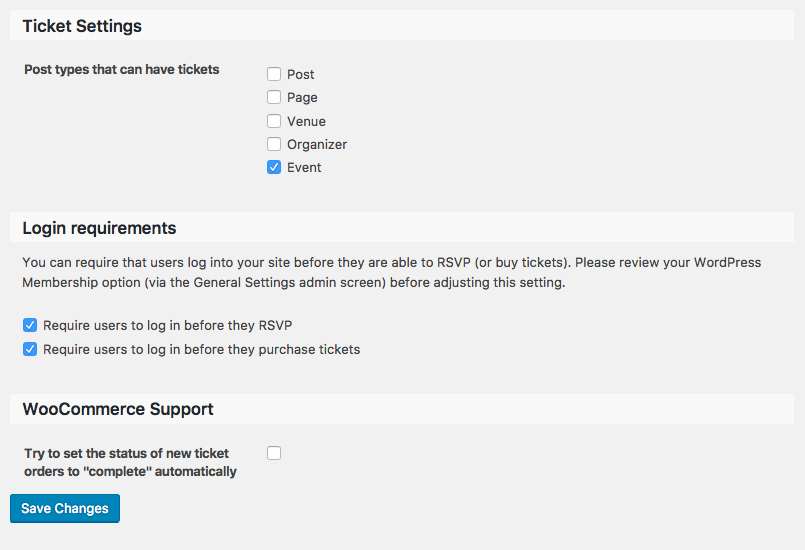
There is a “history” on each individual event that a user RSVPs to (or buys tickets to) if you activate the “Login requirements” features of Event Tickets and Event Tickets Plus, which options are shown in this screenshot (click for a larger-sized image):
Anytime the logged-in user then views the event they RSVPed to (or bought tickets to), then, they will see a “View your RSVPs” link at the bottom of the event above the tickets form like shown in this screenshot (click for a larger-sized image):
☝️ Other than this, there is no current feature that allows for the sort of user history you describe.
Sorry to disappoint! Please let me know if there are any other issues or questions I can try to help with.
— George
ParticipantHey Mike,
Thanks for reaching out!
There is unfortunately no user history of tickets or RSVPs at this time. 🙁
There is a “history” on each individual event that a user RSVPs to (or buys tickets to) if you activate the “Login requirements” features of Event Tickets and Event Tickets Plus, which options are shown in this screenshot (click for a larger-sized image):
Anytime the logged-in user then views the event they RSVPed to (or bought tickets to), then, they will see a “View your RSVPs” link at the bottom of the event above the tickets form like shown in this screenshot (click for a larger-sized image):
☝️ Other than this, there is no current feature that allows for the sort of user history you describe.
Sorry to disappoint! Please let me know if there are any other issues or questions I can try to help with.
— George
ParticipantHey Robert,
Thanks for reaching out. There’s unfortunately not a way to apply filters to which events are in the map view without writing custom code. 🙁
There are the filters built into the Tribe Bar (the bar with the “View As” selector, search box, etc.) and the premium add-on Filter Bar which let you search and narrow down the display; but you have already expressed the trouble with this on your site in your case.
Other than these filters, custom code would be needed to apply other limitations to what events show up in the views.
To implement custom filtering, then, you would have to write that custom code or hire a professional developer to do it for you. We have a list of great developers here → http://m.tri.be/18k1 (and have no affiliation with any of these folks—they’re simply some well-respected names in the community that we’ve compiled to share in situations like this one).
I am sorry to disappoint here! Please let me know if there are any other issues or questions I can try to help with.
Sincerely,
GeorgeParticipantHi Fernando,
Thank you for reaching out!
We unfortunately can only provide support here in English at this time. We have some multilingual folks on our team and to try to put their faculties to use when possible, but for now I am going to respond to your thread here in English.
It sounds like you are asking about how to ensure that WooCommerce orders do not remain “In Progress”.
Using this snippet may help you out ? https://docs.woocommerce.com/document/automatically-complete-orders/
Let me know if this helps! Sorry in advance if I have misunderstood your question! 😀
Sincerely,
GeorgeParticipantSure thing Oliver, thanks for clarifying. I will close up this thread for now.
Cheers,
GeorgeOctober 23, 2016 at 12:21 pm in reply to: Looking for events slider that works with "Importer Bundle" #1181655ParticipantHi Diane,
Thanks for reaching out. I will answer your questions a bit out-of-order, but hopefully thoroughly! 😀
Also, do you have a trial program for your products, where I can make sure they are working and get a refund if I have to go back to my previous klugey solution?
Lastly, can you provide any sites that are using a slideshow with your calendar so I can see.
☝️ For both of these questions, I would recommend that you check out this page on our site ? https://theeventscalendar.com/knowledgebase/do-you-have-a-demo-examples-i-can-see-or-trial-licenses/
That will address both questions you pose; when it comes to specific sites that have event slideshows, the only “demo” sites or showcase sites we have are the ones available in that article I linked to above. There isn’t a specific one that has a slider. 🙁
I am considering switching to The events calendar for my site, but need a slider at the top for FEATURED events ONLY.
None of our plugins provide any such feature, unfortunately. I also do not know of a specific slider plugin or theme out there that does. This may therefore require custom development, or searching for specific themes that have this feature.
Also, I want to know which feed types will import images also, if any and how well the duplicate remover works.
Facebook Events have event images that can be imported—upon import into WordPress with our importer Event Aggregator, these images get added as the event’s “Featured Image” just like it is originally on Facebook. Eventbrite events behave similarly.
Other formats like the generic ICS file format (used for iCal, for example) do not have this support featured images at this time.
Please let me know if there are any other issues or questions I can try to help with!
— George
ParticipantHey Tony,
Our plugins indeed work with Yoast SEO.
As for bundle pricing, the only bundles currently available are the ones listed here ? https://theeventscalendar.com/bundles/
If there is a combination of plugins you want but it does not explicitly exist in one of the bundles on the above page, then there is no current discount or bundle pricing for it.
Please let me know if there are any other issues or questions I can try to help with!
Sincerely,
George -
AuthorPosts